Archive for the ‘ChurchTech’ Category

TapHearing aid induction loops

29 Jan 2007 16:02 by Rick

Loop logoAn induction loop is a system that allows hearing aid users to receive a signal directly from microphones placed close to the users rather than rely on transmitted sound. It is of considerable benefit to them because it separates out just the sound required and removes other distracting noises and reverberation.


The building regulations (1992) require that new buildings open to the public and ones that are substantially reconstructed are fitted with systems for ticket booths and auditoriums over 100 sq m. Systems must meet BS8300:2002, BS7594:1993 and EN60118-4.

The Disability Discrimination Acts (1995 & 1999) may extend this to existing premises if it is otherwise unreasonably difficult for disabled people to use the facilities. An installed loop must be properly maintained and staff must know how to use it. I have been told that some of these regulations are retrospective and older systems may no longer conform but, apart from this maintenance requirement, I can’t find any evidence for this.

The specification for an induction loop system requires a current drive amplifier (a normal PA amplifier is voltage driven) with a single turn loop and account should be taken of losses caused by building metalwork such as girders and reinforced concrete. The input to the system can be dedicated microphones or from an existing sound system.

Ampetronic, a leading manufacturer in the field, say that the type of wire is not too important so long as it appropriately sized to give a total resistance in the range required by the amplifier. The normal arrangement is for it to run around the listening area. They also say that it should not be at head height, though I haven’t discovered why, but floor level (or ceiling if it is not too high) is more normal.

The recommended field strength is 0.1 A/m for an average level speech signal with peaks at four times that value which allow for some dynamics. Larger variations are flattened out using a compressor built into the amplifier. For a single turn loop, and bypassing all the complex equations and caveats, the peak current can be simplified to approximately 4a/9 where “a” is the length of the shortest side in metres. From this you can calculate the wire gauge and the amplifier power required.

Once installed, the easiest way to measure the field is with a pink noise generator amplified to normal listening levels (though you may want to turn off the loudspeaker amplifier) and measure the field strength with a meter in different places. With a listening device you can also test the tone over the coverage area. The frequency response is required to be flat (+/- 3dB) between 100Hz and 5kHz with an upper response limited to 16kHz. High frequency losses are caused by building metalwork and compensatory EQ (and additional current) will be needed to correct for this. You may need professional advice for particularly large, oddly shaped or difficult buildings.

TapDigital Dividend

22 Jan 2007 11:51 by Rick

A hot topic at the moment is Ofcom’s proposal to sell off the Analogue TV frequency bands, called the Digital Dividend. This is controversial, not only for those people who want to retain their old tellies bus also for the live entertainment industry. The reason for this is that digital TV requires less spectrum than analogue so they can free up some bands as the analogue is turned off. However, they currently share these bands with low bandwidth, low power uses such as radio microphones who slip into the gaps between TV transmissions.

How does this affect church systems?

The VHF Band III license exempt range 173.8 to 175.0 MHz is not affected at all. Although the band is coming into use for DAB radio, it misses our channels.

The UHF licence exempt Channel 70 (863.1 to 864.9 MHz) is also to remain unchanged under the proposals.

So no change then! But one other proposal will have an effect. It is proposed to change the currently licensed Channel 69 (854.1 to 861.9 MHz) to become license exempt. This could be good news for churches and other amateur use because those frequencies, which come on many systems but you are not supposed to use, suddenly become available.

As you might expect, professional users who have a considerable investment in licensed equipment are up in arms about this and other changes so I don’t expect the proposal to get through unaltered. Ofcom wants them to go digital at the same time but the technology is not up to it yet.

TapVideo switcher

1 Jan 2007 15:21 by Rick

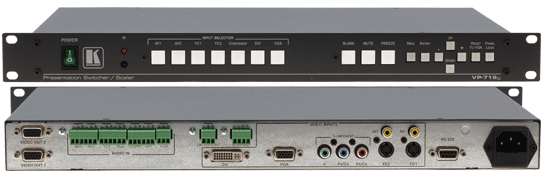
During the install of our projector system I have been very impressed with the Kramer products. The main component is the Switcher/Scaler which is the heart of the system and the general impression is that they do what they are supposed to do with no fuss and in exactly the way that you would expect. The VP719 is a 7 input, single VGA output device (inputs are VGA, DVI, 2 x composite, 2 x S-Video and component) and it seems to be able to cope with whatever you throw at it without a glitch.

Kramer VP-719xl

There are inevitably small faults where details off the main function could be thought out a bit better. This is clearly an installation device rather than portable/mobile and as such, some things should be hidden from the end user. In particular, the remote control is much too complex exposing controls that would be rarely required—a very prominent button changes the output resolution—something that is not required after install. If things like this are required on the remote then there should be an “advanced” panel with a cover. On the other hand, there is no “blank” button on the remote at all but there may be a programmable feature to enable this some other way.

In an installation like ours the actual device is hidden away in a rack so we use the computer serial connection with the GUI application to actually control it. This just duplicates the function and appearance of the remote but with the same problems; actually worse because it is a multi-device application for all models so there are lots of redundant controls. It needs to be customisable so that unwanted functions can be removed and, in particular, more meaningful labels put on the input selectors so that you don’t have to remember which device is plugged into which socket.

Another improvement would be a second VGA input. We have worked around the lack of this by using the DVI input for the main control computer but that was not ideal for other reasons and would not always be possible—for instance with two laptops. Perhaps we needed the 724 model but this is somewhat more expensive with a lot of unneeded features.

Now that it is installed the silly audio connections are not a problem but I don’t see why standard RCA (for the video channels) and mini jack (for the computer channels) were not used. XLR for the PA output would have been nice but I can see that there is a space limitation on a 1u box. Does anyone seriously use the 5 Watt audio amplifier built in?

Anyway, notwithstanding these little gripes, I thoroughly recommend this device for any simple church or conference room setup.

TapSong (Un)Select (UK)

23 Dec 2006 19:57 by Rick

If I can find a way to send SongSelect back and claim a refund, I will. It is RUBBISH. I don’t know if the USA online version is any better but this offline one that we have to use is very poor. It is not so much the clumsy interface and it’s pretending that you can use it to project directly but the transcription of the songs built in is very poor and that is the purpose for which we bought it. I quote a (public domain) example:

God holds the key of all unknown
And I am glad
If other hands should hold the key
Or if He trusted it to me
I might be sad I might be sad

What if tomorrows cares were here
Without its rest
I’d rather He unlocked the day
And as the hours swing open say
My will is best My will is best

Joseph Parker (1830-1902)

I would say that this is un-singable. Not only is there no punctuation on the ends of the lines, which I understand is trendy these days, but leaving the question mark off the first line of the second verse makes no sense. And where is the apostrophe in “tomorrow’s”? and the comma in the middle of the last lines? This is not an isolated example, many are like this and they are inconsistent. It is quicker to type them in from scratch.

And while you are at it, where is the support—I have had a query on the online forum for weeks now with no reply.

TapEasyWorship Schedule Printer

11 Dec 2006 10:25 by Rick

One of the few flaws in the EasyWorship church projection software relates not to its primary function but the printing facilities. It was perhaps thought that these were entirely secondary but we are aware that some people can’t (or won’t) get on with the projected image and need a paper copy. When the church is geared to a bookless service, perhaps by necessity because the songs now in use are not in the books, there needs to be a way of providing a few paper copies. It is not worth expending large amounts of administrator time in producing these as used to be done when printed orders of service were provided to everyone, so a means to reproduce what otherwise appears on the screen is needed.

The EasyWorship software provides a “Print Schedule (Details)” facility but this is of fixed format and one song (or whatever) to a page. Variations to this may well be needed. In our church we project liturgy, sometimes only two lines per item. This would be very wasteful of paper and a thick pile for someone to handle. The only alternative has been to cut and paste the song details to a word processor document but this was exceedingly tedious and took too much time. The best time to produce this leaflet is just before the service.

To get around this problem I have written a post processor to format the output in a more useful (and customisable) form … [more]

TapLicence to Sing (2)

5 Dec 2006 09:01 by Rick

Earlier, I wrote about the problem of songs that were not covered by the CCL licence now that, for morning services and festivals, we are changing over to exclusively projecting the words of hymns rather than using books. After some research I discovered a solution that resolves most of them.

There is another licence organisation which is not widely known about in evangelical circles (i.e. those who use CCL). This is the Calamus licence run by Decanni Music, a publisher in the catholic tradition. It allows the use of songs by 80 or more authors and a dozen publishing houses in a similar manner to CCL. Not all that many, but the cost is also relatively low.

I think many churches, particularly those in the middle of the spectrum who mix sacramental and bible based worship should be considering this. They are either missing out on some great songs by such authors as Bernadette Farrell and Marty Haugen or they are breaking the law.

TapSize matters

24 Nov 2006 08:30 by Rick

When planning a video projector system for a church, or anywhere else for that matter, you need to do things in the right order. The first thing to decide is what sort of material you are going to project: is it cinema type video, detailed business type presentations or are words of hymns the main objective. These determine the shape and most importantly the size of screen that you require. This must come before choosing your projector. Most online advice guides ignore the first criteria—type of presentation.

For the cinema type of experience you will probably want a 16:9 format screen and most of the advice online will be able to assist you to decide the size. The consensus seems to be a screen height 1/6th the distance to the back row of seats. You may also want at least a partial blackout.

For a business presentation you would probably want a 4:3 format and, unless you wanted very fine detail, you could probably go to a screen height 1/8th the distance to the back row.

For a system primarily for the words of hymns and scripture then it is a different prospect altogether. Doing the calculations for our church, which is 24m from front to back (we don’t have a chancel/choir area), we get a screen 7m x 4m for cinema and 4m x 3m for business. Without exaggerating — this is HUGE. Even the smaller would completely dominate the front of the worship area and the larger would block out all view of the East window and generally annoy everyone including the diocesan architects.

Fortunately we consulted a good professional contractor who knows churches and he put us right (in fact we consulted two and got similar answers). The difference is that you are rarely showing more than a dozen lines of text on the screen at once. Any more than that and the reader will lose their place. Hence you can use very large text sizes which reduces the necessary size of the screen. You can still do video clips and pictures for illustration but you are not aiming at that all enveloping cinema experience. Many years experience also tells me that only about half the members turn up to church business meetings so pack them into the front when you want to display the detailed financials.

So, taking the advice, we determined that we only needed an 8′ wide screen (that is about 2.4m) and I have been holding off posting this item until I had seen it in action: he was right! The benefits were great. It was much cheaper (both screen and projector), it is not overly obtrusive, and it folds away neatly when not in use. I can just about read it from the middle without my glasses and I my sight is pretty poor. It is perfect from right at the back with them on.

TapLicence to Sing

15 Nov 2006 10:04 by Rick

When we started the investigation to change over from using hymn books to projecting words of songs onto a screen, the administrative position looked straight forward. We had a CCL licence and we would note which songs were used for the annual report. We were already doing it for intermittent photocopies and the projection software may even help by recording the activity for us.

Whilst loading whatever songs I could lay my hands on in electronic format I spotted a hitch. Songs of Fellowship helpfully provides a disc containing all the words, originally formatted for OHP slides but easy to translate into most projection software using utility programs. Whilst doing this I spotted a rider on one of the songs which said that “songs published by the Taizé Community were not covered by the CCL licence and permission to copy or display had to be sought directly” (or words similar to that). I did some research and found that there were lots of others in the same position. The well known books such as Mission Praise and the big publishing houses like Kingsway and Integrity Music are well covered by the CCL licence but some others, particularly those in the catholic tradition, are not.

Many years ago we put together a song book of our own as we couldn’t find a published book which covered the wide range of material that we needed and didn’t want to give out an arm full of books every service. It is many songs from this book that we now have difficulty with. At the time each song was researched and permission sought from the copyright holder, sometimes with a royalty fee. It looks like that, now we wish to change media, we have to start this all over again.

The availability of the CCL licence has certainly made multi-media worship easier, but it has not eliminated all of the problems.

TapWot no Printer!

19 Oct 2006 15:26 by Rick

There are some systems that you put in that have no direct access to a printer; our new church projection system is an example. But some software reports need one to be used effectively. If the software has thought of this in advance then they will have provided a file output option so you can take it away for printing elsewhere but if not then you are a bit stuck.
EasyWorship is an example. It provides options to print the schedule either in detail for those that need a paper copy, or summary as a crib sheet for the leaders. It also provides song usage statistics and database reports the same way; but if you have no printer you can do little more than read the screen.
There are two solutions to this dilemma; There is some free software called CutePDF which allows you to “print” from any application to a PDF file. This preserves all the layout and style as if it went to a high function printer. The second is built into Windows XP; the “Generic / Text Only” printer. This is very easy to set up and produces a plain text file from a text print. Not pretty but very useful if you want to manipulate it further.

TapZone Distribution for Church Audio

25 Sep 2006 20:35 by Rick

One thing that complicates the running of church sound is the requirement for multiple mixes for different purposes. In addition to the output to the main speakers you often need a feed to the induction loop, a tape recorder and perhaps the crêche and other parts of the building. The requirements of each are slightly different, and to do this effectively you need more than just a splitter on the main outputs—some stereo, some mono, some with an “ambient” mic mixed in etc.
When looking at some church systems I was struck by the complexity and the involvement required by the operators. The most common arrangement I have seen for recording or a hearing-aid loop is complete separate mixes on auxiliary-sends. This requires the operator to be aware of two or more levels on every channel and, if they are doing it properly, monitoring each one separately each time something changes (even if you do have them ganged by using a post-fade auxiliary). There are too many opportunities for error doing it this way.

The “ambient” additions are what we use the last mixer group for (see my earlier post on Group Mixing for Church Audio). These are microphones for signals that you do not want to go out to the main loud-speakers and can include high level microphones suspended above the congregation to pick up the singing, perhaps a microphone or direct feed from the organ (because even an electronic one normally has its own speakers rather than go through the PA) and once I even had a radio microphone in the bell tower. This group is switched so that the “Send to Mix” button is not pressed and there are connections to the group output sockets.
There are other ways to achieve this result, for instance using a auxiliary-send (containing only the “ambient” channels), a direct-out socket if there is only one microphone or even a separate small mixer, especially if you have limited channels available on the main one.

So now you have four wires and you need to generate the right signals for your various destinations. When we first installed our system I built a custom distribution box using mixer modules and line drivers from a range of modular units sold by Maplin. This got to be less than reliable due to my poor construction skills and we had to find a better solution. When it became critical I discovered the perfect solution by browsing around the shops and internet—Citronic Z-5DMthe Citronic Z-5DM. It is small, in a 1U rack mount, very good quality not disturbing the signals at a critical stage, versatile and modestly priced. It is intended for background music in bars and hotels where two different stereo sound sources are required in up to five different areas but there is no harm in employing it for a different purpose. There may be other brands but I haven’t come across any and you may need to go to a specialist supplier to get one. There are similar devices called matrix-mixers which offer multiple inputs and outputs but these are often too complex and quite expensive.

The way it is connected is to take your main desk output, left and right, into the Line 1 inputs and the secondary “ambient” mix, left and right (or split from a single output), into the Line 2 inputs. You can then adjust the level of these for each of the five zone outputs independently, select stereo or mono for each and connect to your outboard equipment and amplifiers as required. The outputs will work balanced or unbalanced as required and, as each one is driven separately at low impedance, the loading from one amplifier will not affect the others and the distances can be quite long allowing the use of powered speakers for instance.
A typical arrangement would be

  • Zone 1 — Line 1 only, stereo, balanced outputs, to main amplifiers.
  • Zone 2 — Line 1 only, two mono, balanced outputs, to powered speakers in the side aisles and transepts.
  • Zone 3 — Line 1 and 2, one mono balanced output, to hearing aid loop amplifier. Adjust the relative levels to suit the user’s requirements.
  • Zone 4 — Line 1 and 2, one mono balanced output, to 100V line amplifier for distribution to crêche, chapel and other small rooms.
  • Zone 5 — Line 1 and 2, stereo unbalanced outputs, to compressor then on to tape and CD recorders. Preset the levels by monitoring the recording.

All the levels can be adjusted from the convenience of the mixing console area without having to touch anything in the amplifier rack, though once they are set they can generally be left alone. I am told that this sort of multiple output facility is now available on some mixing desks but what we have done here is a simple solution which can easily be retrofitted to an existing system.