Archive for the ‘Technical’ Category

TapParsing XML with PHP

17 Nov 2008 19:55 by Rick

Following on from the last.fm saga described earlier, I went on to look at the method user.GetWeeklyAlbumChart which requires accessing user.GetWeeklyChartList first.

I am using the plugin iLast.Fm from Leandro Alonso and the code he is using looks right but doesn’t seem to work. He uses curl to get the XML from the last.fm site. The XML you get is of the form

<lfm status="ok">
<weeklychartlist user="[username]">
<chart from="1225022400" to="1225627200"/>
<chart from="1225627200" to="1226232000"/>
<chart from="1226232000" to="1226836800"/>
</weeklychartlist>
</lfm>

He then parses it with simplexml_load_file() and puts it into an object called $chart. Then the code processes this as follows

$chartopt = sizeof($chart->weeklychartlist->chart) - 1;
$chart = $chart->weeklychartlist->chart[$chartopt];

and uses $chart['from'] and $chart['to'] in the call to user.GetWeeklyAlbumChart.

The problem is that $chartopt always has the value 0 which means that the sizeof() function is not working properly. There is a comment on the PHP documenattion page which says that foreach doesn’t work but reccomends count/sizeof() instead. What can be wrong?

Update: The answer seems to be here: SimpleXML is not so simple and it doesn’t behave correctly. It needs

$chartopt = -1;
foreach($chart->weeklychartlist->chart as $i) $chartopt++;

TapLast.fm API

12 Nov 2008 22:20 by Rick

Having tried some calls to the Last.fm API, I am wondering if some of the calls are flawed or if there is something wrong with my account.

You access the data using the address http://ws.audioscrobbler.com/2.0/? and supplying certain parameters separated by &.

Two are required with all calls…
method=<the data table you want>
api_key=<a hex key which you sign up for>
and other parameters for the data table requested.

I am looking at the method user.getTopAlbums which requires…
user=<username>
period=<overall|3month|6month|12month>

This seems to work fine for period=overall returning a list of albums in descending order of number of tracks played but if I use, say, period=3month then I get a very short list of albums with a playcount of just 1. The same happens for the other periods and also user.getTopArtists.

I have only been signed up for a few weeks so I would have expected to get the same list—or is it that it doesn’t like so little data? Update: looking at the results carefully, I think it has got stuck at the first tracks I listened to on the system when I was trying it out. Could it be some sort of cache stuck somewhere? It can’t be on my system as it does the same from wherever I look.

What I would really like is user.getRecentAlbums but that one doesn’t exist. If I use user.getRecentTracks then, because we play whole albums at a time, the list gets flooded with tracks from the same album. You can probably see the effect towards the bottom of the sidebar, unless I have found a way to fix it.

TapHaywire

2 Nov 2008 22:04 by Rick

Friday I left work a bit early hoping to get down to Cornwall in good time. Just as I left the car park I stalled. Well perhaps I didn’t give it quite enough welly but no matter—but it wouldn’t start again.

The AARemoving and replacing the key, everything went haywire; warning lights flashing and flickering, relays clicking and dials jumping and showing random values. Oh help, this looks expensive, but I have to get away so ring the AA.

After only 45 minutes, during which I ring home and explain, a yellow van arrives. The AA man tries it, and thinks, and scratches his head and thinks that perhaps the battery is flat. A meter only shows about 10 volts so out come the jump leads. No luck, it just seems to be soaking it up and losing it. So he suggests trying a new battery—Bingo.

What seems to have happened is that a cell has shorted internally and 10v is just not enough to run the electronics, let along start the car. So, new battery paid for, I am off on my way and only about an hour late.

Thanks very nice man.

TapWordPress Event Plugins

23 Oct 2008 13:45 by Rick

Looking for plugins for WordPress (or probably any other package) is very frustrating. First you have to search the directory (which, I agree, is a big improvement on what it used to be) and sift out the possible from the unlikely. Then look at the descriptions, which are often completely inadequate, and test the promising candidates.
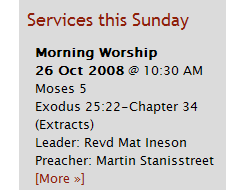
Upcoming ServicesI have been looking for an Event system for the church web site—one that allows you to post-date items and list upcoming events, particularly services. There are a number based around iCal and Google Calendar but I didn’t want to get into that level of complexity and, anyway, a calendar based presentation is not as direct and immediate we wanted. Eventually I narrowed it down to two: WP Events and RS Event. Another one which looks promising (but complex) is Events Category but I haven’t had time to look at it [Update below].

WP-Events

Pro—Actively maintained and developed by the author (Arnan de Gans).
Supports start and end dates and times, multi- and all-day events.
Provides sidebar widget and main page hooks for upcoming events and archives plus function calls for experts.
Allows different categories for events.
Incorporates Event Location. This is not something that we would use, preferring to put this sort of information into the description.
The dedicated admin page (Manage Events) has full information about each item.
Allows HTML tags in sidebar for images and markup.
Very flexible configuration.
Simple implementation so easy to hack.

Con—Uses a separate database table for events so they are not found by the search engine.
Excerpting is done by character count rather than word which can break HTML.
Non-standard interface for creating events which is not foolproof for the non-geek e.g. no implicit tags and validation.
Events cannot be in more than one category and they bear no relation to WP post categories.
There is no single event display without creating a separate WP post and linking to it.
The More link appears even if there is no more.

RS-Event

Pro—Uses extra metadata on standard posts to indicate start date/time. Hence search and ordinary posts listings work.
Provides sidebar widget and function call for experts.
Allows different (standard WP post) categories for events.
Events can be put into multiple categories
Very easy to use, suitable for admin staff.
Simple implementation so easy to hack.

Con—the author (Robert Sargant) has vanished so it is no longer supported, though a working version patched for current WordPress can be found at LivingOS. A hacked version exists with some extra features by Nudnik.
Uses standard (rather inflexible) WP excerpting which doesn’t allow markup.
You can’t tell from the admin pages (Manage Posts) the date of each event.
There is no recording of end date/times so no concept of an event duration or multi- and all-day events.
Non-widget configuration has to be done by editing the theme files making the theme site specific (because it refers to categories explicitly by ID).
Requires an unpublished hack to get event date/time to appear in archives, search listings and single post pages.
The More link appears even if there is no more.

I have included both in my demonstrator so the user can choose. I think they will go for the second as it is easier for them to use—the extra work has already been put in my me.

[Update 24 Oct 2008]

Events Category

Something that has saved a great deal of effort is that the author of Events Category (Weston Ruter) has provided an excellent write-up. Reading this I can at least superficially evaluate it without having to download and test it.

Pro—The aforementioned write-up and I think it is maintained though there is a suggestion that it does not work with WordPress 2.5+.
Uses extra metadata on standard posts. Hence search and ordinary posts listings work. In addition, the output method uses the WordPress loop with additional template tags so customising it is flexible and straight forward.
Supports start and end dates and times and hence Multi-day events.
Events can be put into multiple categories
Allows multiple sidebar widgets and plenty of scope for theme writers.
The start date of an event is easy to see from the Manage Posts admin panel (because it is the post date).
Easy to use, suitable for admin staff.
Incorporates a comprehensive Event Location and integrates with various calendar systems.

Con—The start date of an event uses a forward dated post which loses some information, though the update tracking in current WordPress provides this information for audit.
Looking at the (well described) method of operation it is probably fairly complex, modifying deep parts of WordPress, and hence hard to hack. I am not sure I could get it to work with current WP.

From that analysis I don’t think we will be using it but there are some great ideas there that I may adapt for use with whichever system we do go with. One thing the exercise has demonstrated is how many different ways you can use to achieve the same objective.

TapCode Comments

28 Sep 2008 18:01 by Rick

Putting comments in code is a well established, if not rigidly employed method of documenting what the thing does. At best it tells future maintainers how it works and at worst it reminds you when you come back to it later. It doesn’t do anything else. With WordPress it does!

I wanted to make one page in a blog type application look different. The WordPress documentation says that first it looks for a template called pagename.php

Any custom Page Template selected for the page – If the page slug were about, WordPress would look for about.php

failing that then one called page.php and finally index.php working down the hierarchy until it finds one that exists. Now you would think that “pagename” was the name of the page—wrong!

After rootling through the forums I discovered that you have to select a custom “Page Template” on the write/manage page admin panel, THEN it directs it to use the right one.

Looking at the panel—no sign of a “Page Template” menu as promised. Further deep hunting on the forum and even resorting to Google I discover that you have to declare your custom templates—by adding a comment to the beginning in the form

<?php
/*
Template Name: templatename
*/
?>

Now the menu appears and you can chose between “Default Template” or the one you have declared “templatename” That is what I meant. These are not comments, even if they look like comments because the theme integration code is reading and interpreting them. They are effectively executed. I wonder if that is true for any others?

TapSlow progress

25 Sep 2008 10:56 by Rick

Sorry there haven’t been many posts here recently. I have been working on a new web site for someone else which I will announce when it is launched, probably mid November.

A blank image

  • While doing that I came across a bug which I first saw years ago and thought would be fixed by now. Back when I first started coding web sites, in 1998 when blogs hadn’t been named but this site performed a similar function, we had to allow for all sorts of browser bugs. Good web pages had special coding to allow for the differences between Internet Explorer and Netscape.
  • There was still a problem when IE6 came along and, as there is still a lot of it about, that is what I spent all yesterday evening fixing. The current releases of browsers are generally good enough so that you only need to code for their differences if you are very fussy or are using something obscure.
  • So it came as a surprise that the float & list bullet overlap problem still existed. I have tried to demonstrate it by enclosing the last few paragraphs in a list. The pink image is outside of the list and floated to the left which allows paragraphs to flow around it. This fails in all browsers that I have tried so perhaps it is a specification problem and they are all sticking to the rules. It is surely wrong though.

TapGoogle Chrome – success

4 Sep 2008 12:31 by Rick

Well, I got it up and running and fine it looks too. A bit dodgy around the edges but it is a Google Beta (what the rest of the world calls an Alpha release) and still a development project so we can’t criticise.

What I actually want to say here is much deeper. It must be noted that Google are not designing a new browser. The market is already full of those IE? (pick a number from 5 to 8), Firefox, Safari, Opera… Chrome certainly should be a good browser and proposes some interesting features. But, no, what Google is promoting here is a platform; a base on which they can build their web applications that they have developed over the years and will be continuing in the future—Search, gMail, Calendar, and more. So far they have been dependent on the browsers and those, without exception, have had weaknesses in areas that Google needs to succeed.

For example, we know that occasionally any browser will lock up. The developers try hard to fix them but they still do it. Google are in the business of supplying all your needs via web applications so can’t afford for the browser to crash. They are not saying that Chrome will be immune from this problem but that a lock caused by one site will not crash out the whole browser, just that window.

When you look at it this way, Google are putting themselves right into competition with system suppliers like Microsoft and Apple, but Google are doing it via the web where the others do it on the hardware. What Chrome does is bring the interface under their control. This will allow kiosk like devices (thin clients) where, as far as the user is aware, the operating system is the browser. All services are obtained remotely; the closest we have got to network computing since the idea was mooted.

TapGoogle Chrome – no luck on first try

3 Sep 2008 10:20 by Rick

The talk on the web is about the first completely new browser for over a decade (I think). Designed from a blank sheet it promises to be popular, emphasising speed and reliability over features. Only a Windows version is available at the moment but I found that I couldn’t even download it from my Mac, it must be doing some platform detection. I will try again tonight after firing up my VM.

TapAlphabet spamming

2 Sep 2008 10:46 by Rick

I have often wondered why, when all other things are equal, some people get more spam than others. Perhaps this is the answer. We know about dictionary spamming—that is trying every possible name before the @ on common (and uncommon) email servers. What seems to be happening is that this process is partially optimised so that more popular starting letters, ones that have more genuine accounts, are tried before less popular ones. So if your name starts with r, p, m or s then you will get more spam than if your name starts with q, w, y or z. It seems that it would be a good idea, if you have to change your account name, rather than become rick325@hotmail to try yyyrick or xyzzy.

TapHot stuff

18 Aug 2008 14:24 by Rick

As we had a surplus of loyalty points I splashed out on an MP3 player the other day. Not wanting an overpriced iPod I got the Samsung YP-T10 which does everything I need and has 4GB of memory and Bluetooth. I have not figured out the latter yet but can load the music from my Mac with a third party application XNJB.

The controls on this device (apart from the on/off switch) are a touch pad which is heat rather than pressure sensitive. So it works from your fingers but not hard objects in your pocket or knocks. Putting it in my shirt top pocket I find that it keeps cutting out—it is clearly warm in there and the “little bumps on my chest” …

I will have to put it in the pocket control side out!

^ Top