TapOne finger at a time at NYPD

11 Sep 2009 09:24 by Rick

Do you remember all those old US detective programs like Kojak and Columbo? You get the inevitable scene back at the precinct with the bustling and noisy office where you would see a detective pecking away at a manual typewriter whilst taking down the statement of a suspect or producing a case report.

Well things don’t change much. Despite the glowing BBC report of the NYPD Real Time Crime Center (spelled wrongly in the article) if you look in another place you will find that NYPD has just signed a $1 contract for … manual and electric typewriters

Gee, Officer Krupke, your pension will surely come soon, just fill out this form with three carbons.

TapWPA/TKIP broken

2 Sep 2009 09:19 by Rick

For those of you with Wireless Internet systems at home who have just got around to not using WEP encryption because it was seriously broken, I’m afraid you can’t rest there. It has been announced in Japan that it is possible to break WPA/TKIP encryption in under a minute. Not in a way that can discover the key but enough to insert bogus messages into the stream and compromise your traffic.

So, if your hardware has the capability, and that is always the problem, switch over to WPA/AES or WPA2 as soon as possible.

TapHave Mercy

24 Aug 2009 10:20 by Rick

Politicians of the world seem to have trouble understanding the concept of mercy.

  • Mercy is unconditional. It does not require any response from the recipient, either in action or restraint. The recipient doesn’t even have to be grateful or understand why.
  • Mercy is independent of whatever the recipient may have been accused or convicted of.
  • Mercy is not dependent on actual guilt or innocence, just that the recipient should be receiving a sentence that can be reprieved.
  • Mercy supersedes all other considerations and is a gift in the sole power of the giver. It can be given or withheld, it is not a right.
  • Mercy is a mark of civilisation. It shows that we are above revenge and retribution.

Scottish law provides for mercy in the power of the secretary of state on behalf of the government. Kenny MacAskill exercised his authority and explained in great detail that this was what he was doing.

Read Zechariah 7:9 and Matthew 5:7.

End of story.

TapHome Non-Delivery

5 Aug 2009 20:46 by Rick

I’ve ranted before (though probably before this blog) about how useless most courier services are for delivering to homes. They are geared up for office and business deliveries and hence work office hours, Mondays to Fridays. If that is their business plan, then fine but I wish internet retailers realised this and stopped using them.

However when one says it is “… the UK’s largest dedicated home delivery and collection service” then it is a fat lot of good if it will only deliver Monday to Friday without specifying even morning or afternoon (no not evenings) and their depot, which is 12 miles out from the city centre is only open Saturdays 9 to 12. That is not a home service.

Three cheers for Royal Mail.

TapThe New American Censored English Dictionary

15:49 by Rick

Another Apple Dumpling.

The publishers of the Ninjawords application for the iPhone, which is an electronic dictionary, have been made to remove all “objectionable” words before it was accepted on the Apple App Store. That not only includes swear words than have a single meaning but also all words that have multiple meanings, one of which is lewd—like ass, pussy or screw. The developers went to great lengths to ensure that you wouldn’t come across them by accident, but it seems that was not good enough, they had to be removed.

And, even after that, it has a 17+ rating!

People who know me know that I am not in the habit of using these words, or at least I don’t think so, it rather depends on exactly what they have removed; but I do want them in a dictionary. As children we had great fun furtively looking them up, but that didn’t stop dictionaries being stocked in WHSmiths or even any odd looks from the assistants when you bought one.

An update (6 Aug) – partial explanation and signs of improvement.

TapTime Capsule Pricing

3 Aug 2009 09:40 by Rick

We know that accessories for the Mac (in fact all Apple things) are a little spendy but the pricing for the Time Capsule doesn’t make sense.

The Time Capsule is basically an Airport Extreme with a disk drive added (and support for Time Machine. Update: I am told you can do Time Machine to an Extreme as well so even that is not an addition). An Airport Extreme sets you back £139 ($179). For the Time Capsule 1TB disk you pay an additional £90 ($120) which, for Apple gear, is not bad; but for the 1TB more in the larger model you are stung for an extra £150 ($200). That is silly.

TapUI Fail

30 Jul 2009 13:19 by Rick

I have been puzzled why the battery on my MP3 player is sometimes inexplicably flat and at other times goes on for ages without a recharge. Now I have solved it.

The Samsung YP-T10 doesn’t have a off switch; it times out after a certain period of inactivity which is adjustable in the system preferences. When playing music files, I stop (actually pause) the song using the centre touch button and that counts as inactivity. However, when using the FM radio, the centre button is a MUTE—so I have been leaving it on for days at a time, hence it is flat when I come back to it. The only way to stop the radio is to back up to the root menu using the top left touch button. This activity doesn’t stop ordinary music playing at all.

TapAudio Routing in MacOS X 10.5 (Leopard)

26 Jul 2009 22:08 by Rick

This is a short tutorial on how the audio system works in MacOS X and how to get the best out of it.

If you are a basic user of sound, such as listening to iTunes, streamed music from the internet and perhaps the Skype telephone system then you will have found that it all works straight out of the box. What you will be using can be shown like this…
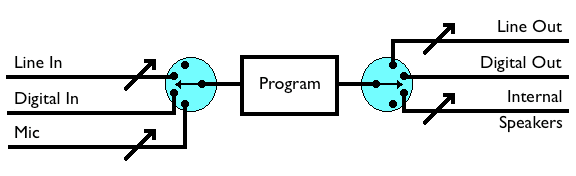
Simple Audio Routing

This shows the program in the centre and on each side are the audio selectors for default input and output shown as rotary switches to indicate that only one can be selected at a time. Simple programs always take input from ‘Default In’ and send output to ‘Default Out’. Obviously playback-only programs will only use the output side but others, like Skype, may use an input microphone as well. Depending on the model of your Mac you will have different inputs and outputs available. My experience is with a Mac Pro and I have on the input side ‘Line In’ (Analogue) and ‘Digital In’ (I don’t seem to have a Mic socket which I always thought was a bit odd). On the Output side I have ‘Line Out’ (Analogue), ‘Digital Out’, ‘Internal Speakers’ and ‘Headphones’. I have bought a USB desk microphone so that adds to the input options.

The selector switches allow you to control what channel is assigned to the default input and output and this is done using the Sound panel in System Preferences as you would expect. On some devices (the analogue ones) you also have a volume control and a mute which are shown as variable pots and the analogue stereo output ones will have pan controls. Digital channels have fixed volumes and pan.

So, if for example, you have connected your desktop speakers to the ‘Line Out’ socket then you would switch ‘Default Output” to “Line Out’ and everything will be fine. Quite honestly, I find the Preferences panel confusing, especially the volume controls. If you are regularly switching things around then a useful accessory to get is SoundSource from Rogue Amoeba. This puts a control up on the menu bar which does the same as the System Preferences (and more) in a more convenient and intuitive form. For instance you can assign ‘System Sounds’ such as the bings and bonks issued by programs to a separate output—I send mine to the ‘Internal Speakers’ out of the way.

[Edit 20 Apr 2013] N.B. For those reading this and trying it on later versions of Mac OS. Lion (10.7) requires the latest version (v2.5.1) however this doesn’t work on Mountain Lion (10.8). Perversely the previous version (v2.5) does, so hunt around the internet for that. You need to run it manually the first time and some people have reported that it can affect the keyboard volume controls (which doesn’t bother me).

In all of this, ‘Headphones’ is a special case. They don’t appear in the System Preferences until you plug them in. What can be convenient is that when you plug them in they mute the other outputs—this is controllable in SoundSource but not anywhere else that I know of.

Monitoring

Moving on to more sophisticated programs, some like to control their input and output sources for themselves and bypass the ‘Default Input’ and ‘Default Output’. Skype is like this and allows you to select which microphone you would like to use (if you have more than one). Another little gadget I find useful is LineIn also by Rogue Amoeba. This is a very simple applications, best run automatically at login time, which simply routes input through to output with no modification except a mute button. Not only is this handy for monitoring the input sources if your recorder doesn’t do this, but is also useful just for listening to an external source on your Mac speakers.

Recording

Now if you want to record audio on your mac there are a number of applications that will do it. There is the quite sophisticated Garage Band from Apple and also the freeware Audacity which offers a lot of facilities and plugins. Using the diagram below you can see how to take an input signal, monitor it, record it and subsequently play it back. I use a Windows application called WaveCorrector which has state of the art click removal facilities. To get it to work here I run it under Crossover for Mac which works really well. The Crossover Windows interface only provides basic default input and output channels so I use SoundSource for routing. It does come with a monitoring facility but I prefer to use LineIn because it is there before I start setting up the recorder.
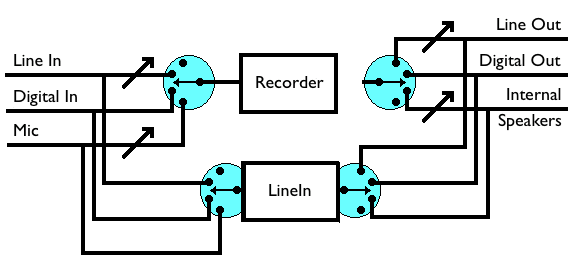
Audio Routing with LineIn for Monitoring

But what if what you want to record is sound that is generated on the computer itself—for instance a streaming radio station via the web browser? There is no way to get the output of, say, Safari, to the input of your recorder. Here another little gadget comes to the rescue…

SoundFlower

This little application from Cycling74, despite its daft name, does just what is required: but this is where it starts getting a little tricky to remember how to set it up. We will only be using the 2ch option—I think if you are into multi track recording then you are probably beyond this tutorial. Let’s start with a diagram…
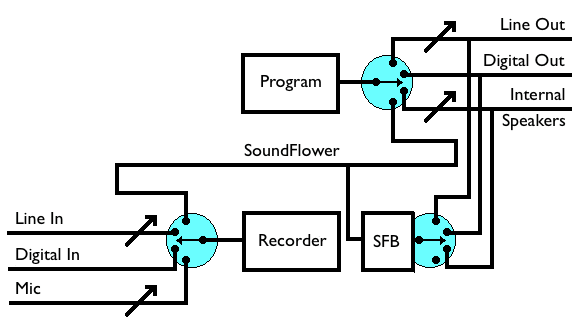
Audio Routing with SoundFlower

Tracking it through from the top you can see that the browser outputs to ‘Default Output”. We have routed this through to SoundFlower using SoundSource. Now SoundFlower does its magic and sends it around to the front again. We set the ‘Default Input” to SoundFlower using SoundSource again and there it is ready to go into the recorder. No sound comes out of the speakers because we have intercepted it so we could use LineIn as before to do the monitoring but SoundFlower comes with its own tool called SoundFlowerBed. This is another application which you run at Login (it can be found in /Applications/Soundflower/Soundflowerbed) and sits on the menu bar as a little flower. You use this (shown as SFB on the diagram) to say where (else) you would like to route the SoundFlower signal to, so we set it to ‘Line Out’ so we can listen to it on the speakers.

Putting it all together

My main audio activities on the Mac are

  1. Listening to external source (LineIn)
  2. Recording them (add in WaveCorrector)
  3. Listening to Internet sources (Native)
  4. Recording them (add in SoundFlower)

To achieve this conveniently the settings I use are

Default Output = SoundFlower.
System Output = ‘Internal Speakers’
LineIn input = ‘Line In’ (actually ‘Digital In because my feed is digital)
LineIn output = ‘Line Out’
SoundFlowerBed = ‘Line Out’

This copes with 1. (output goes via LineIn) and 3. (Output goes to SoundFlower then ‘Line Out’ via SoundFlowerBed), Skype ringing goes to the internal speakers.

For recording I set “Default Input’ to ‘Line in’ (actually ‘Digital In’ in my case) for external sources (2.) and SoundFlower for internal sources (4.). Just one switch to change!

Finally a few cautions. I have found that some recording programs, including mine, like to have the routing set up before you start them up. They ignore any changes afterwards. Secondly be very careful with monitoring options. If used rashly then you can set up a feedback loop and make horrible loud noises. Lastly, if you want to record vinyl records via the ‘Line In’ socket then you will need a device called a “Phono Pre-Amplifier” to boost the signal and also provide some tonal correction. Even though there is this extra complication, a good old fashioned turntable gives much better quality than the USB-ready plastic turntables you can buy these days.


TapFirefox 3.5 Extensions

2 Jul 2009 06:12 by Rick

Rather quietly, certainly without the fanfare of version 3, Firefox 3.5 was released a couple of days ago.

This is an update to my earlier post about difficult extensions bringing the version numbers and locations up to date. There are still a few that I found that could be simply hacked to enable them to load. I haven’t altered the functionality at all, just changed the maximum version number to 3.* and tested them. They work on my system but you use them at your own risk on yours.

Stop-or-Reload Button 0.2.2 — The page says it works up to Firefox 3.0 (but it doesn’t even do that). The Hacked version 0.2.2.99 still works with Firefox 3.5.

UK Threat Level 0.16Hacked version 0.16.99

British English Dictionary 1.19 — The page says it works with Firefox 3.6 but it doesn’t. The Hacked version 1.19.99 still works with Firefox 3.5. This extension is also suitable for Thunderbird 2.*. It is not entirely clear if this dictionary is needed for Firefox 3+ or if there is one built into the English (British) basic download.

Google Pagerank Status 0.9.8 — Although the web site doesn’t say so, the version there is now 0.9.9 and does support Firefox 3 but not 3.5. Hacked version 0.9.9.99

Objection 0.3.3 doesn’t support Firefox 3.5 though they are working on a version 0.4. Update 6 Jul 2009: v0.3.4 is now available.

Minimize to Tray 0.0.1.2006102615+ (Windows) doesn’t work with Firefox 3 — The Hacked version 0.0.1.2006102615.99 also works with Thunderbird 2.*.

TapID Card Victory?

1 Jul 2009 14:05 by Rick

The Home Secretary, Alan Johnson, announced yesterday that there was to be a change in policy and that Identity Cards were no longer to be made compulsory for any UK Citizens. This would abandon the trial for air-side staff at airports. They would, however, become compulsory for foreign nationals and the voluntary scheme was to be speeded up.

Does this make sense? Not really, as foreign nationals should have their own passports anyway so an additional card won’t make a lot of difference. There may be more of a case for people who have “mislaid” their papers.

Is this a victory? Well, partially. It is a clear indications of a steady back-pedalling by the government on the policy. You can no longer be required to produce it if there is no requirement to have one. There will no longer be an issue with lost or damaged cards or fines for failure to register.

However, there was no mention of the back-room ID Register. This will remain and be populated with information from passport applications. There is no indication that the amount of information required here will be relaxed at all. A passport, in theory, is voluntary but, if they can argue that digital television and broadband access are essential for daily living, then I can hardly see that passports can be regarded as optional.

My old (pre-blog) article on the issues is still largely relevant and, of course, No2ID.

^ Top



