TapScreen Size/Page Size

16 Nov 2007 09:02 by Rick

There is a disturbing tendency for web pages to get larger and larger. What seems to be happening is that web designers are believing the statistics that say that most people now are buying larger screens. Yes, that is probably true, but it is not the point.

I haven’t bought a 19″ screen to view your web site full size and hitting me in the face. I multi-task, even if women say that men can’t! I want multiple windows open on my screen. In 19″ I can get two good sized windows open and three or four little ones like IM rostas. I can keep my mail box open while I am browsing. I can make notes from web pages. I can refer to one web page whilst viewing another. If you make your web site so it only works when the screen is full width then you are stopping me doing any of those things.

The rule of thumb should still be: Make sure your web pages work on a window 800 x 600 pixels; and that space must include the browser furniture like scroll-bar, toolbar, status-bar etc. Better still, make it dynamic so that it expands to fill the available space. The width is important to the users because there is nothing worse than horizontal scrolling. It is clumsy and difficult to use and quite often users will not notice that there is content off to the right. The height is important to you, the designer. Users are quite used to vertical scrolling but unless your page makes an impact in the bit that is visible at the top then they may not bother to look any further.

I am not saying that there should be no limits; if your page becomes ugly or just looks daft above or below certain widths then feel free to restrict them but aim for allowing any width between about 600 and 1000 with the optimum at 800 and you won’t go far wrong.

TapLocal Shared Objects

15 Nov 2007 16:23 by Rick

These little things are a well kept secret of the browser world. You all know about Cookies? No, well I’ll first explain about them…Cookies are small pieces of data that are stored by your browser on behalf of the sites that you visit.

The problem discovered in the early days of web browsing is that it is a stateless process. Each request for data on a page is independent of every other. Although you know that your request for page 2 is related to your just having read page 1, the server at the other end sees it as an isolated call. If you are following a sequence, such as a process to purchase a book from Amazon, the server needs to know that the pages are all part of the same transaction. It does this by creating a cookie at your end which contains a unique identifier. This is sent along with each subsequent request so that the server can relate them all together without losing track.

There are two sorts of cookie—transient ones which are deleted as soon as the process is completed and longer term dated ones which carry forward information from one browser session to another. There is some security included which only allows a server to read the cookies that it created; this is done by domain name. A good example of a long term cookie is the one that holds your preferences for Google searches so it remembers which languages you prefer etc.

One use for cookies that have gained them a bad reputation is for advertising. The ad-server will store information about what ads it had sent you so it could ensure that you get different ones next time and perhaps also which ones you have clicked on so it can give you more of the same. These became known as tracking cookies, but it is not really as bad as it sounds; the security is still there and the only information that could be called personal is your network address. There is no suggestion that email addresses, personal names or other such things were disclosed, but by looking at the cookies on a user’s system you could get some idea of what sites they have been browsing. For more information see the Wikipedia article.

Due to their reputation, there is now a problem for companies that need to use them; up to 40% of people delete cookies on a regular basis. There is a built in feature in Firefox (and perhaps IE) to delete all cookies now or every time you shut down. As a result many advertising programs were not working properly.

Enter Macromedia (now Adobe) Flash. This system which operates on top of the standard web protocol is widely used by advertisers (and often disliked by users) because it allows animation and sound. It is also used by sites like YouTube to display short videos on demand and web designers to create really fancy (flashy!) sites. Flash has the capability to read and write cookies but it is cumbersome so they created their own (called Local Shared Objects). This was a good idea when they were used for the same purpose that cookes were designed for. But they are now being used as a backup to standard cookies because most people don’t know about them. If some sites spot that their standard cookie has been deleted, they will read the flash backup copy and immediately recreate the cookie, subverting the intention of the user.

Firefox extensions to the rescue—Objection. It is not very clever but does allow you to see the LSOs that have been created and delete them if needed. I am not suggesting that you get paranoid and delete everything in sight but you deserve to have control over your own browsing experience. Of course you could chose to block Flash altogether! I find animations distracting.

Update 14-Aug-2009: The new Firefox Private Browsing (sometimes know as porn mode) introduced in version 3.5 does nothing to stop the storage of or delete LSOs. Your private habits could easily be revealed by looking at what gets stored there. Also there is now a more comprehensive management. This is the Better Privacy plugin but be careful setting it up as it could affect sites that legitimately use LSOs (read the FAQ at the end). There is a management mechanism provided by Adobe which gives you some limited control over what is allowed. Not surprisingly, the options that you chose are themselves stored in an LSO for later retrieval by Flash.

TapWordPress Security

7 Nov 2007 12:56 by Rick

BlogSecurity has published a white paper about how to secure your WordPress installation. A lot of the stuff in there is security by obscurity e.g. changing your database prefix and renaming your admin account which may slow down intruders but there is some good stuff in there as well. They also advertise a WordPress Security Scanner which should be worth a test.

Thanks to LiquidMatrix for the nudge.

TapWhere have all the $$$ gone?

5 Nov 2007 10:10 by Rick

If a bank like Citigroup can lose $11Bn in under secured loans, where has it all gone? The money was paid for the houses in the first place and now they are worth less so presumably there are a lot of house builders now rolling in loot—or doesn’t it work that way?

TapThought for the day

27 Oct 2007 22:05 by Rick

If you have ever put together a computer or audio rack then you will praise the Lord for the dexterity of our fingers—being able to do up nuts with two fingers at full stretch behind a panel while holding the bolt and all the weight of equipment in the other hand is amazing.

If you have ever experienced someone else putting together a rack you would wonder why they hadn’t been blessed with the brain cell to go with it.

P.S. Wago plugs are the work of the devil!

TapCar identification

22 Oct 2007 14:53 by Rick

I don’t know if there is any kind of privacy or security problem here but I have discovered that many tyre retailer web sites have a system of identifying your car (make, model and colour) from its registration number. For example Kwik Fit or Tyre Shopper tell me that mine is a red Renault Laguna X74 5-door hatchback. I am sure that there must be a use for this.

Update:
I took a look at the DVLA website which gave a link to Release of information from DVLA records and this doesn’t mention this usage of data supplied but seems to be only datasets where the owner/keeper information is included. Following links further I found the DVLA Vehicle Online Services which gives a Vehicle Enquiry service. This requires the registration number and the manufacturer (I can’t see why) but gives quite a lot more information—date of liability (when the tax disk expires I think), first registration, year of manufacture, engine capacity, CO2 emisions, fuel and a few other bits and pieces.

Update 2:
The Motor Insurance Database ASKMID is another route. It tells you the make and model and also, usefully, if it is insured. You are only supposed to use it if you own the vehicle but that is unenforceable except, perhaps, in the extreme case of bulk enquiries.

TapPointed ad

17 Oct 2007 10:54 by Rick

The Aussies have never been shy when it comes to making a point—remember the safe-sex ad “Got a stiffy, get a jiffy”. Well they’ve done it again with a road safety ad. Of course you have to know what the hand gesture means; just remember, size matters!

TapIntelliPlug

16 Oct 2007 15:09 by Rick

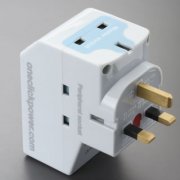
Unlike many of the supposed power saving devices available, the IntelliPlug works and can be seen to work.

IntelliPlugIt is a mains adapter with some smart logic inside. You plug your computer into the master socket and peripherals like the screen, printer, scanner, external hard drive and speakers into the other sockets. When you shut down the computer, the device detects the drop in power requirement on the master socket and, after a short delay, switches off the peripherals as well. Clever eh! No more finding all the switches or worse still, leaving them on all night. There is a trickle of power still available at the computer so things like the soft-power button and Wake-on-Lan still work. When you switch back on, the peripherals come back on in plenty of time for them to be detected by the boot sequence if needed. The list price is £17 but I have seen it available for £14.



You should only connect devices to it that are not needed when the computer is off so, in my case, I haven’t connected the printer as that is networked for other people, but it is still quite useful. But, you say, there are only two peripheral sockets. Well, yes, but they do a power strip version with 7+1 for about £30 or, much easier, you put the plain powerstrip that you used to use into one of the available sockets.

Because of the unique features of laptop computers you have to have a special version for these. This will be because the charging current is somewhat independent of whether you are using the computer so it has to use a USB connection to detect the shutdown which is a bit of a fiddle. I am not sure if it would work with a docking station—are the USB ports on there live all the time?

TapWalled garden

12 Oct 2007 12:56 by Rick

This idea being promoted by MAAWG looks like it could be an effective way of limiting spam at source, and, as the members are high powered, it could actually get implemented.

The problem is that a large proportion of spam and associated phishing, viruses and other attacks are sent, not from huge malicious systems in a far off place, but many thousands of small home systems each adding their little bit to the flood and under common malicious control. They were infected by a previous attack and then join in themselves—these are called zombie systems and are collectively known as a bot-net.

The principle of this proposal is for ISP’s to identify customers on their own networks who are infected. Nothing new there except that they currently don’t do it because of the administrative overhead it would trigger. The difference is that once identified, the customer would have all their internet traffic automatically routed to a sanitised area called the Walled Garden within the local domain and that all browser requests result in a link to an internal site which provides education and disinfection tools. Until the customer systems are cleaned no traffic is permitted out onto the wider internet. Think of it as a quarantine with a pharmacy on hand for self treatment. The reasoning is that the majority of customers with infected systems are unaware of it and wouldn’t know what to do if they were told. This way they don’t have a choice.

There will still be some admin overhead—in calls to the help desk—and it would need to start easy to minimise false positive alarms, but it is probably the only way to force these infected zombie systems off the network.

As I said, there are some heavyweight people on this working group, AOL, AT&T, France Telecom (Orange) but not my ISP. But when(if?) the momentum gets under way, no ISP is going to be able to ignore it and stay in business.

TapGreen snake oil

9 Oct 2007 11:26 by Rick

With the growing interest in ecological living, there are a few companies selling Electric Power Savers now. Actually EPS stands for Efficient Power Systems (web site doesn’t work well in Firefox—actually not very well in IE either), a trade mark of the company of the same name that makes them.

These devices purport to save power. They are plugged into any socket in your house (i.e. in parallel with your appliences not series) and claim that they can reduce your house power consumption by 10–20% by “a combination of filtration and correction techniques to improve the efficiency of various appliances and circuits.”

Well I say that a device plugged into one socket in your house cannot affect the consumption at a different socket any more than you can affect the electricity usage of your neighbour. The best it can do is act as a surge/spike suppressor by absorbing them and even then its effectiveness will depend on the electrical distance from other devices; on a different ring, for instance, will reduce its effectiveness.

Their FAQ points out that people with accurate usage meters have noticed that it is consuming some power—I am not surprised.

Think before you buy.

Update: Croydon Trading Standards are aware of the scam. See right at the bottom of this link.

^ Top