TapSonos – where next?

5 Oct 2007 11:02 by Rick

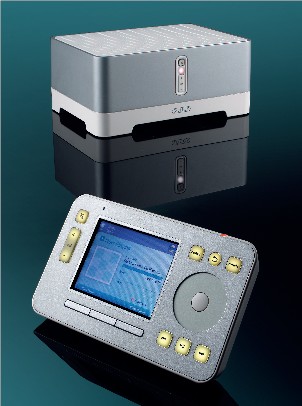
As I have written before, the Sonos is a great system for distributing music around your house. The current range consists of three items; The ZP100 player which just requires a pair of loudspeakers to play the music, the ZP80 player if you want to provide your own amplifier and the CR100 controller which is a sophisticated remote control. A weak point from the marketing point of view was that you had to use one of the ZP units (normally the cheaper ZP80) to connect to your computer network even if you didn’t want music in that room. In large houses you might also need one to act as a wireless relay to get the range you needed. This was seen as a waste even though, by buying a bundle, it was actually costing very little (less than £100).

It hasn’t been announced yet but it looks like the gap will be filled with a new bridge device (thought to be called the BR100) which will be a cut down ZP80 (i.e. without the audio output option) and at a much lower item price. To some extent I imagine that it is a bit of a loss-leader, or at least very low margin because there is not a lot to be left out—just the DAC, ADC and some analogue circuitry, but it is possible they will also leave out the local storage of the library index. The price, however, would need to be significantly lower to be seen as a sensible option.

I suspect that the margins on the BU130 bundle were getting to be too low so, together with this release, I would expect to see a new “Starter Bundle” consisting of a BR100, a ZP100 and a controller; a direct entry into the Sonos world for one room priced at about £600; add more rooms for £250–£350 a time.

This is a move in the right direction but still does not address the issue that it is a geek or professional installer system. The reason is that it is not a stand-alone package, it needs a lot of non-Sonos bits and pieces to make it work. As I mentioned in the previous article, it needs a broadband connection, a router with DHCP, some disk storage, a CD ripping mechanism and library management. All of this is computing stuff and puts the layman off. There has been some debate as to whether Sonos could make a box to reduce the geek aspect of the system a bit. opinions vary, as you would expect; the options run up to a fully integrated “library device” which includes router, hard drives, CD player/ripper, integrated auto-tagging (naming of tracks, artists and album cover art) with perhaps a keyboard socket and screen for editing.

There are many issues

  • In the near future, broadband connections will come with a router integrated. This is already the case with the heavy promotion of wireless systems.
  • A disk drive will never be the right size for everyone so do you just provide USB sockets for external drives.
  • With disk drives you have to consider the noise, but integrating with the bridge rather than the player should solve that.
  • Any storage system must have a backup facility as they are not reliable enough.
  • The US people are suggesting that CDs are becoming obsolete and everything is moving to download and Rhapsody-like streaming. In Europe that is not happening quite so fast as it is bogged down with copyright issues.
  • In my opinion, the one task that really needs a computer is library management and tag editing. Having to provide a decent dedicated interface would be a step too far. For the mass market user it won’t be necessary (often) as thy will have mainstream music which will be auto-tagged successfully.

My conclusion is that the best route for Sonos to take would be to work with one of the NAS manufacturers and come up with a re-badged or endorsed product which fits in with the Sonos style, plugs straight into the back of the BR100 and sits on top (or underneath as it is likely to be heavier). Very little development would be needed; it just needs to be a properly conformant CIFS NAS device with provision for two hard drives (perhaps with a range of sizes) and a RAID mirroring capability. Perhaps a little modification of the install procedure would be needed integrating with the Sonos controller to make it easier. Now with joint marketing you can put together a true starter system dedicated to music—just add the music.

I would suggest leaving ripping and library management to the existing software on the home computer. There is a lot of choice and people use a particular one for a variety of reasons; the overlap into other technologies such as portable devices and video is too great. It is true that this will still leave out people that don’t use computers but I am not sure that they would be interested in this type of system anyway. For novice users, all home computers come with suitable software pre-installed and a set of decent beginners guides to the most popular solves most of the problems.

  • One final plea—it is about time the controller came with a free cradle. Even though the cost is a small fraction of the total, it is seen as a rip-off.
TapGoing Straight

28 Sep 2007 11:31 by Rick

I have a collection of music tapes; not commercial ones but bootlegs; every now and again I get a twinge of guilt.

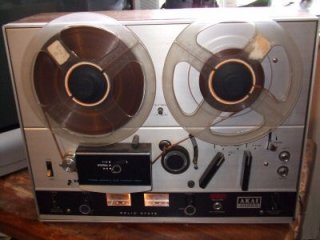
Looking back at the history of this, my collection started when I was a poor student. I spent a significant portion of my grant on buying records. (Aside for younger readers: a grant is something the government used to give you to help with your further education, not to be confused with a loan. I don’t have any feelings of guilt over that, my education didn’t suffer in any way due to lack of funds and it was probably better for me than booze). Friends of mine did the same and, as I had a tape recorder (Akai 4000Da big reel-to-reel thing), I recorded copies of theirs which increased my collection at lower cost. It was always my intention (honestly) to buy the records when I had the cash.

Then came the cassette. I adopted this format late and reluctantly because the quality at first was awful. It only improved a little later. My reel-to-reel recordings were transferred to the compact medium and the big beast put away in a cupboard. I remember at the time buying some of the records to replace them as I had a good job by then; but many were deleted and unobtainable.

Around this time (mid 1970’s) I had new friends with their own record collections. They had great recordings that I didn’t have and these were no longer obtainable either—so I took copies. The justification now was definitely that there was no other way to obtain the record.

Here we need a little political history. There has been an intermittent debate over home-recording rights for at least the last 35 years since the home cassette recorder became popular. The argument from one side was that we were stealing from the musicians—Remember Home TapingHome taping is killing music;” and on the other hand that the record companies were profiteering. The latter argument was boosted by regular stories of how musicians had been tricked into bad contracts. Every now and again the idea of a “home taping levy” on blank cassettes was brought up but it never came to much. There was a brief revival with a levy on blank audio CDRs but that is now dead as no one uses them any more, everyone uses ordinary data CDRs. It was really silly when it was apparent that the same companies who made the home recording equipment (notably Sony and Phillips) were also the owners of the record companies complaining about home recording. Now the attention is on downloading from the internet and sporadic attempts at prosecution. It is my firm belief that home recording boosts record sales. Without access to other collections over the years I wouldn’t have bought anywhere near as many for myself. There is also the argument of duplicate media for different locations but I have never got into that, not trusting cassettes to the car for instance.

Back to my story; In the 80’s I was doing a lot of music for parties, initially for children at the local schools but also for 21’st birthdays and wedding anniversaries. My trademark for this non-profit service, at least for the adult ones, was as a “human jukebox.” If there was a hit from the 60’s or 70’s then there was a good chance I would have it and could play it. A lot of the more obscure ones were (are) on tape obtained from scouring friends collections.

In the last 10 years I haven’t listened to music very much at all, but I have noticed a change in what is available. Suddenly all those records that were deleted only a few years after they were issued were being re-released on CD. I bought a few and retired the tapes but not with any great enthusiasm.

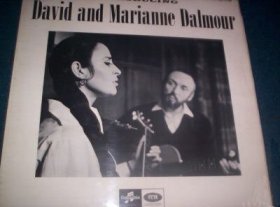
David and Marianne DalmourRecently two things have happened. I am going digital and we have been clearing out some cupboards and came across all the old reel tapes and the recorder. The recorder is still working fine—no rubber perishing or other problems, though it still has an intermittent fault with one of the playback amplifiers and some of the knobs are missing. More sadly, I have discovered that I had erased some of the tapes after transferring them to cassette and also that the lists of what was on them have got lost. It takes a lot of internet searching to identify recordings and I know that I will never find out what some are (I had a brief liking for atonal and “musique concrète.”)

So, at the end of it all, my Christmas list this year will be filled with requests for old and obscure recordings to try and replace them on CD. That will be a challenge for the children. The unobtainable I will digitise from the best copy I can find and I am only resorting to internet downloads when the CD I own refuses to rip.

TapMagnanimous Home Server

22 Sep 2007 08:17 by Rick

Windows Home Server?
Windows Home Server looks like it might be an interesting product. More interesting than Microsoft imagine perhaps as that definitely looks like a white Apple Macbook that they guy is using on the sofa! I got the picture and story from IStartedSomething. The Question is which is the original? Who has retouched the picture? Even so, it could be a Macbook Pro.
Windows Home Server

TapOverload

21 Sep 2007 09:56 by Rick

Basic recording on a PC should be a fairly straight forward task. There are plenty of tutorial web pages around which tell you how to connect your equipment, such as a tape player, to the line-in socket (not the microphone socket) with the appropriate lead. Some even remember to remind you that most turntables require a special pre-amp.

There is, however, a big gap in most instructions (the ones I link to above are the better ones). I will use the standard windows tools as an example but your sound card may provide its own version. When setting up the recording you are presented with a “Recording Control” window (one route to find it is Control Panel—Sounds and Audio Devices—Audio—Sound Recording—Volume.) On here you would un-tick the Microphone Select and tick the Line-In Select then, just above it is a Volume control. What do you think it does?

There are supposed to be standards for audio interconnection but they have not been consistently adhered to by manufacturers. In the golden years of Hi-Fi (mid 1970’s) there was a de-facto line-level sensitivity of about 200mV and you could buy virtually any combination of equipment and it would connect together. This was the boom of mix-and-match. Prior to that it was a bit more hit-and-miss but the critical change was when the CD player was invented. Whether it was to hype the supposed quality of CD or some other reason I don’t know but they consistently had a much higher output. People connected them to the AUX sockets on their amplifiers and were blown across the room; isn’t it loud and clear! But after that, they had to remember to turn the volume down when switching over to CD; I am still doing it. This didn’t matter a great deal because the analogue circuits are flexible enough to cope though the more discerning can tell that they are really being over-driven causing a brittleness to the sound.

Getting back to the PC, sound cards do seem to adhere to the standard which, by the way, is -10dBV sensitivity for domestic audio. Instinct would suggest that the volume control is like the record level on a tape recorder or the gain control on a mixing desk. That is mistaken; those controls are passive attenuators BEFORE the active pre-amp circuitry. The control you see here is a digital control AFTER the Analogue to Digital Converter (ADC). The important point is that if your input signal level is too high then the damage has already been done. The overload will have been converted into very nasty digital distortion. In fact the volume slider is practically useless as the standard one is not even calibrated with a zero mark. I presume that above a certain point it offers gain to boost signals that are a bit quiet but, unless you are mixing it with other input signals in real time (in which case you really need a lot more sophisticated equipment) then setting it below the imaginary zero mark is unnecessary—why would you want to waste any of the signal you have been given.

My problem is with an old reel-to-reel tape deck (remember them?) which is an early 1970’s model with a very high output. I realised when I bought a decent sound card that had calibrated controls (E-MU 0404), that I was well into the red before starting. So what to do about it.

You could follow some advice given and use the headphone out socket but some, like mine, do not have a level control, and even then you are subjecting the signal to an often low quality headphone amplifier. You could try sending the line signal via an intermediate pre-amp but this may pass the signal straight through unless you have an adjustable line level output; mine doesn’t, and in any case it would be a bit of a nuisance to extract it from the Hi-Fi system. A third possibility is to use a mixing desk. These are designed to handle a wide range of input levels but not many people have one in the cupboard (and I discovered that mine was broken).

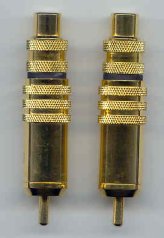
The ideal solution would be a passive attenuator between the deck and the line-in socket. I have found one cottage industry maker of these which he calls GoldenjacksGoldenjacks. He does them primarily for the audiophile improvement of CD reproduction but he reports that he is selling more and more for our purpose. Mine haven’t arrived yet but I have ordered a pair of -10dB “source end” plugs and I fully expect them to do the trick. I thought initially that I would need a variable control but really it is a case of you either need attenuation or you don’t; in which case they can be removed. If you need more than 10dB (1/3 the signal level) then you have a more serious problem.

TapThe advert blocking debate

14 Sep 2007 11:25 by Rick

We all know that some web sites contain adverts and we know that some people don’t like them. Some people don’t like them so much that they block them. If you use Firefox then there is a very popular extension called AdBlock Plus. But now the site owners are beginning to fight back. They claim that the existence of the web sites and, in many cases, their livelihood depends on the revenue from the adverts and that, if you are not prepared to view the ads then they are not willing to show you the pages. They have developed a piece of code so that if you visit one of their pages with AdBlock Plus enabled then you will be redirected to a page of explanation.

Originally they blocked Firefox altogether but fortunately they have backed off from that. One argument is that the original AdBlock had this capability built in but now it is a war of the coders. This is a war that could get quite heated. Personally I don’t use AdBlock, my brain filters out unwanted stuff naturally, though I do stop animated GIFs and Flash because I find them irritating.

TapMicrosoft Stealth Patches

09:12 by Rick

It seems that Microsoft has been engaging in a little underhand patching. People are reporting that changes are being made even when they have automatic updates turned off. There is apparently nothing to worry about, they are perfectly good patches, but the deceit is troubling. To see if you have been hit, check the version of \windows\system32\cdm.dll (use right click – properties – version). A pre-patch version should be 7.0.6000.374. If you have been stealth patched then it will be 7.0.6000.381. There is a little discussion about it on the Microsoft Forums but nothing official yet. The only justification I can think of is that, as this is a patch to Windows Update itself, there may be no other way it can be done, but even that doesn’t excuse the silence.

Update: Microsoft have explained what is going on and it is just as I thought, but I still maintain that if they can detect and action that an update is required then they can just as easily tell you about it so you can make an informed decision.

TapSonos

13 Sep 2007 10:42 by Rick

After we cleared out and re-carpeted the study, it was always our intention that it should be used as a dining/entertainment room but it had been lacking any music system. I was not looking forward to running loudspeaker wires from the room above where the Hi-Fi is. Even the family dining room was inconvenient since, though I had wired it up many years ago, it was a bit of a bind having to run up and down the stairs to change CDs. How we managed in the days of vinyl I don’t know—fitter then perhaps.

Another possibility was to install a mini system but I have always been fussy about sound quality and, even then, we would be bound to get into a state where the record we wanted was always “in the other room.”

A couple of years ago I had heard about networked media players when they were in their infancy and, though I didn’t like the idea of having to have the PC switched on, this was the incentive to look at them more closely. The first I saw was that Richer Sounds had a Phillips model for £99. This would require amplifier and speakers but investigations showed that the quality wasn’t great. looking at the market more seriously the front runner seems to be the Slim Devices Squeezebox at about £250 which has decent D-A converters. They also do the Transporter which is a serious audiophile device but way out of my budget. All these type of systems work the same sort of way. They use the UPnP network system to communicate with the media player on your PC to pick up your library of digital music, sometimes direct from your media player or sometimes using dedicated software. This is transmitted over your network, either wired or wireless and then converted to analogue where you want it to be fed into a traditional Hi-Fi amplifier. You can also get dedicated media servers which handle the UPnP protocol and avoid having to have the PC switched on.

Sonos SystemIt was around then that I discovered the Sonos system. At first sight it looked like a “Mercedes” range—what everyone wanted but couldn’t afford. It had a very good reputation for quality, ease of use, flexible with a responsive support team—but expensive. For my situation, this proved to be an illusion. I already had a (plain) file server with big disks, a network with router and broadband connections. To set up a UPnP system the way I wanted it would have meant replacing or adding a compatible server and disks. The Sonos system bundle 130 (at £700) comes with an amplifier built in (so just add speakers) and would give me two rooms of quality music which would mean I wouldn’t have to use the grotty PC system in the office (despite all the hype and marketing, these are never Hi-Fi). It also comes with a very slick wireless remote control which appeals to the technical and non-technical alike.

So I bought it.

How does the Sonos work

The philosophy behind it is rather different to most other media players. It is first and foremost a Hi-Fi system so attention has been placed on sound quality and convenience and minimising the technical input to a step by step “Getting Started” sheet.

Although it is possible to set up a system with just one player, its strength comes with two or more (up to 32) communicating around the house. One needs to be wired to the network containing the router, internet connection and server. This can be used as a player, but also acts as the gateway for the rest of what they call “Zones” and streams all the music on demand. It can use cable interconnects, for those with the luxury of a house with structured wiring, but it comes into its own using the built in wireless system. This uses the same frequencies as 802.11 Wi-Fi but they use a proprietary protocol which is optimised for music streaming and automatically invokes a WPA standard encryption scheme with no interaction with the user. It chooses the best channel for itself, avoiding interference from neighbouring wireless networks.

The star of the show is the hand-held wireless controller which has a 3.5″ colour screen. From this you can control what is played where and it also gives feedback of what is in the library, what is playing now and quite a lot else. It is possible to add multiple controllers to the system e.g. one per floor, but each one is universal and interchangeable.

Not surprisingly, each player is, in fact, a diskless computer processor with embedded Linux. Each holds its own copy of the library index in memory which makes navigation very quick, not requiring network traffic or server response. The ZP80 adds a quality sound card (with digital output) and a wireless adapter and the ZP100 also has a 50W per channel audio amplifier. They have decided to keep the dedicated software closed, only publishing the source of the modifications to the Linux as required by the GPL. This means that, unlike say the Slug, there not a strong “hacker community” though some have had a look at the controller interface and produced alternatives based on web browsers for PDA hand helds.

Conclusion

How has it worked out in practice? Was it the right decision? Overall, I think yes. The sound is good. It is reliable, easy to set up and fun to use.

Would I recommend it to any/everyone else? Yes, with reservations. The system they supply is very easy to set up. The bits they don’t supply are not. This is not just a Sonos failing but the whole concept. For Hi-Fi to have to rely on a dirty distant cousin, the PC, is a big drawback and will put most people off. Many people now have broadband, and many of those will now have a router because that comes with the wireless systems being promoted, but few actually understand it and installing a server, whilst a piece of cake for a geek, is not for the average domestic user. Perhaps the answer is for Sonos to produce a dedicated music server in the range, but somehow I don’t think they will because it is only half the problem. There is the library creation and management which requires the use of the PC and software such as Windows Media Player; I have written earlier about the headaches and problems using this and, unless Sonos unexpectedly expands the role of the Desktop Controller (a PC version of the remote control), I don’t think they want to get into this end of the market competing with Microsoft, Apple and Real.

So it will appeal to the already geeky, and perhaps to those having been brought up on iPods and suchlike, moving onto more serious stuff, but for the average casual music listener, probably not. The resellers have found a market, however, in processionally installed systems. They can do all the planning and setup and, so long as the customer only buys new mainstream CDs, they are easily run with a little instruction.

As for ourselves, now we are started we are already planning future zones and how to get some of our rare vinyl onto the system.

Appendix—the downside of the Sonos system

  • It doesn’t handle WMA Digital Rights Managed (DRM) music well—the stuff you buy from Napster, and DRM music from iTunes and Rhapsody is not supported at all.
  • The support for internet radio is there but, in the UK at least, is a bit patchy. It doesn’t support the BBC’s Listen Again.
  • The advertised streaming music services, Rhapsody Live, Pandora and Sirrus, are USA only.
  • By the standard of the iPod, the controller is a bit on the chunky side.
  • It requires a router with DHCP, a broadband Internet connection, an available file share, preferably a file server, and a PC (or Mac) to rip the music and manage the library.

Appendix—the upside of the Sonos system

  • Any file share will do, not a PC or dedicated music server
  • Most well known file formats are supported; MP3, WHA, Ogg, Flac, WAV, Apple etc. The only notable exception is WMA lossless and, as mentioned above, DRM downloaded stuff.
  • Use a high bitrate format and the sound quality is excellent. Whether it justifies the lossless formats like Flac or Apple Lossless, my ears can’t tell.
  • It is dead easy to set up; plug it in and press two buttons, tell it where your music is and you are away.
  • The controller is unmatched by any other system.
  • Music “Zones” can run independently or in combination with any others right up to a house party where every system is playing the same thing.
  • The wireless range is excellent and, with careful positioning, even coped with a two floor jump in our solid Victorian house. Multiple zones are a breeze as each one acts as a relay for the next, all perfectly synchronised.
  • Each player comes with a 2 or 4 port Ethernet switch so, as a bonus, your computer network is distributed around the house for free.
  • The internet radio runs independently of the PC and does not require plugins or anything like that.
  • Updates are handled directly across the internet and usually transparently.
  • The support and user forum are first class
  • The green credentials are good with everything possible shutting down when not in use.
  • Although they don’t advertise it, it is possible to run it without the internet connection after the initial setup.

TapDistorted, Choppy Sound

3 Sep 2007 19:56 by Rick

All of a sudden, my PC had started to distort the sound of playback of anything, even the internal Windows “bonks.” Especially it would no longer allow me to play one piece of music off my network drive whilst ripping another, but any activity, especially disk activity caused the music to take a back seat only getting attention in the gaps. Awful! There may have been some impact on the overall performance as well.

The solution was totally unexpected but made a little sense in hind-sight. Some time earlier I had trouble writing a CD-ROM creating a coaster. It seems that in the process of all the errors, Windows in its wisdom, had downgraded my IDE controller which contained both the writer and the hard drive.

This can be confirmed by looking at Right Click “My Computer” / Hardware / Device Manager; then expand “IDE ATA/ATAPI Controllers” and Right Click “Primary IDE Channel” selecting Properties. The Advanced Settings tab would show Content Transfer Mode = PIO mode (which is wrong).

To Fix it you need to uninstall the driver. Do this by closing the properties and Right Clicking “Primary IDE Channel” and select Uninstall. Do this for all of them if there is more than one. It will ask for a system restart. When you log back in you will notice various “Found New Hardware” slugs come up—for DVD/CD Drive, Hard Drive and the IDE channel itself. It will then ask for another reboot. This time if you go through the check again the Content Transfer Mode should be “Ultra DMA Mode 5” (or perhaps other numbers) and it should all be wonderful again.

Tap[SA26524] Doomsday Multiple Vulnerabilities

31 Aug 2007 08:41 by Rick

Isn’t even the end of the world safe from hackers!?

For those who note the incorrect spelling, apparently it is deliberate.

TapCataloguing Music

29 Aug 2007 10:59 by Rick

Sorry about the gap, it has been holiday time here.

Creating a music catalogue is something that has bothered me for decades, ever since (or soon after) I first started my record collection in school. There just seems to be no logical way to do it, I don’t know how libraries manage. People have always been confused by my record cabinets because I insisted on indexing solo artists by surname so James Taylor was under “T” (but of course Jethro Tull was under “J”). Mixed artist compilations have to go at the end because there is no other way. Classical records have their own section ordered by composer and, again, mixed records are put to the end.

Doing the same thing for an online library is even harder. You would have thought that a lot more thought would have been put into it; perhaps other software is better but Windows Media Player is infuriating. It does a good job of ignoring the “The” from the front of everything but insists on sorting everything else strictly alphabetically so James Taylor ends up under “J”. The file system is first by artist, then album and finally track and this works quite well (and is largely transparent anyway). What the system does have is separate indexes for each, and also Composer, and Contributing Artist (the artist on each track) if you want it.

It is when you come to do classical recordings that it runs into serious trouble. The first problem is that there is only one catalogue—so, although you can put in the correct composer, if you look at the composer index you find it is cluttered up with people like Neil Sedaka from the popular catalogue when all you want is Brahms and Liszt. On top of this you have the problem that classical works are generally broken into movements which are not separately named and the pieces themselves can have very long titles which often includes the opus, key, instrumentation and sometimes a nickname. Then, what do you use for the “Artist”? Is it the composer, conductor, orchestra or principle soloist—I have seen all of these used. There are separate Conductor and Composer fields so I have tended to use either the orchestra or the soloist in the Artist field, whichever is more appropriate. The downloaded album information is very inconsistent and, for classical recordings, quite often wrong.

^ Top