TapAcceptable Usage Policy

8 Aug 2007 12:24 by Rick

My ISP, Virgin Media, advertises “Size L, Up to 4Mb, No Download Limits† (unlike some of our competitors)” where the † is a link to the Acceptable Usage Policy (the other grades of service are similar).

Now some people have said that this is a cap in disguise, but I have read all the small print, and it is small, and it makes no mention of any limit of usage except in sections about operating servers (section 7.3 w.r.t. upstream traffic), incoming email (section 9.2.7) and webspace traffic (section 10.6). So if they do have a capping system then it would be in contravention of their own AUP. If they are relying on section 3.2, which talks about “using…to the detriment of other Internet users” then I would think they were on very weak ground.

The only other possible clause is not in the AUP but in the Terms and Conditions section B.4.i where it talks about “usage allowance applicable to your Internet access” but nowhere does it define what this is.

Indeed the AUP is much less restrictive than I remembered or expected. I thought running servers was banned altogether. The only awkward and loose clauses I can see are 6.1.2 banning advertising and 6.1.4 banning business use which should worry big eBay traders.

P.S. Which? has recently criticised the “Up to” phrase but I am getting 3.7Mb and am not at all unhappy with it.

TapRenault Laguna Radio Controls

6 Aug 2007 08:56 by Rick

This is referring to the model installed in the 2001 Renault Laguna II but may apply to other models as well. If you have lost the handbook, as we have, some of the radio controls are a bit obscure and difficult to find by chance. I have borrowed someone else’s book and here are those instructions.

I have covered setting the security code elsewhere (item 6).

Mute/Pause

Pull both remote volume controls toward you at the same time. Repeat to come out of it.

Tone/Balance Controls

Press the Quaver button. You will then get a selection of options which are controlled by < and > or the remote scroll wheel to change between options and + and – or the remote volume toggles to change their values. The options are BASS, TREBLE, BALANCE and FADER (front to back relative volume). The rear speakers have to be activated in Expert mode for the latter to work.

Tuner Preset

To retain a station on one of the 6 quick buttons, first find it by other means. Then when it is playing, press and hold the desired number button until it beeps.

Tuner List

To change the selection of stations in the list press and hold the Tuner button until it beeps. The search takes some time but they will be stored in alphabetical order of RDS name.

Traffic announcements

The book says you can press the “i” button again to revert back to the main station early but this is not easy to do while driving. I have found it is easier to scroll forward and back quickly on the remote which has the same effect. I wish I know how to change the volume but the book doesn’t mention it.

News announcements

This is a facility rather like the traffic announcement facility but I don’t think it is supported by any UK stations. To enable it, press and hold the “i” button until it beeps. Switch it off the same way.

CD Random Play

To enable this, when the CD is loaded, press and hold the “1” button until the display shows RD.

Expert Mode

In order to invoke Expert Mode, press and hold the SRC button until it goes beep. You now have a series of options you can change in a similar way to the tone controls (above).

  • AF (ON/OFF) controls the alternative frequency system which searches for a better frequency for the same station if reception becomes poor. Often good for national stations but not so good if reception is generally poor or for local ones.
  • SPEED (0-5) controls the increase in volume as you increase speed to compensate for road noise. The higher the number, the more pronounced it becomes.
  • LOUD (ON/OFF) a strange American invention which boosts the bass and treble at low volumes.
  • TUNER (AUT/MAN) setting Manual switches OFF the station seek function in Tuner Manual mode which keeps scanning until a strong enough signal is found. Instead it moves 100KHz for each click.
  • REAR (ON/OFF) controls the back speakers.
  • LIST (MAN/DYN) I’m not sure what this does.

Press SRC again to leave this mode.

Factory Reset

Not something you are likely to need unless you ship the car to another continent. You need the SECURITY CODE to do this! To engage it, switch the radio off, hold down the 2 and 5 buttons and whilst holding them, switch it back on again. You now have a 2 minute wait while it beeps at you then, eventually, it will ask for the security code.

After that is entered, it will ask for the continent. The choice is America, Japan, Asia, Arabia and Other. The reason for this is they use different AM and FM bands. Select the right one with the scroll wheel and then press the button on the underside of the remote (nearest your lap).

The next question is CURVE (0-5) and sets the frequency response to suit the car. The values are 0 (Off), 2 (Clio), 3 (Mégane), 4 (Laguna), 5 (Safrane). I haven’t experimented to see what the effect is. Again press the underside button to move on.

Finally there is REAR (ON/OFF) which is asking about the rear speakers again. I think this relates more to whether they are installed at all rather then if you want them on. If you want to temporally disable them, use expert mode above. Press the underside button for the last time and the radio will be fully operational again.

TapCreating a digital music library

3 Aug 2007 09:53 by Rick

I thought I would look at Windows Media Player (WMP) to see how good it was before considering alternatives. After all, you can’t (easily) remove it from your PC even if you don’t use it. It is surprising how little information there is out there about this other than the official Microsoft Guides or rehashes of them. Just why I am looking at it now, having ignored music on the PC for all these years, I will leave to another post.

I started with WMP 10 which is what I had available and my first impressions were very good. The controls are straight forward and clear. I don’t have a lot of time for skins, the player is not what you want to look at and it just hides all the useful controls, nor do I really want to hide the menu bar though, once it is set up the way you want it, you won’t be using it much as all the day-to-day commands are available elsewhere.

Once you have set the “Rip” destination to what you want (it defaults to My Documents\My Music) and chosen the format and bit rate, creating the files is all automatic. It uses the file structure <artist>\<album title>\nn <track name> by default (where nn is the track number) which makes things quite easy to find and the database allows you search on other criteria. Choosing the format and bit rate is largely a matter of personal preference. Of the ones available I rejected WAV because the files are large and the support for tags is limited. I rejected WMA lossless for other reasons so there was a practical choice between WMA and WMA Variable. The latter is supposed to be higher quality for any particular file size so I set it to that and the maximum bit rate. This requires around 125MB for a typical CD. If you are playing back using an onboard sound card and budget speakers you can get away with a lot less than this though you should think ahead for future requirements to avoid having to go through your collection again later. In WMP 11, the popular MP3 format is available but is generally thought to be slightly lower quality than WMA for the same file size. There is no reason why your library cannot contain a mixture of types depending on need and availability; for instance you may need a smaller format if you are loading them onto a portable player. There are other formats which I won’t be considering in this article as WMP doesn’t support them.

Most file types allow for the embedding of meta data; tags which describe the music. These range from the specific—song title, artist, composer etc.— to the more subjective such as genre and style. The ability for WMP to find some of these details online (based on the nearly unique disk serial number) was very good but I found that obtaining the Album Art was rather intermittent. The record so far, having ripped 24 albums from a wide a variety of types, is:—

  • Full information available, including artwork—6
  • Most information obtained and correct but cover picture downloaded from Amazon by hand—16* (only one typo spotted. It even found the details for a Sue White Cornish Folksongs album which surprised me)
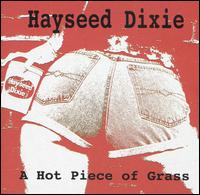
  • Faulty Information (wrong and missing tracks)—1 (Hayseed Dixie—A Hot Piece of Grass)
  • Track names only, rest wrong or missing, no image on Amazon—1 (v. old compilation album)
  • No information at all—1 (Sampler album bought from street buskers)

The most frequent error was a missing date. This is disregarding information that I have never seen such as Copyright, Language, Key, Writer and Conductor, but perhaps I haven’t loaded the right type of disk yet.

What I can praise WMP for is that it is very easy to alter any of this information with just a “right-click Edit”. If you have the “Rename and rearrange music using media information” flag set then it also tidies up your library automatically in the background. Other important options to set are “Update my music files from the internet” but NOT “Overwrite existing information” otherwise you will find all your edits disappearing. Similarly you should think carefully before using the right-click “Update Album Info” command as this also overwrites your changes.

An aspect that I have not yet fully understood is the Data Provider. This is one of the optional fields you can display and most often it is “AMG” (All Music Guide) or AMG/Microsoft but sometimes it is “User Feedback”. The information from the latter is generally accurate but incomplete. The errors with the A Hot Piece of GrassHayseed Dixie album were possibly because it had detected another edition. Checking the AMG database by hand it only has what is presumably the US edition and the UK one must be different. With WMP 9 and 10 you could select “View Album Info” and then select or reject different alternatives if they were available. There was also the option to edit this information directly which is presumably what was used to create the “User Feedback” Data Provider information but I am not sure where it went. As far as I can tell this facility has been dropped from WMP 11. The help file and online guide still talks about “Find Album Info” but the option is not present on the menu nor is the prominent “View Album Info” button.

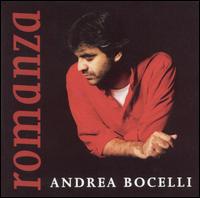
The “Genre” tag is really perverse, even to the extent of two disks in a double album or the same disk in different editions having different values; this is the field I find myself altering most often. Really this system is not sufficient to categorise music properly as, quite often, an album can fit a number of pigeon holes. For instance RomanzaAndrea Bocelli—Romanza comes in as “Classical”. That is certainly wrong, though he does also record Opera. The songs are in Italian so perhaps it should be “World” like Edith Piaf. Iona is marked as “Religious” which is right but that doesn’t say anything about the style which I would put in the same group as, say, Enya which is marked as “New Age” whatever that means. With such a limited system I don’t think they can win, just as record shops could (can) never sort out their racks rationally. I see that the AMG database has quite a sophisticated “Styles” and “Moods” system but this doesn’t find its way back to the WMP tags.

Finding the album art was better for recent (last 5 years) and mainstream disks but even then it failed on quite a few. It doesn’t seem to get these from the AMG database but some other source so perhaps that is not as comprehensive. As I have fiddled with the settings so much on my machine, I tried on Mary’s laptop and this seemed to be a bit better as was my work machine (WMP 9) even though it is behind a corporate firewall. To try and reset my machine I have installed WMP 11. This may have been a mistake as it now seems to find even fewer but I haven’t done a systematic analysis. As a minimum you need a file called “folder.jpg” in the album folder in the library and it can be any size. The automatic system also creates AlbumArtSmall.jpg (about 72 pixels square) and copies of both files with some sort of randomised file name. It is also possible to embed images in individual track files but support for this in media players is mixed.

[update: I think that there may have been a temporary problem somewhere. Asking for an “Update Album Info” today found the art work for a further 9 discs.]

TapCheques must not be allowed to die

2 Aug 2007 14:29 by Rick

From yesterday, Sainsbury’s will not accept cheques at the checkout. Perhaps I am a bit unobservant (well a lot actually) but I haven’t seen any warning of this. They will provide an inconvenient, slow and possibly short term concession if you are prepared to be escorted to customer service and pay there. I understand Asda, Morrisons, Boots, Smith’s, Shell and Woolworth’s have already done likewise. Tesco’s and Argos will go soon, but not Waitrose—there is a good argument for a customer centred company. The shops claim that “This is to help stop cheque fraud” but they can’t really do that and in the same breath say that “few people use cheques” anyway. If they were, they wouldn’t be making this change, it would affect sales too much.

Here are ten reasons why it would be a BAD THING for cheques to die out completely.

  1. There is no better way to transfer money from one individual to another e.g. Birthday presents in the post.
  2. It is the best way to send money via an intermediary, e.g. school trip money via your child, then the teacher to the school office.
  3. There is no audit trail for cash transfers, hence VAT, tax and benefit fraud.
  4. It is the only sensible way to pay large sums of money, a car deposit would blow many people’s credit limit.
  5. For various reasons, some small businesses don’t accept cards, e.g. the extortionate merchant fees.
  6. Temporary trading locations, like car boot sales, cannot handle chip and pin without expensive satellite or mobile phone equipment.
  7. Many voluntary organisations are not geared up to the sophistication of card handling.
  8. What happens if the retailer’s card system dies. Twice recently I have had to scrabble around for cash or go to a hole in the wall late at night to pay a restaurant bill.
  9. Cheque stubs (or record slip) gives you short term recording of transactions before the statement arrives at the end of the month.
  10. If your cards are lost or stolen you will starve for a week while the bank sorts out a replacement.

Can you think of any more?

TapMedia Players (4) Troubleshooting

08:52 by Rick

The way Audio Visual playback works on a PC is that your player software of choice looks at that the file and decides what format it is from a 4 character code in the headers. This will tell it what codecs are required (they are separate for video and audio). It will then read the data from the file and pass it to the relevant codec. This will decode and expand the data stream and pass it back to the player software for display. The decoder parts of the codec have standard algorithms so, assuming they have been coded correctly, it doesn’t matter which one you use.

The best known codecs types are

MPEG-1—used on Video CDs.
MPEG-2—used on DVD and SVCD.
MPEG-4—used on HD-DVD and Blu-ray.
Sorenson3—used by Apple QuickTime videos.
WMV—Windows Media Video sponsored by Microsoft.
Realvideo—now used mostly for streaming video.

but there are subdivisions such as mp42 and mpg4 which are both MPEG-4 codecs.

The best known audio codecs are

mp3—the generic and (probably) public domain codec.
WMA—Windows Media Audio which compliments the Microsoft video codec.

Some codecs do other things like the splitter which separate the audio from the video content. There are also surround sound decoders, subtitle extractors, language separators for multilingual files, chroma-key generators and digital signal processors for sound and picture manipulation. Even Audio and Video hardware drivers are considered as codecs by some applications.

Codecs come as installable packages, often in bundles, and are stored in C:\WINDOWS\system32 as .dll or .drv files.

How to find out what you need

AVI Codec Analyser tells you what you have installed and what you need to play any particular file but I can’t relate the two and it doesn’t seem to recognise QuickTime at all.

GSpot is popular doesn’t seem to recognise many for me.

MediaInfo gives similar information in a much more readable format (with many options) and supports QuickTime.

Finding missing codecs

If you find you need a missing codec, the best way is to search for them by name. Many will be found in the K-Lite package from codecguide.com

TapSecurity tip

25 Jul 2007 09:34 by Rick

Here is a suggestion to reduce the risk of credit card fraud.

On the back of your card is a three digit number which is not in the electronic information, either the mag. stripe or the chip. It is only used in online and telephone transactions.

Make a note of this number elsewhere and then erase it from the card—I have scratched mine with a pen-knife and then blacked it over with a pen. It is not easy to completely erase it as it is often indented into the plastic but that doesn’t matter. The aim is to make it difficult to read by cashiers and waiters when they handle the card. A favourite trick is to memorise this number together with the main number easily obtainable from the till and use it in online transactions before you get home.

Taprobtex Swiss Army Knife Internet Tool

08:48 by Rick

This is a nifty little gadget; it tells you all you ever wanted to know about your own connection to the internet (or any other I/P address specified)

robtex

Click on the information line to find more details. It includes blacklists (RBL), “whois” checks, routing and many others.

TapNigerian Progress?

24 Jul 2007 12:33 by Rick

This is a first for me

Mlle Chantal kouakou,
C’est avec respect et humilité que je vous j’écris cette proposition suite à ma relation avec vous . je crois que ma relation avec vous me sera beaucoup utile .
Je souhaite solliciter votre aide dans la migration et l’investissement dans votre pays la fortune que j’ai hertitée de mon père .
Brièvement, je suis une sierra léonaise agée de 22 ans et la fille unique du défunt DR Kouakou Bah Theodore…

A Nigerian 419 as blog spam, and in French too (it is apparently from Sierra Leone but currently in exile in the Ivory Coast).

TapMedia Players (3) In practice

18 Jul 2007 11:16 by Rick

In part 2, I described a method for getting the three primary applications installed safely on your system. You should be able to run any media files that you come across with it’s optimum application. In the case of generic files such as .wav, .mp3 and .mpg you may not have assigned a player, in which case, ask for the list of options when prompted and select which one you would like to handle it. At fist un-tick the box “Always use the selected program” until you have a feel for which player is best for you (and which ones work!) If you change your mind later, open a file with the right mouse option “OpenWith …” and chose an alternative.

DVD Playback

Note that none of these are actually capable of playing a DVD by themselves. They still needs the relevant codecs from a third party. If you go to The Plugins option table and click on “Look for Plugins on the Internet” you will be taken to a sales page with a number of options (Roxio, CyberlLink, InterVideo and nVidia at present). Fortunately you will find that you probably already have one which came with the DVDROM drive. If not then there is a freeware alternative available called DScaler.

The other thing that you will notice is that whatever you set earlier, Windows Media Player or an application that came with your DVD/CD drive may be the application selected automatically when you insert a disk. This is not directly related to the application itself but the Autorun features set on the drive. What I suggest is that you go to My Computer, right click on the drive icon and select preferences. On the Autoplay tab select each media type In turn and tell it to “Prompt me each time to chose an action.” This will give you a chance to think about it and make your decision later for each type of disk.

Online

One feature that you do want that comes with all the players is the browser plug-ins that enable inline and streaming content to be handled correctly. This is what the question about MIME types was about on the real Player install. Fortunately all three now come with plug-ins for IE, Firefox and, I think, Opera. There is a fourth application that I haven’t mentioned yet which is important in this context—Adobe Flash Player. This doesn’t present too many complications, it is a single function application unlike the others, only works from within the browser and comes with its own codecs built in.

Part 4 will talk about troubleshooting problems.

TapHappy Birthday Windsor

17 Jul 2007 14:55 by Rick

Apparently it is 90 years today since the royal family changed their surname to Windsor. It was done in the middle of WW1 because the old name sounded too German.

EIIRAccording to an on-the-street radio reporter survey this morning (in Newcastle) one person thought the Queen’s surname was Rex. Her initials are on the post boxes aren’t they?

After stopping the car and drying my eyes, there was a follow up item—someone had emailed in and said that the Kaiser had invited King George and Queen Mary to a celebratory performance of William Shakespeare’s “Merry Wives of Saxe-Coberg-Gotha.”

^ Top