All the talk this morning is about passenger profiling so it is a good time to review what it means and how effective it really is. This article from Bruce Schneier is a very good summary (it is not as long as it looks, 90% of the page is comments). The conclusion is that when done by trained intelligent people then it is very effective. When done by an automaton, either mechanical or human, then the false hit rate is so high that it discredits the whole thing. For some UK examples think of the poor reputation of Stop-and-Search and the Suss laws.
 Profiling
14 Aug 2006 09:19 by Rick
Happy Birthday PC
11 Aug 2006 11:21 by Rick
Tomorrow is the 25th aniversary of the IBM PC.
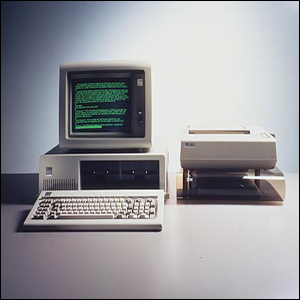
On 12 Aug 1981 you could buy a home model of the IBM PC for $1,565 equivalent to about £1,800 today. For that money you got a 4.7MHz processor, 16K of memory, mono sound from a built in 2½” speaker and a keyboard. No mouse, 160K disk drives were extra as was a monitor for the 4 colour graphics.
Big Bin Day
09:14 by Rick
Today is our first day of the new rubbish collection regime. We expect lorries around for the Brown Bin, the Black box and the Cardboard. There should also be one for the Green Bin but it will bypass us because we didn’t buy one. Next week there will be “Even Bigger Bin Day” when they collect the Black Bin as well.
Does that look like saving the planet to you—four trucks clogging the roads where a few years back there would have been just the one?
Another side effect of the Brown Bin is that we now have very little paper to recycle because it is all used up lining the Mini Brown Bin to try to keep it reasonably clean.
P.S. The rubbish web site is rubbish. The important links are broken and the details based on post code completely contradict the leaflets we have been sent.
Update: The website is rubbish and the Brown Bin truck did arrive today. And they took the cardboard so it is only three trucks not four!
Update: They moved the web page so I have corrected the link above—but it is still rubbish.
Visual Liturgy branded “Spyware”
4 Aug 2006 17:00 by Rick
Visual Liturgy, the package published by the Church of England to make the current version of the prayer book available electronically has been branded as spyware by Norton Anti-Virus. One feels sympathetic towards vicars who had their lifeline software disabled automatically, but perhaps it will teach them not to use Norton. I can’t count the number of times I have had to remove it from systems because it caused problems of one sort or another.
Qana is not Cana
31 Jul 2006 09:47 by Rick
I know that there is some doubt about exactly where the biblical Cana was, but in all references (John 2:1, John 4:46 & John 21:2) it is clearly Cana-in-Galilee. There is no reason for the writer to have got this wrong and it suitably near the events that occur a little later than the wedding story.
Qana in Lebanon, where the recent and 1996 massacre occured, is much too far away.
Rossini: Petite Messe Solennelle
29 Jul 2006 22:38 by Rick
I spent part of this evening sorting out some old tapes and came across a recording of the Rossini Requiem Petite Messe Solennelle. It is by the choir of St. Mary Redcliffe and Temple School and almost certainly recorded in St. Mary Redcliffe Church in the early 1990’s but more than than I have no idea. It was certainly a good performance.
I mention it because, as it was the master tape, I must have recorded it myself—but I have no recollection of doing it. I can find no notes of who the organist, pianist or soloists are nor is there any sign of copies having been made. I was involved with the PTA around that time so that is probably why; but it is strange that it was never exploited. Perhaps by posting this here, one day someone will come across it and provide the missing details—including the missing days from my life.
How email works (4) Viruses
27 Jul 2006 12:58 by Rick
Email viruses are another plague on the electronic utopia. To fulfil its definition a virus has to be able to replicate itself and pass on to another victim, preferably without manual intervention (else it is properly called a trojan, a subtle difference which can often be ignored). Because the email protocol is so simple, this is the easiest way for it to achieve its goal either via the native email client found on the machine or by a crude one built into the virus itself. As a result, once a machine has become infected it becomes the source for further infection. In the early days this involved attaching itself to legitimate outgoing mail and sending further infected mails to known addresses found on the source machine e.g. from the address book or a disk scan. Later this developed to the virus itself containing a database of potential targets which was shared out between victims in a cascade process. Ultimately it became more of a spam mechanism with the virus generating names semi-randomly using dictionary type techniques.
There are a number of places that viruses can be trapped and dealt with. All users are recommended to have a good anti-virus product installed. These are capable of scanning incoming and outgoing mail so attempting to deal with the symptoms as well as any potential infection. The better ones do this directly on the port drivers, between the applications and the outside world, so they can catch hidden email clients as well as the standard ones used by the owner. If your anti-virus tool reports outgoing infected mails then look to updating it and doing a major disk scan because you are probably infected.
Trapping infected emails on arrival is not really sufficient. Despite all the warnings, some people run without anti-virus software and can become infected increasing the problem. Also there is the cost involved with storing and distributing these emails. I said in part 3 that the mail servers only see the text stream and pass it though untouched. This is no longer true. Since the flood of malicious emails started there has grown, rather slowly in some places, a need to staunch it on the carriers rather than wait for the users. So now, most ISPs and company mail servers scan each email, decoding the MIME formats and checking each attachment before delivery. I believe that even some inter-network routers also do this.
This is a reasonably acceptable form of mail intercept—there are rarely false positive alerts with good mail being declared infected, and the better scanners just remove the attachment and pass the rest of the mail through with a note so that you know what has happened. The cruder ones strip off all attachments of certain types, such as .exe, which is less helpful and it becomes difficult to send legitimate files reliably. All sorts of subterfuge is used by good citizens to get their files though, the favourite being to change the file extension to something like .xex and give the recipient instructions how to restore it. The paranoid strip off all attachments reducing email to its basic text messaging form. This tends to only be short term at times of high risk.
Rack mount equipment
19 Jul 2006 12:35 by Rick
 In the computing, telecoms and professional audio/video business the 19″ rack is ubiquitous for mounting equipment. This standard, named after the equipment size, came originally from the cabinets used to house telephone switchgear and has resisted metrication largely due to the dominance of the USA in computing. There is however enough slack in the dimensions to allow a fairly crude conversion to metric units though you do come across modules that are a bit “tight” when mixed with others.
The fundamental dimensions are the overall width to the outside edge of the flanges which is 19″ and a height, edge-to-edge, of a multiple of 1¾”. This height is known as 1 unit or 1U so pieces of equipment are specified as, for example, 3U which is 5¼”. The standard actually says that every item (however large) should be 1/32″ shorter to allow for clearance but this can be ignored unless you are manufacturing them.
The flanges (or ears) have holes for bolting to the rack rails and the horizontal distance between centres is 18 5/16″ though the holes are usually drilled oval which allows quite a bit of sideways movement. For a neat effect you should loosen the screws a little after installation align the units before final tightening. The minimum clearance between the rails and other obstructions should be 17 ¾” though some are a very close fit.
 The fixings are most commonly M6 cheese-head bolts (in Europe) and corresponding “cage-nuts” inserted into the 3/8″ square cut-outs in the rails. You do sometimes see drilled and tapped rails but this is usually on proprietary racks used by the bigger computer manufacturers. The rails can either be steel or aluminium and it should be noted that they require different cage-nuts to allow for the metal thickness. The bolts are usually steel and plastic washers can be used to protect the finish. If earth isolation is required then nylon bolts (for light equipment) or plastic flange washers are available, but otherwise it is general practice to earth the rails with a strap.
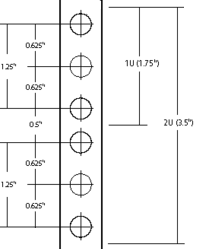 The hole spacing on the rail is complex. Each U has provision for three holes, though the middle one is rarely used. The spacing to the centres from the top or bottom of the unit is ¼”, 7/8″ and 1½”. This means that they are uneven, some being ½” apart and others 5/8″, making it VERY important that units are correctly located in their proper U positions, not offset by one or two holes. To help with this, many rails have a small notch cut out of the edge of the central square hole in each group to identify it. The cage nuts allow a small amount of vertical movement which may be needed when installing fractionally oversize modules.
The smaller equipment (up to 3U) is usually secured by two bolts on each side. 1U and 2U cases usually use the outer hole positions, 3U cases use the inside ones, being 2¼” apart. Larger modules use four or more bolts in various positions (but again, rarely using the central hole of each U.) It is worth noting that when installing equipment, it is the lower screws that should be inserted first and removed last because it is those that “take the weight” and stop the case from twisting, bending the flanges.
Many racks also have back rails to support heavier equipment; there is no standard depth though 31½” is quite common. Equipment that requires front and back mounting often has movable brackets or is dedicated to one brand of rack. Using runners is quite common for large equipment as it allows maintenance without complete removal, though care should be taken to avoid the rack tipping forward.
When installing equipment it is important to read the ventilation requirements. Although it is possible to butt the units up tight together they may cook, so you may need to leave gaps (with blanking plates for neatness). Fan modules are available for situations where a lot of heat needs to be removed.
This standard leaked for a short while onto the domestic audio market in the late 1970’s when it was fashionable to have the flanges even if you had no rack to install them into. This lingers in domestic circles with “full size” components being 430mm wide which potentially could have flanges attached for rack mounting though many of the cases would not be strong enough. They do, however, fit quite neatly onto rack shelves. Semi-pro gear often has rack mount kit options, though beware that they are often overpriced.
How email works (3) Attachments
14 Jul 2006 09:51 by Rick
The body of an email is a continuous stream of plain text lines, each no more than 80 characters long (remember punched cards?) and terminated by a line containing just a single dot “.” this doesn’t allow for much other than simple messages. To get round the restrictions and allow the sending of other types of data, uuencode (unix to unix encode) was borrowed from another system. This allows any data, including binary, to be transformed into plain printable characters, though you wouldn’t want to read them. A corresponding program uudecode converts it back to the original form without loss. The drawbacks to this are that the message increases in size and that the process is very manual. The first problem was addressed by compression but that made the second problem even worse as it is now a three stage process at each end i.e. compress, uuencode send—receive uudecode uncompress, and some data needed different handling, perhaps a different compress program.
The major development to resolve this was MIME (Multi-purpose Internet Mail Extension). Using this the body of the email is divided into a number of sections, still all in plain text and the whole lot terminated by the “.” The mail server knows nothing about it, it is all handled by the client at each end. Each section has its own sub-header which contains details about what sort of data the section contains and how it is encoded. Then when the mail arrives, it is all sorted out into the message (now perhaps formatted in HTML) and the attachments all with their correct type and name.
Songs on the internet
12 Jul 2006 18:13 by Rick
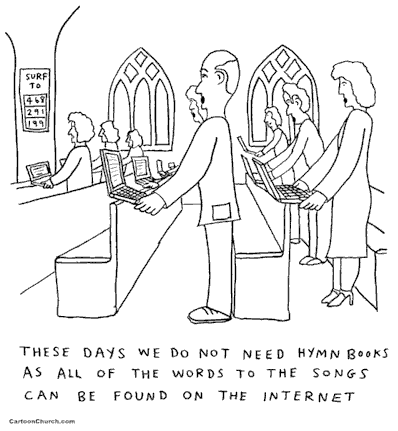
Very topical at the moment as I am trying to get a projector installed at St. Matt’s. Thanks to Dave’s Cartoon Blog for the joke.






 Webmaster