TapI’ve sold my soul

12 Jul 2006 15:34 by Rick

Well, not quite. I’ve sold an advertising slot on one of my pages. Not, you will be relieved to hear, on my main West-Penwith pages, nor on this blog which is guaranteed ad-free, but on one of the few miscelaneous pages.

I wondered, at first, why anyone would want to buy it. True it is one of my busier pages, 718 hits in June (and the stats say that they come in and go out without a look around the rest of the site) but that is nothing in the real world. The key feature of that particular page is that it has a Google Pagerank of 7 out of 10 which is pretty good for a commercial site let alone an amateur one. So that is why they wanted an ad, and a plain text one at that, so that the Google fairy dust would rub off on them. Rank is everything in the Search-Engine-Optimisation world and it is earned by reputation which is judged on who links to you. The more high rank links-in you get, the higher rank you earn and hence the higher up the search listings your site appears. Points are lower (or even lost) for links that look unrelated or generated from link farms and Points mean Prizes—or hard cash for commerce sites.

Now if I could sell a few more I could give up the day job, but I suspect that really would mean selling my soul.

TapHow email works (2) Relays

10:52 by Rick

What we saw in part 1 is the simple case with just a sending and receiving mail server, but quite often a number of intermediate hops are required to reach the ultimate destination. Using the “Received: ” headers in reverse order you can see what route a mail item took to get to you.

When email was invented, the networks weren’t as richly interconnected as they are now and consisted of small islands connected by narrow, unreliable pipes. So the technique to deliver a message was to forward it to another server which was a bit closer to the final destination. There was even a way you could suggest the route you wanted your mail to take. A system evolved where servers would discover the best routes by learned experience. This meant that servers became accustomed to accept any mail and forward it on as required.

In more recent times this custom was exploited as the servers didn’t care where the mail came from. Spammers arranged to send mail to random servers and specify obscure routes knowing that they would dutifully forward them on and their tracks would be hard to detect. This is called the “Open Relay Exploit.” To avoid this, servers began to be more selective and mostly they now only accept mail from their own clients or, alternatively, mail destined for places that they know about and are responsible for. They will no longer accept mail from anywhere to anywhere. In practice you will see from the headers that most mail gets moved around internally at the source end, makes a big leap to the destination, and then moves around a bit there before being stored.

An organisation called ORDB (Open Relay Database) tracks down the few remaining open relays and system managers can use this list to ban them from contact as their transmissions will be unreliable.

TapW98 Rest in Peace

11 Jul 2006 06:41 by Rick

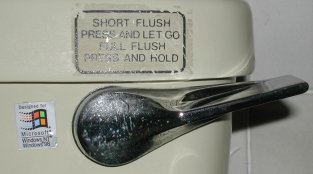
W98

Well, it has finally gone after all these years, and it is the full flush this time after an earlier attempt failed to see it off. The one we all loved to hate has gone forever. I am certainly not sad to see it go. I can now say with a clear conscience, “sorry I can’t help you; you could install Linux on the old box.” Much has been said to deride XP but it is an order of magnitude better than 98 (we won’t mention ME which has been in a coma for years).

Of course some people loved it; that is fine, I never had to support them anyway as they were enthusiasts and they could get it to work. Joe User, however had nothing but heartache and blue screens.

Now what?

Using it to let the grandchildren surf the net is not a good move. Just because MS have laid it to rest, doesn’t mean the virus writers will. A botnet of W98 zombies will suit them fine. According to W3Schools, 1.6% of systems connecting to them are still running it. Make yours stand-alone and let them run all those great games you had forgotten about.

If you have an application that absolutely must use 98 then isolate it, use the box for nothing else. If the machine is running reliably then leave it alone. If it is a bit dodgy then consider reinstalling from scratch with all known patches. There is a list at Techspot but I don’t know how long they will remain available at MS so cut them to a CD now. Surely someone will create an online archive, but there may be copyright problems. Install just that one application. You probably won’t be able to get AntiVirus updates for much longer so you need to disconnect from any critical network, especially the open internet. If it has to connect to something then put in a firewall, the current ZoneAlarm should work just fine; close it right down to the bare minimum.

TapHow email works (1)

10 Jul 2006 16:18 by Rick

Consider an email that you send. It starts when you type it into a client program such as Thunderbird, Outlook Express or Hotmail. It then makes it way to your ISP. From there it goes to the recipients mail server where it is stored until they read it. Simple isn’t it. All except the last stage is controlled by SMTP; Simple Mail Transfer Protocol. Simple in this context is as in “Village Idiot” as we will see later.

An email is a plain text file consisting of some headers (consider this as the envelope) followed by the body which contains the letter. In theory no headers are required at all because you tell the courier who it is for but a destination line starting “To: ” followed by an email address is good. It would also be courteous if it had a “From: ” line and a “Subject: ” but they are not essential to the system. After the headers there is supposed to be a blank line before the body starts. At the end of the mail there will be a line containing a single “.” but you may not be able to see that when it arrives.

The email starts its journey going to your ISP mail server. It knows where that is because it is in your email client configuration. The conversation between the client and the server looks like this—the four letter codes are from the client, the server replies begin with a number.

220 mail.server.com Sendmail 8.6 ready at Mon, 10 Jul 2006 19:21:01
helo
250 mail.server.com Hello goodclient [64.223.17.221], pleased to meet you
        [yes, it really is this chatty—goodclient and the address are your client]
mail From: me@server.com
250 me@server.com ... Sender ok [note, it hasn't checked it really]
rcpt To: you@recipient.com
250 you@recipient.com ... Recipient ok
        [this gets minimum checking but it is important to get it right]
data
354 Enter mail, end with "." on a line by itself
From: me@server.com
To: you@recipient.com
Subject: greetings          [none of these are checked]

How are you today?
.
250 Jhub756hQ Message accepted for delivery [The random characters are an internal id]
        [now you can start again with a new "mail" or exit]
quit
221 mail.server.com closing connection

For a bit of fun you don’t even need an email client, just connect to the mail server on port 25 using telnet and type the commands in by hand. It is rather tedious though and there is little room for error.

The first thing the mail server does is add a new header to the front “Received: from … by …” and perhaps a time stamp, recording where it came from; think of this as a postmark. It then uses the destination (from the “rcpt” command not the “To: ” header) to decide where the email should go next. It will look at the domain part of the address (after the “@”) and ask DNS (Domain Name Service) what the address of the mail server is—this is obtained from DNS “MX” (mail exchange) records. It then goes through the same chatter with the destination mail server.

When the email arrives, after adding its own “Received: ” header to the front, the destination mail server will check that it really does belong here and store it in the file, sometimes called the mail box corresponding to the user (the bit before the “@”) It will wait there for them to fetch it, usually using a different system called POP3 (Post Office Protocol v3). The POP3 server uses a similar set of 4 letter commands to list mail, retrieve it, delete it etc.

Apart from a bit of queuing to cope with delays, that is all a mail server does.

Note that during all this, almost all the headers are ignored. “From: ” is never used for instance and can say absolutely anything! “To: ” may sometimes be used if the message has to be queued but not otherwise. “Cc: ” (Carbon copy) headers are checked and processed as new destination addresses using the same process as above. “Bcc: ” (Blind copy) is stripped out very early before being processed like “Cc: ” so it remains invisible to everyone else.

TapThe big one

7 Jul 2006 23:51 by Rick

This web page is bigger than the universe (only works in Firefox or other compliant browser I’m afraid). It is hard to believe but the page is 9,000,000,000,000,000 pixels on a side (I think the total number of pixels is missing a zero). At 77 pixels per inch that is 1.844 billion miles in each direction—and you can scroll across it with your mouse!

TapLeaf Cutter Bee

2 Jul 2006 14:57 by Mary

While sitting out in the garden recently eating dinner, we were attracted by audible munching noises from our wisteria plant. Further investigation showed a bee-like creature neatly chopping an oval piece out of a leaf then flying away with its prize. It then returned for another piece of leaf, and then several more.

Leaf Cutter Bee

Later research told us that it was indeed a bee—a leaf cutter bee in fact—a solitary but quite friendly creature that likes wisteria, rose and other leaves as nest making material.

TapAdvent GPS400 File Structure

29 Jun 2006 21:56 by Rick

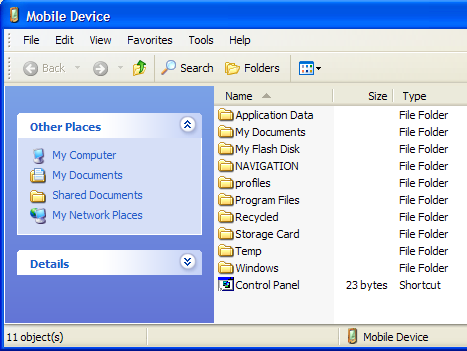
When opening the file system of the Advent, either via the Explore button on ActiveSync or via \My Computer\Mobile Device, then you see the root file structure thus:

Root files system of Advent GPS400

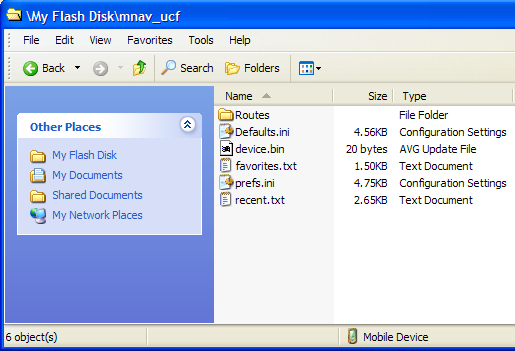
The folder My Flash Disk contains the navigation status, e.g. your saved routes and favourite landmarks.

Navigation files on Advent GPS400

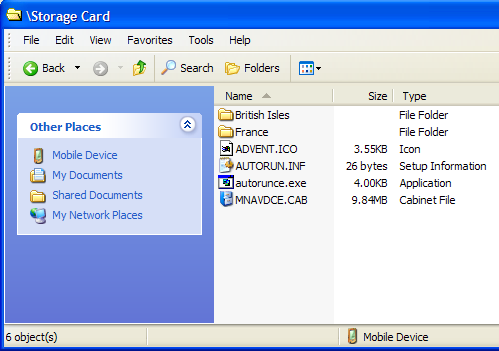
The folder Storage Card is a mount point for the plugin card and contains the loadable copy of the navigation software and your available maps.

Storage Card on Advent GPS400

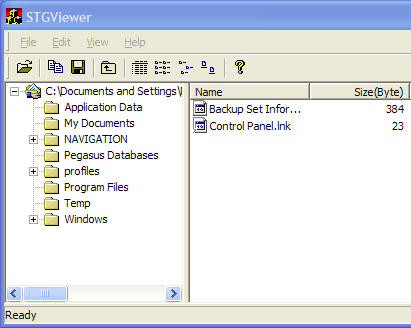
As I mentioned in an earlier post, the backup that ActiveSync makes goes to a file called backup.stg deep under your personal Documents and Settings folder. Using the STGviewer program you can open this and see what is backed up.

Backup files from Advent GPS400

As you can see, Storage Card is not backed up but we didn’t expect that. I have no idea what Pegasus Databases is. What is surprising (and annoying) is that My Flash Disk is not backed up either so it is no good for backup of these variable but important settings. I would suggest taking a copy using normal windows methods.

Initially the My Documents folder on the device is empty but this is where you need to put MP3 files for the built in player. As you can see, this folder IS backed up so the ActiveSync backup function does have some use. The Synchronise files function doesn’t; so, contrary to my earlier suggestion, you may as well leave it switched off.

Select the navigation catagory to find the earlier articles in this series. I think I have just about exhausted the subject for our purposes now, though I suspect that other software could be loaded and the device used as a proper PDA but we have no need for that.

TapGenpets

17:46 by Rick

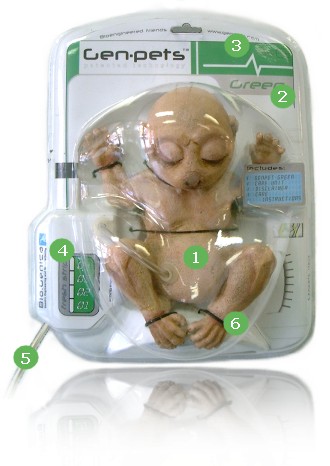
Genpet

Genpets are living, breathing mammals. Bio-Genica is a Bioengineering Company that has combined, and modified existing DNA to create the Genpets lineup. Genpets are flesh and blood just like any other animal.

Please tell me this is a joke—Please!

TapBigger Hair Day

27 Jun 2006 19:09 by Rick

Free bottle of larger after 5pm with your haircut

An advertising flyer through our door today.

TapNasty

26 Jun 2006 09:48 by Rick

Yesterday our district was leafleted by the Nazi Party. This is strange when we are stubbornly a Liberal/Conservative marginal; leaning more leftwards when the students are in residence. It all seems a bit of a wasted effort. It was also a surprise that these nutters still exist, it must have been one guy passing through. I won’t give them the honour of a link nor even identify them. Suffice to say that they thought Mosley was going soft (and it is not the BNP).

Heil!

^ Top