
Archive for the ‘Technical’ Category

TapAGP muddle

24 Jan 2007 12:36 by Rick

This discussion is about ordinary AGP graphics cards, it does not consider the latest, most powerful gaming cards available; these often have extra special requirements and connectors. I am also not considering PCI Express (PCIe) cards. Motherboards either accept AGP or PCIe, but rarely both.

Disregarding the “pro” types, there are three main types of AGP graphics standard: AGP 1.0 operating at 3.3v and supporting 1x and 2x speed; AGP 2.0 operating at 1.5v and supporting 1x, 2x and 4x speed; and AGP 3.0 operating at 0.8v and supporting 4x and 8x speed. Individual cards and motherboards can, however, support more than one standard.

Will it fit?

That depends on the slots in the card and keys in the socket on the motherboard. These are there for safety. In general, if a card fits then it will not damage either the graphics card or the motherboard. However I give no guarantees here, some cards and boards do not obey the rules, beware of no-name budget models. There are two slots and corresponding keys. The 3.3v slot is about a third of the way along from the back end of the connector, and the 1.5v slot is about 2/3 of the way along. There is no 0.8v slot, this is worked out automatically. If a socket has no keys (called “Universal”) then it should safely accept either. In the same way that if a card has both slots (also called “Universal”) then it should be safe in any socket.

Another practical consideration is the thickness of the card and its components. Some are so fat that they occupy all or part of the space that should be available for the adjacent PCI slot.

Will it work?

The fact that a card may fit and not damage either itself or the host does not mean that it will function. There are terms that are defined by the standards to describe them, but are often misused or ignored by the manufacturers.

Here is a simple table to try and determine if it will work. The first column shows the terms that should be used to describe the interface. The second column shows what the connector should look like so compare it with the actual devices (or pictures), The last column shows the available accelerator speeds. Manufacturers are better at giving these figures than any others. So long as it fits and there is overlap in both the operating voltage and the available speeds then the card should work in the slot.

Motherboard/Card Connector Available speeds
AGP 3.3V 3.3V key/slot 1x, 2x at 3.3V only
AGP 1.5V 1.5V key/slot 1x, 2x, 4x and 1.5V only
Universal AGP Universal 1x, 2x at 3.3V and 1x, 2x, 4x at 1.5V
AGP 3.0 1.5V key/slot 4x, 8x at 0.8V only (electronic detection to prevent 1.5V operation)
Universal 1.5V AGP 3.0 1.5V key/slot 1x, 2x, 4x at 1.5V and 4x, 8x at 0.8V
Universal AGP 3.0 Universal 1x, 2x at 3.3V, 1x, 2x, 4x at 1.5V and 4x, 8x at 0.8V

For example – I am trying to fit a Matrox P650 card to my machine which has a Gigabyte K7 Triton GA-7VKMP motherboard. The motherboard manual says that it has a AGP 4x slot. Looking at it, it has no keys in the socket so I am inclined to think it is “Universal AGP”. The graphics card is described as AGP 3.0 supporting 8x, 4x, 2x and 1x* operation. The picture of the card has a 1.5v slot. This doesn’t fit the specification for “AGP 3.0” as it supports 2x operation, it has only the one slot so it is not “Universal AGP 3.0” so it looks like it is actually “Universal 1.5v AGP 3.0”. The conclusion is that I expect it to work; at 1.5v 4x speed. There is footnote * by 1x in the Matrox specification but I can’t find the footnote.

Playtool have some good charts and a lot of detailed notes to fully explain the position and this quote resolved the bulk of questions immediately “nobody makes AGP 3.0 cards, and nobody makes AGP 3.0 motherboards …Every single video card I could find which claimed to be an AGP 3.0 card was actually a universal 1.5V AGP 3.0 card. And every motherboard which claimed to be an AGP 3.0 motherboard turned out to be a universal 1.5V AGP 3.0 motherboard.” Which simplifies the situation no end because it becomes true that “If an AGP card fits in an AGP slot then they are compatible”—a great reassurance. This link also conveniently lists most AGP cards and their true type.

TapDigital Dividend

22 Jan 2007 11:51 by Rick

A hot topic at the moment is Ofcom’s proposal to sell off the Analogue TV frequency bands, called the Digital Dividend. This is controversial, not only for those people who want to retain their old tellies bus also for the live entertainment industry. The reason for this is that digital TV requires less spectrum than analogue so they can free up some bands as the analogue is turned off. However, they currently share these bands with low bandwidth, low power uses such as radio microphones who slip into the gaps between TV transmissions.

How does this affect church systems?

The VHF Band III license exempt range 173.8 to 175.0 MHz is not affected at all. Although the band is coming into use for DAB radio, it misses our channels.

The UHF licence exempt Channel 70 (863.1 to 864.9 MHz) is also to remain unchanged under the proposals.

So no change then! But one other proposal will have an effect. It is proposed to change the currently licensed Channel 69 (854.1 to 861.9 MHz) to become license exempt. This could be good news for churches and other amateur use because those frequencies, which come on many systems but you are not supposed to use, suddenly become available.

As you might expect, professional users who have a considerable investment in licensed equipment are up in arms about this and other changes so I don’t expect the proposal to get through unaltered. Ofcom wants them to go digital at the same time but the technology is not up to it yet.

TapPhisher-Price “My first Web Fraud”

17 Jan 2007 10:48 by Rick

Thanks to Alan for the idea and Bruce for highlighting the story.

TapMonthly archives

12 Jan 2007 17:21 by Rick

What are they for? Little more than the ego of the blogger—Look how long I have been going and how much I have written!

I was looking for a way to reduce the space they used in the side bar until it occurred to me that they have no real function. Who is likely to want to know what I was writing about in July 2006? The only time I have ever used other people’s is to “get a feel for the style” of the blog and that can be better achieved by looking at the categories.

So they are gone! And while I was at it I removed some other cruft as well but also put the full sidebar onto the archive pages so that you can navigate anywhere from there. Much neater I think.

Footnote: I discovered a new word today thanks to Mik—Craplets. It is not quite the meaning intended but I think it sums up 90% of WordPress Plugins.

TapSearch me

11 Jan 2007 21:08 by Rick

I must apologise to the readers of my main West Penwith Resources site. It seems that since the 5th of January the search engine has not been working.

I have looked into it and what seems to have happened is that the hosting company have done an upgrade to PHP v5 and in the process they have overwritten one of my configuration files (/etc/php.ini). The ZOOM search engine requires more than the default 8MB of memory and it used to be set to 32MB. I don’t seem to have write access to it any more either so I have raised a call with support … … … … …

Users of the other search engine hosted here (for the COCP web site) are still working because that uses the CGI version of the engine.

TapSecurity alert

10 Jan 2007 10:59 by Rick

According to the news you can now sign up to receive security alerts from MI5 direct. I was going to write about this yesterday but I had no luck in finding it on their web site. Even the What’s New page doesn’t mention it—to save you the effort, the page is here (Contact Us) though I see that there is now (sometimes) a link under the What’s New paragraph on the front page (the secure and plain versions of the home page have different content).

Anyway, I am rather disappointed that they have only set this up using a communication system that is, itself, fundamentally insecure. By this I mean e-mail. It is not that there is any particularly sensitive information being sent, but that is not all security is about. Spoof e-mails are widespread and all sorts of fun and games could be had by issuing bogus MI5 alerts, even if they are not strictly on topic. There is widespread misunderstanding of what MI5 does anyway.

A much better system would be to use an RSS feed, especially as systems to use them are now widely available (IE7, Firefox, Thunderbird etc.) The thing that is lacking is public understanding of the system, but what a good opportunity for education; there is nothing better than a want-to-know to get people to learn.

[Update]
You can get a Firefox plugin that displays the threat level.
The implementation was a shambles. Although the form may be on a secure page (depending on how you get to it), the data is transmitted in plain text straight to a commercial direct mail organisation in the USA.

TapGamma Delta

9 Jan 2007 10:03 by Rick

When I made the rather flippant post last Friday about Mary’s screen being set too bright I hadn’t realised; firstly that the problem is widespread and secondly that it is harder to get right than I thought.

The problem seems to be that TFT flat panel screens have an inherently different response to colour signals than the older CRT screens. It also seems to be true that the default settings are set “too bright” by the manufacturers. I could even suggest that they do this deliberately so that you see the “nice bright colours” when you are shopping for a new monitor. I know TV makers used to do this as the brighter pictures sold more sets.

The adjustment that is needed is called the “Gamma Correction” together with the brightness and contrast. These can sometimes be adjusted on the monitor itself, on the graphics card or with an external program, though the latter often only compensates within the relevant application like Adobe Photoshop.

Gamma correction compensates for the fact that CRT screens respond non-linearly to the values of the (linear) RGB signals sent to them. If the screen is uncorrected the image overall looks dark with poor detail in the shadows but glistening bright spots on the highlights. This is because the screen brightness (approximately) follows an inverse power law, usually with a value of about 2.5. Brightness changes at the darker end make little difference on the screen but at the lighter parts of the image they have more effect giving the sparkly points. To compensate for this, graphics cards boost the low level signals and dampen the higher level signals using a reverse function. The default compensating value (the Gamma) on a PC (and the US NTSC television standard) is 2.2 and on a Mac it is 1.8. The debate about which is right has been endless and I won’t continue it here.

The different technology of the TFT LCD flat panel screens requires a different adjustment and my impression is that they over compensate causing the opposite effect—i.e. the overall image looks very bright but with poor detail in the highlights. This makes photographs and video look stunning, particularly the latter which were often filmed very dark for cinema blackout conditions. For many desktops and websites, like this one, you get a washed out look, partly because they were designed on and for CRT screens.

Making the adjustments takes some getting used to and some funny squinting faces but the best method that I have seen can be found on the Monitor calibration and Gamma assessment page by Photoscientia (towards the bottom of the page) First it is important that you install the correct and up to date drivers for both your graphics adaptor and screen model. It also helps to avoid confusion and complication if you set the screen itself to the manufacturers default, probably using the buttons on the front. Then the specially calibrated test images can be used and, by altering the settings for the graphics adaptor, produce the best effect across the range. It cannot be perfect for bright middle and dark images but a close approximation can be made. At first, at least, I suggest that you don’t adjust the colours separately but use the combined controls if they are available. Adjust for any apparent colour casts afterwards.

Personally I prefer the colour balance with the Gamma value set to 1.8. When adjusting my DELL 1707FP with an ATI RADEON X600SE graphics adaptor using the DVI-D port, I found that a compensating Gamma setting of 0.90 was a good compromise. The light image wanted nearer to 0.85, the mid one 0.95 and the Dark one was happy with the default 1.0. This was leaving the brightness and contrast on the defaults of 0 and 100 respectively. Note that different graphics adaptors may use other calibration scales and they don’t seem to mean very much. Just twiddle the knobs until it looks right.

Another useful test is the PDI Test Image (©Photodisc Inc.) which can be found at Northlight Images (it is the first image with the four faces at the bottom) . This is a high quality photograph containing a lot of different types of object: light, dark, metallic, skin tones, high and low contrast etc. This should be viewed so it fits your monitor full screen from top to bottom not zoomed to it’s natural resolution. I think that if you can pick out detail on the circuit board in shadow at the top left and the brightly lit valves on the right and the faces at the bottom look natural (particularly the second one is not washed out) then you have got it about right.

[added afterwards] I forgot to mention: now wind the brightness way down so it doesn’t light up the whole room and strain your eyes. About -40 was about right on my screen.

Many graphics cards allow you to have different settings for the desktop to those for video so you can adjust each to get the best performance. What is surprising is that though all these adjustments are provided by the manufacturers, so little information is provided on how to use them.

TapTyre tracks

3 Jan 2007 14:18 by Rick

I always wondered how the tyre pressure sensors worked on my Laguna. Now I know, I am not sure that I wanted to!

TapAkismet weakness

2 Jan 2007 13:24 by Rick

I took a bit of a break over Christmas and didn’t do much with the blog at all, in particular I took my eye off the spam queue maintained by the Akismet plugin. The baddies must have skipped all the parties because I find this morning that there are 2174 items in there waiting for my attention. Now I know that if I leave them for 15 days then they will be deleted automatically but I like to be sure there are no false positives. Unfortunately the page only displays the last 150 and there is only one button “Delete all” so there is no way to review them. I am sure I have seen someone else comment about this and perhaps a solution but I can’t find it now.

[added later – the latest version (1.2.1) improves things a bit. At least I can see the rest of them now, but it still needs a facility to delete them a page at a time. Anyway, I got bored so just killed the lot!]

TapVideo switcher

1 Jan 2007 15:21 by Rick

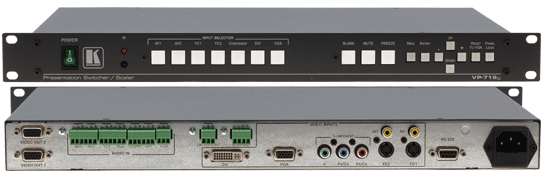
During the install of our projector system I have been very impressed with the Kramer products. The main component is the Switcher/Scaler which is the heart of the system and the general impression is that they do what they are supposed to do with no fuss and in exactly the way that you would expect. The VP719 is a 7 input, single VGA output device (inputs are VGA, DVI, 2 x composite, 2 x S-Video and component) and it seems to be able to cope with whatever you throw at it without a glitch.

Kramer VP-719xl

There are inevitably small faults where details off the main function could be thought out a bit better. This is clearly an installation device rather than portable/mobile and as such, some things should be hidden from the end user. In particular, the remote control is much too complex exposing controls that would be rarely required—a very prominent button changes the output resolution—something that is not required after install. If things like this are required on the remote then there should be an “advanced” panel with a cover. On the other hand, there is no “blank” button on the remote at all but there may be a programmable feature to enable this some other way.

In an installation like ours the actual device is hidden away in a rack so we use the computer serial connection with the GUI application to actually control it. This just duplicates the function and appearance of the remote but with the same problems; actually worse because it is a multi-device application for all models so there are lots of redundant controls. It needs to be customisable so that unwanted functions can be removed and, in particular, more meaningful labels put on the input selectors so that you don’t have to remember which device is plugged into which socket.

Another improvement would be a second VGA input. We have worked around the lack of this by using the DVI input for the main control computer but that was not ideal for other reasons and would not always be possible—for instance with two laptops. Perhaps we needed the 724 model but this is somewhat more expensive with a lot of unneeded features.

Now that it is installed the silly audio connections are not a problem but I don’t see why standard RCA (for the video channels) and mini jack (for the computer channels) were not used. XLR for the PA output would have been nice but I can see that there is a space limitation on a 1u box. Does anyone seriously use the 5 Watt audio amplifier built in?

Anyway, notwithstanding these little gripes, I thoroughly recommend this device for any simple church or conference room setup.

^ Top



