
Archive for the ‘Technical’ Category

TapSpeedo

5 Mar 2007 12:29 by Rick

The speedometers in cars are notoriously inaccurate. This is something we have always known but with the ubiquity of GPS devices with rather more accurate (if lumpy) speed measuring this has become much more obvious. They are always calibrated to read high so that the inaccuracy will never cause you to inadvertently exceed the speed limit.

This is annoying. Like most drivers with some experience I don’t read the speedometer very often but judge it mentally, only checking the dial when changing speeds (or spotting a camera, but that is another matter). However, even then, we are judging our speed by a previously learned experience based on an inaccurate instrument. It is really noticeable when stuck behind someone doing exactly what they think is the speed limit when you know that they could be going 5 or more mph faster.

The law says that speedometers should be between -0% to +10%(+4 km/h) accurate. As they cannot achieve the -0% by design, they always over read a bit. They work by counting revolutions of the wheels and I thought that part of the inaccuracy was due to tyre wear so I did some calculations. I have 195/65R15 tyres; these are nominally 25″ diameter, i.e. about 807 revolutions per mile. If we assume that a new tyre has about 3/8″ of tread and when worn it is reduced to 1/8″ that is 1/2″ loss on the diameter and now 823 revolutions per mile. This is enough to cause the meter to read 2% fast; certainly significant but not as much as the discrepancy that I observe (nearer 6%). Changing your tyre or wheel size or the differential can make even bigger changes if you don’t get the speedometer re-calibrated.

It ought to be possible to make speedometers more accurate. They could use GPS technology—by setting my handheld device to sample quite frequently it becomes relatively smooth and if this were further smoothed by software and translated to an analogue device it could make a good and accurate meter. Alternatively it should be possible to adapt optical mouse technology. These work on any suitable rough surface, the road would be ideal, and the only thing that would need to be changed would be the range up to about 400 mm to the underside of the car rather than 4mm to the mouse mat and this would probably need a more powerful laser. Pointing the device at the tyre would reduce this necessary range. (I thought of this independently but I see that halfbakery has a similar idea—which proves how daft it is)

P.S. The ACPO formula for determining speed violations is currently 10% +2mph. Police car speedometers are calibrated -5% to +0% (the other way around to ordinary ones) so that they don’t think you are going faster than you really are. Camera speed traps are triggered at an even higher point than this but not enough to compensate for thinking you were in a different speed zone. Those annoying electronic flashing “SLOW DOWN” notices seem to be randomly set and very inaccurate, often reporting about the car three or more in front of you. They have no weight in law.

A House of Lords reply indicated that speedometers are actually manufactured to a -0% to +5%(+10 km/h) tolerance which over-reads still more, not meeting the legal requirement until 120 km/h (about 70mph). In theory when you think you are doing 30 you could be only doing 24 mph though I don’t think many are that bad.
TapRandom

26 Feb 2007 12:53 by Rick

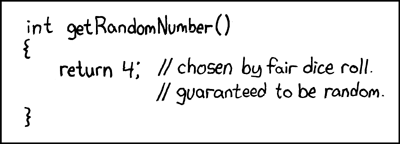
int getRandomNumber() { return 4; //chosen by fair dice roll. //guaranteed to be random. }

Thanks to XKCD

And a couple of classic random quotes

“Anyone who considers arithmetical methods of producing random digits is, of course, in a state of sin.” John von Neumann

“The generation of random numbers is too important to be left to chance.” Robert R. Coveyou

TapROFL

22 Feb 2007 08:50 by Rick

Sometimes you get a spam message that is so funny you can’t help laughing, mostly at their incompetence. Take this one which slipped through my filter; it looks like it is a multiple choice randomiser to generate basically the same message but each one with slightly different wording. At least, it would if it wasn’t for the fact that they have sent the source code not the generated text.

<“Hello”|”Hi”|”Hi there”|”Good day”>

I <“hope”|”sincerely hope”|”wish”> this message finds you in a great <“spirit”|”mood”>. <“For a start”|”First”|”First of all”> <“I would”|”I’d”> like to <“congratulate”|”welcome”> you on this <“offer”|”opportunity”> because our <“association”|”company”|”corporation”> just got your contact and your <“brief”|”short”> profile through an <“email”|”web”> listing affiliated with <“the UK Chamber of Commerce”|”Monster”|”Careerbuilder”|”Yahoo Jobs”|”Google Jobs”|”HotJobs”>
<“I would”|”I’d”> be <“very”|”extremely”|”highly”> interested in <“offering”|”giving”> you a <“work at home”|”great”|”flex-time”|”part-time”> <“job”|”career”> in which you <“could”|”can”|”would”> <“earn”|”get”> an extra income <“of about”|”nearly”|”up to”|”starting from”> J<“2000″|”3000″|”4000”> <“per month”|”monthly”>.

This work <“does not”|”doesn’t”|”will not”|”won’t”> affect your <“present”|”current”> <“job”|”career”> and this is a <“very “|””>limited offer in which I <“will”|”would”|”would really”> require your immediate response. I <“will be hoping”|”really hope”> to hear from you soon, since <“its”|”it’s”|”it is”|”this is”> a job that <“can”|”will”> enable you to <“work from home”|”work part-time”|”enjoy an easy work”|”work at home”>. You will also <“stand the chances”|”have a chance”|”be given the opportunity”> of being a part of our future and <“excellent”|”winning”|”our”> team in which <“you will”|”you’ll”> be highly <“appreciated”|”respected”>.
Please fill out our <“application”|”appointment”> form, <“no fees asked”|”no money upfront”>, just your <“name and a phone number”|”basic contact details”>:
[web address removed]

<“Your application”|”Your enquiry”> will be <“processed”|”answered”> <“as soon as possible”|”ASAP”>.

<“Thank you”|”Thanks”|”Have a nice day”|”Best wishes”|”Take care”|”Bye”>.

Soon afterwards I got the real thing!

TapVista Security

14 Feb 2007 12:56 by Rick

It has been asserted that “Vista is light years ahead” of Windows XP on security (sorry I can’t find the citation but it is quoted here).

Well we have a good test for that over the next few years. Let us see how many new vulnerabilities are detected in Windows XP and its accomplices which are not applicable to Vista.

TapPC Recycling

12 Feb 2007 22:16 by Rick

There comes a time in the life of every PC when it needs to move on, either to another user or, as far as you are concerned, to scrap. We have all heard the stories of personal data being extracted from disks sold on eBay or from salvage exported to Africa so how do we avoid that happening.

The obvious way, of course, is to remove the disk and smash it, but this is very wasteful of resources which may still have a useful life ahead. What we need is a way to erase the data for good but keep the equipment in a working state. The next stage down is to wipe the entire disk clean. This requires a standalone utility on a CDROM or Floppy disk to write random data repeatedly to every sector of the disk. The recommended program will do this but even this is over the top for most people. Not very helpful for the nephew to get a PC with no operating system. So what is a practical way? As I have been asked a couple of times recently to help I have devised the following straight forward method.

I recommend using a tool called Eraser from Heidi, it is free and not complicated, but before doing so you need to make sure that you have located all files that could contain sensitive information. This is what the following process tries to do.

It is for Windows XP only and assumes that it is still working reasonably well. It is not guaranteed but will make it a lot less likely that any useful private information could be found afterwards. For other systems I would suggest one of the other methods above. You need to follow the instructions in this order to avoid missing anything; there are a lot of steps, all are important but none are difficult.

  1. Transfer all the data off that you need later. This is definitely a one way process, there is no going back if you forget something. A good way to do it if you have the capability, is to write everything you want to keep onto CD-R disks. This also gives you a permanent backup of the transition should anything go wrong with your new one in the first few months.
  2. Uninstall as much software as possible, particularly licensed software that is NOT going to the new home. Most modern software doesn’t store data centrally but it is safer this way. Licensed software is generally for one machine only so if you are going to use it on your new machine, it must be taken off this one. Use the Control Panel, Add or Remove Programs to do this.
  3. Using the Control Panel, User Accounts program, create a brand new user account with administrator authority and no password—lets call it Admin.
  4. Download and install the Eraser program. Don’t run it or reboot yet.
  5. Right click “My Computer” and select Properties. On the System Restore tab, turn off System Restore on all drives. While you are there you could go to the Computer Name tab and remove your name from the description. Reboot when it asks you …
  6. … disconnect from the internet (remove the cable) and after the reboot, log in to the new Admin account you just created.
  7. Using the Control Panel, User Accounts program again, delete ALL the other accounts except Guest. When it asks, select to delete all their data as well. This will conveniently wipe out all data files in their “My Documents” folders but also other stuff that is hard to get at such as the browser cache, saved passwords, email account information, temporary work files etc.
  8. Check the “Shared” Documents” folder and delete anything you find in there.
  9. Using the Control Panel, Network Connections, delete any internet accounts contained there.
  10. Now go round looking for other scraps of user data and delete them. The C: drive root should only have “System” stuff on it. Anything other than “WINDOWS”, “Program Files” and “Documents and Settings” and a few ini such like files should be viewed with suspicion; empty the Temp folder. I can’t be very specific about this because some branded systems have other files and folders here and they are all different but especially delete any files you have created here.
  11. Close any applications running; there shouldn’t be many left anyway, but close the explorer and browser windows etc.
  12. Empty the Recycle Bin.
  13. Now you should have a system that looks much like the day it was delivered to you. It may even be tidier. You will probably find that it is running a lot quicker as well; did you really need a new one?
  14. If you are still with me then now is the time to run Eraser. Select Edit, Preferences, Erasing and on the Unused Disk Space tab, raise the level to option 3; 3 times erase. Unless you have military secrets on there (in which case, consult someone else) this will be quite sufficient. Now create a new task with File, New Task to erase all the local disks, set it running with Task, Run and stand back—for a few hours. Ignore the warning messages about full disks, these are transient.
  15. At the end you will get a long list of errors about Cluster tips. They are parts that could not be erased but I wouldn’t worry about them.
  16. Reset the System Restore that was taken off at the start and reboot.

That is now done; a washed, waxed and polished PC ready for a new user. For software that is moving on, such as Windows itself, remember to give them all the original disks, manuals and licence certificates that go with it.

Have I missed anything? Please let me know. Important new things discovered will be added below.

  • Re-installing Windows from scratch onto a freshly created and formatted partition is an even better method but it is very time consuming and beyond many people. Heidi’s Eraser provides an option to do this. There is nothing in my list that the average users can’t do which is why I suggest it.
  • Swap space—is this a serious threat? This is the space that Windows uses to store programs when they are not required in memory and can, potentially, get sensitive information, though it is frequently overwritten. If you are worried about this, turn off virtual memory. In My Computer right click Properties, Advanced tab, Performance Settings, Advanced tab, Virtual Memory, Change, set No Paging File before the reboot. Restore the value at the end of the process to make the system usable again.
  • Added (thanks to Mike)—If you have a recovery disk or partition as some branded PCs do then you can use this instead of step 2. Depending on how much this restores the PC to factory conditions it may be possible to omit some of the other steps as well but it can do no harm to check.

TapManaging comment spam

9 Feb 2007 20:44 by Rick

A while ago I mentioned that I had installed the Akismet spam blocker on this blog. I still think it does a wonderful job, but over Christmas another problem appeared. Akismet certainly traps all the spam still, over 2000 items in a few days when I wasn’t watching closely and then 2-300 per day since, but it parks it all in a holding queue. The default action is to hang onto it for 15 days then it drops off, lost forever. The idea is that it gives you time to spot any false positive identifications and retrieve them. In practice there is just so much of the unsavoury stuff that it was not possible to go through it—it is actually quite depressing trying.

As an improvement I have installed the Firefox Greasemonkey script called “Akismet Auntie spam for WordPress.” What this does is reduce each spam item to just two lines which contain the essential information—the name, email, URL, IP address and the beginning of the comment. This makes it much quicker to scan through and detect any possible mistakes, particularly reducing the huge link infested ones to a manageable size. Yet, with a few days away, even this was not enough and I had noticed that the comment URL on the blog was now the most referenced page on the web server and there was a risk that the web host may complain.

It was with great pleasure that I discovered the answer in the WordPress “Akismet Worst-offenders” plugin—this is sort of a plugin to a plugin, it provides additional admin functions. It is very much a work in progress but it does a great job. The first thing it does is to categorise spam into types based on things like IP address (where it came from) and URL (what it is advertising) and content (number of links). This allows you to delete stuff in related chunks rather than an all or nothing approach which is the default for Akismet. If you have 25 comments all from the same IP address in a very short period then you can reasonably assume they are rubbish and dump them. Using this it is possible to reduce the queue to a single page which it is not difficult to go through by hand.

A recently added feature, however, is even stronger. Having identified where the spam comes from it can add a “Deny” clauses to .htaccess, the file that controls the web server, so that addresses are completely blocked from your site. Now the rouges are completely locked out, the spam doesn’t even get as far as WordPress, and the load on the server and database is considerably reduced. The block list is continually reviewed so that only currently active spammers are blocked and, in case you were worried about potential readers being blocked from the site, however innocent they may be, the chances that the owner of an infected spambot actually wants to read your blog are immeasurably slim, unless of course you are on the A list.

Now the negative bit—the documentation is pretty poor. The guy is at the end of his doctorate so is rather busy at the moment, but I trust that things will improve. The basic function is easy to set up. Just download the file, rename it to .php, install it in the plugins directory and activate it. There is a configuration panel which can be left at the defaults and that is it.

The .htaccess bit is not descibed anywhere that I can find. What you need to do it download your existing .htaccess file and add the following lines to the end.

Order Allow,Deny
# BEGIN worst-offenders
# END worst-offenders
Allow from all

then upload it again. That will tell it where to insert the deny messages and then that just works as well.

TapThought experiment

7 Feb 2007 15:20 by Rick

In the discussions in the EU today, a limit of 130 g/km carbon dioxide emission is being suggested for cars. I was wondering exactly what that meant.

All carbon emitted by combustion must have gone in via the fuel tank, the oxygen came from the atmosphere. The other major emission, water, is the same—the hydrogen from the fuel and the oxygen from the air—but it is not regarded as a pollutant. Apart from some impurities there is no other input or output from an internal combustion engine.

30 MPG is a good yardstick for a petrol engined car’s performance. It is not a standard as some do very much better and others do a lot worse but it is a value that people understand. Converting to metric this comes out at 12.75km/l, or inverted as 78.4ml/km.

Petrol is made up of a mixture of hydrocarbons with a specific gravity between 0.6 and 0.8—let us say 0.7 for convenience. So we are using 55g of fuel per kilometre.

In the next part I am not so sure of the science but the atomic weight of carbon is 6 times that of hydrogen and hydrocarbons are composed of roughly 2 hydrogen atoms for each carbon. That suggests to me that by weight, petrol is 3/4 carbon and 1/4 hydrogen. Hence we are consuming about 41g of carbon per kilometre.

Oxygen has an atomic weight of 8 and they are 2:1 for carbon in CO2 so the total output is a nice round 150g of carbon dioxide per kilometre so it looks like we need to get nearer 35 MPG to meet the new standard. The calculation would be different for diesel partly due to the different composition and density of the fuel but also because some of the output is in the form of solid (particulate) carbon. I leave that as an exercise for the reader.

The important thing to realise is that size or car, size of engine, speed and fuzzy dice have nothing to do with it. The only thing important is fuel consumption. If your people tractor can do 150mph and still turn in 40MPG then fine … for the moment.

TapPrivacy, what privacy?

6 Feb 2007 09:20 by Rick

I always find it interesting how single minded the news reports can get when there is a big story about. At the moment one of the big stories is the outbreak of avian flu at the Bernard Matthews turkey farm in Suffolk. In a radio article it was reported that one of the workers (probably a Portuguese migrant) said how good the bio-security was “they even have cameras in the wash-rooms to make sure that you are cleaning up properly.” I am sure that if this was revealed in any other circumstances it would have been picked up and made a major story in its own right; would anyone, not desperate for a job at any price, tolerate this sort of intrusive surveillance?

TapSignature blocks

30 Jan 2007 12:52 by Rick

Signature blocks are the pieces of boilerplate text that are added to the end of every email that you send. Some are very small e.g. “cheers, Rick” and some, like corporate ones, are very big.

I consider it important that they contain a certain minimum of information; the reader needs to know who you are. First, for technical reasons, every signature block should begin with a line that contains two hyphens and a space "-- " at the start and nothing else. This is required by the email standard and allows client software to know when the content ends and the signature block starts. Many products take advantage of this and, for instance, display the signature in different colour.

The second essential item is your name. If you use multiple blocks and select each one according to the type of email, then this can be just your nickname or your full name and formal title according to circumstances, but if you use one block for everything then make sure that it is sufficient to pick you out from the crowd.

Include your email address. I know that there is a return address in the headers but in some circumstances, e.g. if the mail is forwarded, this can get stripped off.

Finally make sure that the block is appended to all mail—original notes, replies and forwards.

Putting large graphics and logos into signatures is considered bad form but other contact details can be very useful. I think I am unusual but I have always included my full address, telephone number, email address and web site URL in every email I send. There used to be a netiquette rule that 4 lines were the maximum but you can go over that if it is informative, just don’t overdo it.

The requirements for company emails are different and the (UK) regulations have just changed. You are now required to show the company name, registration number, place of registration and registered office address, also your VAT number if you have one. It is also recommended to include membership of any professional or trade association. Most companies are telling their employees to include this information on every email, internal or external, whether or not it is a formal communication, just in case they should be interpreted as such and leak to the outside.

On business emails there are often two other wordy blocks of legalese. The confidentially clause which tells you not to read the message if it wasn’t intended for you; a bit late that one as they are almost always after the content so you have just read it. Even so they are considered worthwhile as they should serve as a brake to forwarding them on to other people. If you really want to keep your messages confidential, encrypt them.

The other is the disclaimer clause which says that you can’t rely on or trust anything you have just read; This is a complete waste of time as you wouldn’t have sent if if you didn’t mean it (I hope). They are also legally ineffective. If you really want your messages to be validated, then digitally sign them.

TapHearing aid induction loops

29 Jan 2007 16:02 by Rick

Loop logoAn induction loop is a system that allows hearing aid users to receive a signal directly from microphones placed close to the users rather than rely on transmitted sound. It is of considerable benefit to them because it separates out just the sound required and removes other distracting noises and reverberation.



The building regulations (1992) require that new buildings open to the public and ones that are substantially reconstructed are fitted with systems for ticket booths and auditoriums over 100 sq m. Systems must meet BS8300:2002, BS7594:1993 and EN60118-4.

The Disability Discrimination Acts (1995 & 1999) may extend this to existing premises if it is otherwise unreasonably difficult for disabled people to use the facilities. An installed loop must be properly maintained and staff must know how to use it. I have been told that some of these regulations are retrospective and older systems may no longer conform but, apart from this maintenance requirement, I can’t find any evidence for this.

The specification for an induction loop system requires a current drive amplifier (a normal PA amplifier is voltage driven) with a single turn loop and account should be taken of losses caused by building metalwork such as girders and reinforced concrete. The input to the system can be dedicated microphones or from an existing sound system.

Ampetronic, a leading manufacturer in the field, say that the type of wire is not too important so long as it appropriately sized to give a total resistance in the range required by the amplifier. The normal arrangement is for it to run around the listening area. They also say that it should not be at head height, though I haven’t discovered why, but floor level (or ceiling if it is not too high) is more normal.

The recommended field strength is 0.1 A/m for an average level speech signal with peaks at four times that value which allow for some dynamics. Larger variations are flattened out using a compressor built into the amplifier. For a single turn loop, and bypassing all the complex equations and caveats, the peak current can be simplified to approximately 4a/9 where “a” is the length of the shortest side in metres. From this you can calculate the wire gauge and the amplifier power required.

Once installed, the easiest way to measure the field is with a pink noise generator amplified to normal listening levels (though you may want to turn off the loudspeaker amplifier) and measure the field strength with a meter in different places. With a listening device you can also test the tone over the coverage area. The frequency response is required to be flat (+/- 3dB) between 100Hz and 5kHz with an upper response limited to 16kHz. High frequency losses are caused by building metalwork and compensatory EQ (and additional current) will be needed to correct for this. You may need professional advice for particularly large, oddly shaped or difficult buildings.

^ Top

