Archive for the ‘Technical’ Category

TapComputing by ear

19 Mar 2006 14:53 by Rick

I feel that this is an art that is rapidly disappearing.

In the old days (excuse me while I fetch my pipe and slippers) we could tell what a system or program was doing by watching Das Blinkenlights. You got to recognise certain patterns and, when the printer started, whether it was results or errors by the sound. Kind programmers deliberately created certain patterns to reassure the operators and other patterns to warn of errors or actions needed to be done, like loading a new tape. I can recall one programmer who used the speed of the hammers on a line printer to create tunes. I think it was the same chap who caused the twin round screens on the Cyber 74 to wink

Later when disk drives came along, you could tell what was running and if it was happy by listening to the head movement. I surprised myself yesterday by using the same technique to find bad spots on Mary’s laptop. Just by listening you could tell the head was repeatedly seeking and a chkdsk was needed. I wonder how long we will be able to do that as drives get quieter (and my hearing goes)?

TapThe Slug (Linksys NSLU2)

11 Mar 2006 18:24 by Rick

I understand that this brilliant little device has been around for a while but it took me by surprise.

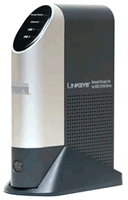
Linksys NSLU2

The spec says that it can add one or two USB2 hard drives to your network accessible from any PC as shared partitions. That is certainly true and it works very well. What is not obvious is the potential of this device; It runs a native copy of Linux from its flash drive and uses Samba to share the drives with Windows. Nicknamed the Slug, quite a lot of people have picked up on it and there is a thriving community of hackers who are turning this cheap little box into all sorts of other things e.g. Web servers, mail servers, media servers, router firewalls, home automation – anything you can do with a decent operating system and a couple of USB ports (or a few other things if you get inside.)

The thing that staggered me when I opened the box was it’s size. How big do you think it is from the picture. I was expecting a mini tower, perhaps the size of a hard back book. The box was smaller than that and when I opened it, the device was the size of the palm of my hand. The slug foot thing is only there to stop it falling over from the weight of the cables.

I have only hit a few snags when installing it and none are problems with the device itself.

  • 10baseT is just not fast enough to drive this thing sensibly, I will have to upgrade my switch.
  • I need some decent backup management software; any suggestions? The device comes with some scheduled job options onboard but I need one driven from the client.
  • Windows Explorer has a problem copying large files nested deeply in folders across the network. It grinds really slowly and watching the lights shows that it goes for long periods doing nothing.

TapEmail Charging Revisited

17:57 by Rick

Prompted by giafly’s comment on my earlier post, which pointed out that AOL had corrected/clarified/backtracked on their earlier statement, I have been taking another look at the issue.

There is a lot of comment around both for and against and, having sifted out the many trolls and flames, there is not much intelligent thinking around that I can see. What I have learned is that the principle of bulk email certification, for that is what this is, is not new. The major difference which has got people all heated is that the model is to charge per item rather than a flat fee. The remainder of the story only concerns AOL customers; that is that suitably certified mail, by a variety of agencies, will be presented as such in their inboxes. That is of no concern to the rest of us. The spectre that this heralds some sort of precedent for all mail, or that uncertified mail will become any less reliable than it is already, perhaps due to neglect of the spam filters, is just not plausible. AOL will continue to serve their customers in the best way that they can because their business depends on it.

TapRat Runs

9 Mar 2006 08:25 by Rick

There was an article on the local news recently about the residents of Barrow Gurney complaining that sat. nav. users were using their village as a short cut to Bristol Airport to avoid the traffic on the A38. Well they are right, but it is not the GPSr users; the Airport Taxis have been using the route for years and have taught the rest of us. The devices are just not clever enough to have picked that way over an obviously more direct route even if it is always busy (with the possible exception of those with congestion avoidance systems and I don’t think there are enough to make that much difference.)

The navigators do need to get better though. I have commented before about some of the silly roads that they sometimes choose based on a line on the map regardless of true conditions to be found there.

TapThunderbird are go (just)

25 Feb 2006 16:51 by Rick

I have been meaning to change over from Outlook to Thunderbird email client for a while; mainly because I gave away my copy of Outlook to someone who needed it and I really ought to stop using it myself, but also because I have been inflicting Thunderbird on other people and ought to know a bit more about it.

My initial impressions are mixed; for a basic user it looks great, certainly a lot better than my last experience of Outlook Express (v5). It has all the things that you need and some more if you want to stretch out. For a user like me, who has been on Outlook for some years (even an old version) and has a complex and large email requirement, then it does seem to be lacking in some areas. Perhaps it is just because it is different and will take some getting used to, but I certainly don’t think that it quite lives up to some of the reviews that claim that it is fully featured. Perhaps if anyone knows a solution to any of these problems they could let me know, I wouldn’t be surprised if I just haven’t discovered how to configure it correctly. I have left out the weaknesses that I know to be fixed by extensions.

  • The structure of the mail files is good. Much better in a (standard) flat file format, one per mail folder (rather like OE) than a proprietary database like PST. However I am having trouble managing these folders: you get the choice, for each account, of creating a new top level structure, merging with an existing one or using the Global Inbox in “Local Folders.” There doesn’t seem to be a way of creating a new top level structure independent of the accounts. This may be possible by creating dummy accounts, but is a bit of a hack.
  • Also I can’t find any way to place these structures in a disk location of choice. I want to do this for two reasons—to get data for long term storage off my C: (software) drive and onto my data drive and also to segregate mail by project (which doesn’t match accounts) and to store that mail with the rest of the project data. This is said to be possible by setting the Local Directory for each account but I can’t find it.
  • I have imported all my live mail from Outlook which works ok but with some limitations. All the “follow-up flags” are lost even though both systems have the concept, and all mail comes in “Unread.” Having done this and marked Thunderbird as my default mail client, it doesn’t want to know any more. I can’t find any way to import my archives from detached Outlook mail files.
  • The spell check dictionary is not installed by default – I expected that downloading the British version of the client would have the British dictionary pre-installed. Although it installs like an extension, it has to be done from a login account with admin authority.

On the positive side, the real-time spell checker is great, the integrated spam filter, image and HTML controls and threaded views are good, though I understand they are in the latest version of Outlook too. I’ve not tried the RSS and News readers, multiple Address Books and Message Templates, but they look promising.

Some minor UI weaknesses which annoy more than break the application—

  • The Previous and Next button arrows go left and right but the mail is organised in a vertical list and so should be up and down.
  • There is no button to Resend a mail, you have to use the obscure “Edit as New” function which doesn’t have a button. Even after scouring all the extensions there are still some buttons I would like e.g. print preview.
  • Dragging mail folders around seems to create copies rather than move them. Sometimes using the standard “hold down the shift key” overrides this but not always (I think it fails when moving between top level structures.) Moved folders show as empty until selected.
  • The “Importance” flags don’t exist, but there is an Important Label which is not compatible. The “Follow-up” flags are limited to on or off – there is no “complete” option nor is any target date possible (perhaps because the calendar feature is not integrated as standard).
  • There are a number of different dates which you may want to use to manage mail—Date sent (I think this is the one that is displayed), Date downloaded and also Date received at server would be useful. A problem with using the Date sent is that it can be accidentally or deliberately wrong putting mail in unexpected positions in the list.
  • I don’t really need Drafts, Templates, Deleted and Sent folders cluttering up every top level folder but I don’t seem to be able to delete them.
  • If you switch on View Full Headers, there is no scroll bar and, if there are a lot, then the message itself drops right off the bottom to become inaccessible. This looks like a bug.
  • The mail item window has the subject too small and hidden away. I expect that it is changeable by an obscure option.
  • The address book is a bit limited. It has only provision for two email addresses per person. It could integrate with the main client more closely such as an optional search on the main toolbar and facilities to easily transfer addresses to new mail items made easier. I haven’t found the file yet so don’t know if it is possible to process it using other applications.
  • When reading a lot of mail at the start of the day, the junk mail occasionally gets flagged but not moved to the Junk folder. This has apparently been a known bug for some time. I think it is something to do with checking all accounts concurrently.
  • As it is using the same spell checker as Firefox (SpellBound extension) and OpenOffice.org it would be good if they used the same additional dictionary so I don’t have to teach all three separately about my unusual words.

TapVerified email, at a cost

7 Feb 2006 12:14 by Rick

You may have seen the announcement the other day that AOL and Yahoo have a wizard wheeze for solving the spam problem. They will charge non-spamming bulk email senders a fraction of a penny per email to guarantee delivery. dg [link edited 21 Feb] has a good commentary on this pointing out that it would mean the end of email as we know it and seems to be more of a revenue generator than a service for customers.

The catch is that, other than these premium emails, everything else will go into the junk box unless it is from known correspondents. So don’t expect to get mail from someone that you haven’t pre-authorised, such as long lost cousin Gertie or the confirmation that the widget that you just bought is on its way.

TapFavourite Firefox Extensions (3)

3 Feb 2006 10:30 by Rick

This week—LinkToolbar

It allows you to add new toolbar icons which make navigation easier. Users of the full Mozilla suite will be familiar with it as a similar feature is integrated. First it looks for specially inserted HTML elements <link … > which define things like Next, Previous, First, Last and Top. If these are not found (and they are not common) then it gets clever and searches the body of the page for similar sounding manual links. Finally it interprets Up as up one level in the web server directory hierarchy and Top to mean just the domain root. You can put the neat little arrow buttons in any available toolbar space.

Finding this is a bit tricky as maintenance is sporadic. The official web site has version 1.1.0.1 which is suitable for Firefox 1.0.* It was patched for Firefox 1.5 but this copy (1.1.99) can only be found via the bug report. When Firefox 1.5.0.1 came out I couldn’t find a copy at all so I have hacked my own v1.1.99.1 (click to install, right click to download). There is no functional change, I have just changed the maximum permitted version, but it seems to work ok. There is reputed to be a version 1.2 coming out some time but the site has been very inactive.

TapAdvent GPS 400

1 Feb 2006 15:42 by Rick

There is virtually no information about this device anywhere. I’m sure that there was a promise of a support web site when I bought it, but there is no sign of anything. The Dixons group (Dixons, PC World and Currys) are the only retailers in the UK and they know nothing about them nor do their parts/accessories agency, Partmaster. There is not much about this device on the various GPS forums yet either.

The Advent GPS 400 is made by Medion as the, now discontinued, PNA 400 re-badged. Their web shop has some accessories including the external antenna and a Traffic Message receiver which I presume work OK with this model.

The box says it uses Navteq software but in fact the software is Navigon 5 (I think v5.1) but with a few modifications, mostly cosmetic; the maps are by Navteq. The only features that I can see are missing are the on-screen qwerty keyboard, signpost information, the info bar and speed limit display and some that would only apply to a PDA device. There is an upgrade to v5.2 on the Navigon download site but I don’t know if it would work with this device. Similarly they have maps available (at a price), including North America, and I imagine these would work with the device. Navteq only sell maps direct for manufacturer’s in-car systems.

Performance

This is not a comparison with other devices, only having used a hand held GPSr before. Some of the faults may be unique but others may be common to all such systems.

  • The physical device seems to have been designed for a left-hander. The battery bulge/hand grip is on the right and the stylus withdraws from the back left. If you use it the natural way around your index finger tends to switch the screen off or eject the memory card.
  • There is very little in the documentation about the external buttons. Some of the functions are obvious but others are not. The sockets for headphones and external power are close together and very similar, fortunately the plugs don’t engage in the wrong socket. A full set of connecting cables, a windscreen mount and a carry case are provided.
  • Getting started proved very easy following the large format idiot’s guide enclosed.
  • Entering destinations is pretty straight forward so long as you know the full address. It only accepts partial post codes and if this covers more than one village or district then you need to select one before going on to enter the street. In some cases the best bet is to get close and then use the map.
  • When navigating, the directions given are clear and there is plenty of volume from a voice we have dubbed “Sat. Nav. Lady.” Perhaps she says “Please” a little too often but otherwise there are few problems. There is no choice of voice but the volume is adjustable. The use of the phrase “Bear left/right” is sometimes ambiguous meaning either to turn off or just a bend in the road. I think that this is because the system has no concept of priority at road junctions. The A4137 junction with the A48 on route from Hereford to Monmouth was not announced at all.
  • It is very good and quick at recalculating routes if you make a mistake, or deliberately overrule the instructions, and she doesn’t complain either <g>
  • There is a tendency on twisty roads for the apparent position to wander off the road. This can lead to delayed or completely incorrect instructions; in the worst case to “Make a U turn when possible.” I am hoping that this is down to the poor reception behind our metallised windscreen and an external aerial will solve it.
  • The currency of the (UK) map varies. Some very new features are there but some older ones are not. A few junctions are missing altogether (e.g. Sussex Place junction in St. Paul’s, Bristol) and it doesn’t acknowledge mini roundabouts at all. The weakest aspect of the maps is the POI (Points of Interest) data. Many of the petrol stations and garages are incorrect; either missing (from the map), wrong or closed.
  • There doesn’t seem to be any recognition of the quality of roads beyond their classification and sometimes speed limit. Examples are: the A5 between Llangollen and Bangor is very twisty, narrow and slow despite its trunk designation. It is preferred over the A55 Expressway on a journey from Shrewsbury to Holyhead. It also likes the A466 Wye valley road. All routes from our house in Redland to the M32 seem to use Brookfield Lane, a very minor residential road which I wouldn’t dream of taking a car down unless I had to, and then turn right onto the busy A38!
  • Possibly for the same reason, the ETAs given are rather optimistic. It expects you to be able to achieve the designated speed limit at all times and no allowance is made for negotiating junctions. Some adjustment seems to be made for built up areas and the target speed reduced to 20 or 25mph but even that is not enough with modern traffic. I would allow at least 10% extra time for any journey and more if the traffic was likely to be busy.
  • It thinks that the quickest route from Bristol to Bromley is via Central London, ignoring both the M25 and the South Circular. As this was our first use of the device ,we chickened out and don’t know exactly which route it was planning to use. I thought that we had said avoid tolls and expected it to not go into the Congestion Zone but we may have got it wrong. Similarly it has no qualms about taking us over the Severn Bridges in either direction.
  • It comes with the UK maps preloaded and street level maps for the rest of Europe on CD. Together with the large 512MB removable memory card this gives it more potential than many devices on the market. It also runs one of the PDA versions of Windows and a copy of ActiveSync is provided giving the potential to run other software. It comes with an MP3 player which we are not particularly interested in but it may have an afterlife as a picture viewer when the navigation features cease to be useful.

Conclusion

Despite some of the rather negative comments we rather like the device. It is easy to use and very good for travelling to places which you don’t know, just that you can usually do better if you do know the roads, however the difference is rarely more than a few minutes.

TapHandy tips for Laguna owners (3)

27 Jan 2006 14:09 by Rick

Don’t lose your key cards!

  • 8. If you lose a card, in order to replace it you will need your registration document and driving licence or other form of identification. There will be at least a 10 day wait while the key blade arrives from France. You will also need around ½hr. workshop time to code the electronics to match the car (this can be done while waiting for the blade).
  • 9. If you lose both cards you will also need a tow truck or a very good car thief. You can’t get in the doors, disengage the immobiliser or the steering lock. On newer models you may have trouble with the alarm and anti-jack system as well.

The main agents have an absolute monopoly on this work as only they get the tools and training to recode the keys.

TapGoogle Talk <–> Jabber.org

18 Jan 2006 18:27 by Rick

You can now Instant Message (IM) me on my Jabber.org account rick.parsons@jabber.org from the Google Talk service.

The Google service has been running for some time and uses the same XMPP protocol, but would only communicate with other Talk users, but now they have federated with any Jabber server so can accept interconnections.

Similarly vice-versa, users of Exodus, PSI and other Jabber clients can now message people on Google Talk.

Not voice though; that is an extension built by Google which hasn’t made the standard yet, nor any of the other clients.

^ Top




