
TapRepairing a Renault Laguna Card Key

6 Apr 2007 17:58 by Rick

A common fault with these keys is that one of the buttons stops working. You can tell when this is a fault with the key rather than the car because the led stops flashing. If both buttons have failed then first try the obvious and test the battery and make sure the contacts are clean. If so then you need to resort to one of two drastic solutions; buy another one (about £130) or repair it.
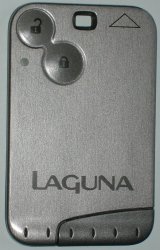
The key before hacking it

This is the type of key we are talking about, it is the type with two buttons and the safety slot in the end, not the proximity type. There may be other models that use a similar key, I have seen one with three buttons for instance, but I don’t know if they have the same weakness. The fault with these keys is that they use surface mount micro-switches and the “lock” one seems to be on a vulnerable part of the board which perhaps flexes and it drops off. Often you can hear it rattling loose inside.

The tools you will need are a good strong Stanley knife, a soldering iron with a very small tip (1mm or less), some long or curved-nose pliers, a strong magnifier and some super-glue.

The first task is to get inside. These are not clip-together cases, they are glued all round and on some internal ribs as well. On the photograph of my one below (click for a larger image without my annotations), I have marked the glue lines in red. The blue dots are unglued guide posts. With a strong Stanley knife and starting at the point marked “A” you can carefully cut along the edge, try to cut if you can as it doesn’t split very well—and watch your hands as the blade is liable to slip. When you reach the first bend “B” go back and do the first internal rib, then you can move round peering in the crack to see what to cut next. Be careful not to damage the components or the circuit board. A close inspection of the pictures shows the things to avoid, it is really a matter of patience, care and brute force.
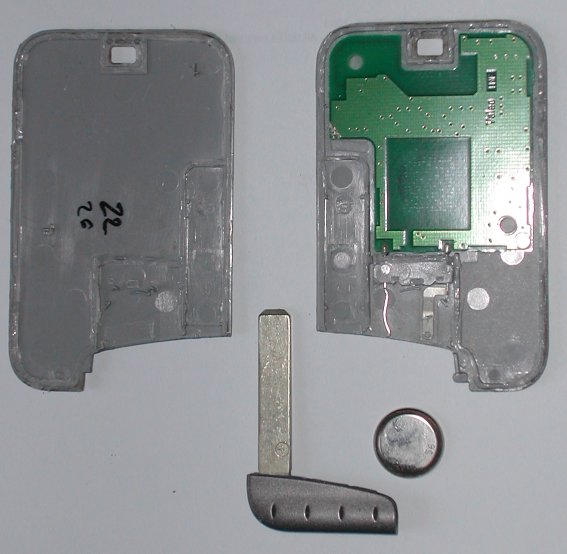
After removing the back

As you can see, mine opened upside down, so the next step is to cut under the battery clip to separate the circuit from the case; I used a small kitchen knife to get in there.
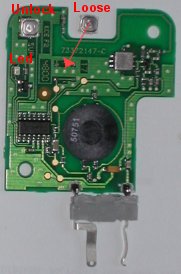
The circuit board exposed

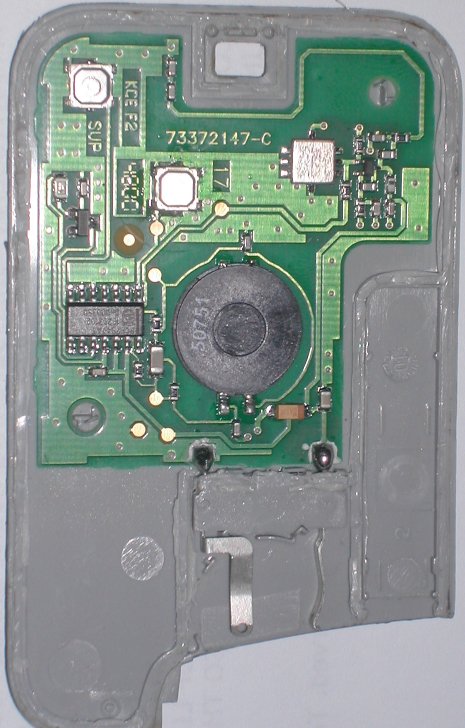
So you should now have all the parts laid out including a loose button switch. This switch has a contact on each corner, two fold-under lugs to hold it together and two other lugs to help it stick to the board (ha! ha!). Sorry, the resolution of our camera is not good enough to see this detail. Near the centre of the circuit board you have a corresponding space with two pads on the earth plane at the top (arrowed blue), two on a track leading to the IC at the bottom (arrowed black) and two isolated holding pads (arrowed red). The orientation of the switch is important, the wrap around lugs MUST be to the sides.
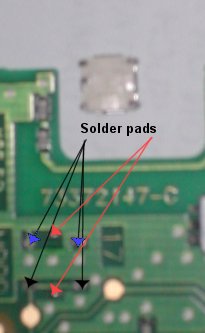
A close up of the problem

With your fine tip soldering iron, clear up and tin all the contacts on the switch. Similarly clean the circuit board pads. You are well away from any delicate components here so there is not a lot of risk. Make a small solder bead on each pad. When I say small I mean small; I used a jewellers eyepiece to see what I was doing, scary with a hot soldering iron inches from my face.

Now lay the switch on top and test that it works by holding the battery in, and pressing the button. If you get the switch the wrong way around, the light will be on without pressing the button. Satisfied that it works you can solder the switch into place—holding the switch down with long pliers, touch the soldering iron to each corner and the top/bottom edges to get the solder to bridge the gap in six places. You may need to go round more than once as the component beds down to the surface. Test it again. As a final touch, I dribbled a bit of super-glue under the switch as an attempt to hold it more securely.
Putting it back together

Now clean up the plastic parts with a knife, removing all loose bits and get the halves to mate together tightly without the circuit. You will also need to clean up the plastic part of the battery clip. Lay the circuit into the back cover, there should be two positioning pegs to hold it in place. Apply a drop of glue to the battery clip to secure it and leave it for a few moments to set. Finally run a bead of glue around the outside edges and the main internal rib, bring the parts together and clamp (clothes pegs) or weight it until it sets. How many of the original lines you do depends on if you are likely to want to undo it again but I would suggest omitting the front of the battery clip.

For the technical, the numbers on the components are: the big round piece (transmitter coil?) is 50751, the DIL package (encoder?) is Phillips PCF7947AT with other numbers 16793102 and DnD00350. The small silvery unit (oscillator crystal?) has EPC05, R727 and M5MN. A Google search didn’t turn up much.

TapHandy tips for Laguna owners (4)

5 Apr 2007 09:18 by Rick

I have been surprised how popular this series has been with readers, attracting many more comments than most. I should point out that I am no expert in this subject, just passing on things that I have discovered either by personal experience, research, investigation or plain logic. To that end I can recommend the prolific RenaultForums which has a much larger group of contributors, some of them quite knowledgeable.

It is from reading many posts on there that I have extracted the following useful tips.

  • The anti-hijack lock. This is the system which locks all the doors (from the outside) as soon as the car exceeds 6 mph. When delivered new, it is switched off. To enable/disable it, with the ignition on (card key fully inserted) press and hold the central locking button on the console until it goes “beep”.
  • Fuses. Having lost my handbook, I am still trying to trace what fuses do what. There are three locations for fuses that I have found, the one by the driver’s knee, one by the battery under the bonnet and one in a very strange place. If you pull out the ashtray (grab it firmly by the sides and pull straight out) then below it is the socket for the engine diagnostic system and a single fuse. This may be for the radio or possibly the cigarette lighter.
  • Tyre pressure sensors. This is a hot topic for discussion but a few snippets emerge.
    • The valves which contain the sensors are quite fragile so care needs to be taken when changing tyres.
    • The metal valve caps corrode and stick on and can cause the valve stems to break when trying to remove them. Many correspondents recommend changing them for plastic ones as soon as possible.
    • The valves are colour coded and a matching code chart can be found on the edge of the driver’s door below the lock. Make sure that the right valve/wheel is on the right corner of the car else the system will get confused.
    • If you get the sensors come on for no apparent reason then try over inflating the tyres by 5-10 psi and then reducing back to the correct pressure to unstick them.
    • If you have to get any new valves then the car computer needs to be programmed to accept the new codes—this seems to require a Renault agent.

As soon as I find some time to repair my bad card key I will post about that and other key related things.

TapSpeechles’s

3 Apr 2007 08:42 by Rick

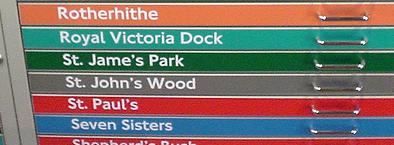
London Transport Shop display

Thanks to DG for spotting this. There are two ways it could be spelt, opinions vary, but this is not one of them. (for that matter, there are two ways “spelt” can be spelled as well.)

TapRenault Laguna – maintenance warning

2 Apr 2007 19:14 by Rick

Thanks to Andy who commented on my first Laguna posting, I now know how to reset the flashing spanner on the dashboard that tells me that it is time for a service. This is set to come up every 18,000 miles and some independent mechanics don’t know how to reset it.

With the key in the ignition (it doesn’t matter if the engine is running) press the button on the end of the stick to scroll through the trip computer settings. The one you want should have a static spanner and the number zero and is the seventh (and last) one from the start.

Now press the reset button on the dashboard and hold it in. After a few seconds it will flash and then reset to 18,000.

This is correct at least for my 2001 model.

TapWeird Wi-Fi

1 Apr 2007 07:46 by Rick

This is an odd problem which is complicated in explanation but ought to be simple to fix; except I can’t!

Our network is straight forward except that it has been put together over a long period so all the components are separate.

  • Cable Modem
  • Router (Linux Router Project now called LEAF) running a firewall, DHCP and DNScache
  • Switch (Netgear GS608) replaced an old hub
  • Wireless Access Point (Netgear WG602v3) replaced a dead Belkin

I have known for sometime that there was something up with the wireless as, although our laptop worked fine, no one else could ever connect. Our machine was using an early 802.11b PCMCIA card (Belkin F5D6020) which came with its own custom drivers, not using the XP stuff at all. We set this up with WEP 128 bit encryption and stealth SSID but no MAC filtering and everything was fine. It connected first time, every time though reception was a bit poor two floors down. When I changed the AP because the old one stopped transmitting it was still fine (and the reception was better).

Everyone else who tried to connect with more modern stuff seemed to connect ok but they would never get an I/P address from DHCP. Fixing the I/P address to one outside the DHCP range achieved a connection but still nothing went through. I can’t remember it it ever worked with the Belkin AP.

We have just replaced the laptop so had to fix it so I have been through all the configuration with a fine toothed comb and upgraded all the firmware to the latest version. What I really needed was a sniffer on the Ethernet but couldn’t figure out how to do it. I first suspected the obvious, that we had MAC filtering on without realising it but no. Then I thought about how switches work and convinced myself that you couldn’t put an AP on a switch (rubbish of course). Then I discovered.

  • it never worked with WEP.
  • it worked just fine without any encryption, though I didn’t test it for long as this makes me nervous.
  • with WPA it works but sometimes you have to reconnect it a few times to persuade it.

It rarely works right the first time, sometimes you don’t get an I/P address, sometimes you do but no communication, sometimes just a few packets get through. Disconnecting and reconnecting once, or sometimes twice, fixes it. Once you get a decent amount of traffic through it doesn’t give any problems and we do now have higher speed and better security. I have switched off the stealth SSID because it seems a bit better that way and makes it much easier to reconnect.

Now we will see if we can live with it like that. If not I may scrap the lot, replace it with an integrated Wireless Router Switch and cut down the clutter, but it irritates me that I can’t solve it.

TapBritish Dictionary for Firefox

30 Mar 2007 08:18 by Rick

I know that the Add-ons for Firefox are created by volunteers but the organisation does itself no favours by allowing a fundamental extension go out of date. In most cases there is nothing wrong with the extension, just that the install package is out of date specifying a maximum version older than the current one. This has happened with the British English Dictionary so I have made available a hacked copy here.

Update: 10 Aug 2009: British English Dictionary 1.19.99.1 Now supports Firefox 3.5+

Update: 24 Feb 2010: British English Dictionary 1.19.99.2 Now supports Thunderbird 3.0+.

TapIdentity credentials

29 Mar 2007 12:42 by Rick

There are three well known factors than can be used to establish a personal identity (this word is used here as a relative not an absolute i.e. who you are with respect to the service you wish to obtain).

  • Something you Know—such as a password or anything else not easily guessed.
  • Something you Have—such as a swipe card or warrant.
  • Something you Are—such as a fingerprint or other metric that is an integral part of the body.

Using all three of these becomes “three factor authentication” the holy grail of identity management.

The caveat of “relative identity” is important because people hold a number of separate identities at different times and places. For example at one moment you may be “mummy” and at another, “teacher.” In the shop you would be “customer” and at work “employee.” It is important to note that these are truly independent and don’t need to relate to each other in any way nor require the same degree of authentication.

In many cases reputation plays a key role. If you are behind the counter and the sign over the shop says “Jones—Butcher” then it matters not at all if your name is really Jones, but if you serve good meat then customers will come back with confidence. If someone else takes your place they will be less sure. Similarly if next day you are in the Bakery, then you will need to establish your reputation again before they will trust your bread.

Each of the first two factors have serious weaknesses when used on their own. Passwords can be forgotten, disclosed or compromised requiring an elaborate secondary mechanism for resetting them; cards can be lost, stolen or forged. Used together they are quite effective and form the mechanism of many well known authentication systems—ATM, chip and pin, Secure-id tokens and the better door entry swipe cards for example.

In theory the third, the “Are,” has the potential to be both an absolute (unique in the population) and sufficient (for the same reason) but in practice obtaining and validating such a metric is often beyond the capability of the systems available. Thumb prints have been used for login to a lap-top or starting a car for instance, but the experiments with facial recognition have been a disaster.

The factors are only valid if they are kept completely independent of each other. It becomes meaningless if you tattoo your password on your hand or store your finger-print on your passport but an exceptions are made, e.g. a photograph (a weak “Are” factor) on an employee id card ties the card to the person before using it to gain entry. This guards against loss or theft (to some extent) but not forgery; for that you need to ensure the uniqueness of the document. At validation this would mean comparing a master copy with the one presented, a relatively simple account lookup. For issuing new documents it means cross checking against all others issued, not just the person standing in front of you; this is a much harder empirical search.

Let us consider some traditional and modern examples. I have selected a few to illustrate both the wide variety of situations where we evaluate identity and the different means and rigour by which we do it.

Let’s look at correspondence; try a telephone call—the recipient may be partially identifiable in respect of having answered the call but the caller is anonymous (disregarding caller-id) unless they give you a name. Voice “Are” identification is not reliable even for people we know well. This explains the lengths the credit card company will go to establish who you are before discussing account details. Face-to-face conversation is little better, you have only substituted another unreliable “Are” factor, your face, but that is about all unless you can identify them from another source. A chat room/forum is even worse, the law may now require proof of age (somehow) for obtaining an account but little else. Your tag (name) is your own choice and there are no secondary means of identification. Try an email; even with ISP or domain addresses, the only requirement is that the user pays the bill. The service provider will know rather more but will only reveal it when legally obliged. Disposable email addresses are available which are not tied to anything. Perhaps you should write a letter; A name is now tied to a house address (an unusual “Have” factor) which needs to be valid because without it you won’t get a reply. There may be a signature but there is often nothing to validate it against. BUT—the question to ask is does it matter? No, not always! If you get an email of thanks for a helpful web page, does it really matter who sent it? Would they have sent it if they had to positively and absolutely identify themselves?

Other examples are financial transactions: You have an account number; depending on how secret this is kept this can vary from a “Know” factor to virtually useless. The Americans have hit this problem with their Social Security Numbers. It can be used to authenticate that the account owner is entitled to the service but not that the person giving the number is that person so requires additional verification. On a cheque, the signature is a very weak “Are” factor which, in theory, is validated against a master copy held by your bank or in association with the “Have” factors, the guarantee card and pre-printed cheques. Use your credit card then you “Have” the card and you “Know” the pin (or on old systems you use your signature which is, in theory, verified from the card). But if you are not present, by phone or web site for instance, then you “Have” the card but have to prove it by giving the secondary security number. How about cash; this is the best known of the “Have” tokens. It doesn’t matter at all who you are, only that your authority—the ready cash—is valid. Extraordinary measures have been take to ensure that it is hard to forge. At the extreme is the contract which requires identifiable witnesses present who know you and are prepared to vouch for your identity. They may also be required to be recognisable members of a community such as professionals.

Now you could argue that a simple National Identity Card would solve all of our problems but that would be to disregard my early point that the absolute and incontrovertible identity that this would attempt to give is not always necessary or desirable; and at what cost? After all, it is only a single factor “Have” token which attempts by some magic to connect itself to your “Are” existence by means of biometrics. None but the blinkered are convinced that this is even possible beyond the photo-id and signature we already have.

TapSafe login

23 Mar 2007 12:06 by Rick

Now you have a good password and you have kept it somewhere safe then you need to consider how you login with it. When you go to the entry page is there a little padlock at the bottom of the screen? Is it closed? If not then the page is not secure; it has not been encrypted. These days most of the important ones are done properly but sometimes you find one that is not; one of my web-mail pages was like this. This is important because without it, your account name and password are being transmitted over the internet in clear plain text. Generally the risk is low but if you use a wireless connection, especially a public one, then anyone can see what you are sending.

One thing that is worth a try is to change the http: on the front of the web address to https: This means “secured” and sometimes it works and gives you an encrypted connection. What has happened here is that your supplier has set up the system but has been too lazy to tell you about it or switch it on automatically. If you find that this is the case, change your bookmark (favourite) so that it always goes to this version of the address and you will be safe in the future.

If even this doesn’t work then complain to your supplier—if it is worth a password login, then it is worth securing! If it is important to you then change supplier if you get no satisfaction.

TapNo truck with RBoS

09:08 by Rick

During the industrial revolution a practice sprung up amongst unscrupulous bosses of paying wages in tokens forcing their employees to use company shops for their provisions, both work-wear and tools and also domestic stuff like food. These were often poor quality at extortionate rates and were manipulated so that the workers never built up savings to enable them to better themselves. A series of laws were introduced to put a stop to this practice. The 1725 act required employers to use coin of the realm and the 1831 act stopped the practice in many trades and virtually all were protected by the 1887 act. Navvyman by Dick Sullivan has a good chapter on the subject. That didn’t necessarily stop the practice; intimidation of workers and forcing other local traders out of business was not uncommon.

It looks like the Royal Bank of Scotland is trying on something similar by forcing their staff to use an in-house bank account. There is no suggestion that there is any profiteering, traditionally bank employees have obtained financial services such as mortgages at a discount, but the practice is still against the spirit of the law if not the letter. It would be very prudent of an employee to hold their savings in an account separate from their employment so that in the unlikely event of a failure, they don’t lose out on both sides. In the same way it is not wise to invest too heavily in company share schemes.

TapSecurity Heresy

22 Mar 2007 17:00 by Rick

You are better off writing a good password down rather than memorising a poor one.

I have already posted the method I use for managing passwords but this relatively high-tech solution is not for everybody. I am not advocating the “post-it on the monitor” that the cartoon in the last post was talking about, but for those important passwords that you don’t use often and can’t remember, write them on a slip of paper and put them somewhere safe. This is a much better plan than using a silly password that anyone can guess.

The point is that everything deserves just the right amount of security. Providing any more is counter productive. You have to balance the potential loss against the risk and take into account the inconvenience; if it is too difficult then you won’t stick with it.

Some accounts don’t need much security at all—a simple password will do for subscription news accounts and you can safely let the browser remember them and automatically log you in (but write them down anyway in case you have to change machines). Most shopping accounts are similar, but email and forum accounts need a little more care because your reputation could be at stake. For financial & eBay passwords make sure that they are good and random and keep them very safe somewhere. If you need an email account on the road then the safe place could be as simple as your wallet. This is not a good place for your online banking account however, as there is a lot of other information in your wallet to help the thief. For most systems an adequate place is a notebook in another part of the house from your PC; you are hardly ever going to use them. And, as I said before, make sure that your heirs know where they are.

^ Top