We have a problem that perhaps someone can help us with.
Emails from certain ISPs to west-penwith (hosted by DotEasy) take an extraordinary long time to arrive. The most noticable are mails from BlueYonder because we use it ourselves as do a lot of our friends locally. I have seen delays of anything from 20 to 25 hours. Studying the headers confirms that the delay is between the last Received: header in blueyonder.co.uk and the first at doteasy.com (after correctly compensating for timezone).
My question is “who is responsible?” Do I contact BlueYonder because they are hanging on to it in their queues or do I contact DotEasy for refusing to accept it in a timely manner?
Archive for the ‘Technical’ Category
 email delays
15 Aug 2006 09:24 by Rick
Happy Birthday PC
11 Aug 2006 11:21 by Rick
Tomorrow is the 25th aniversary of the IBM PC.
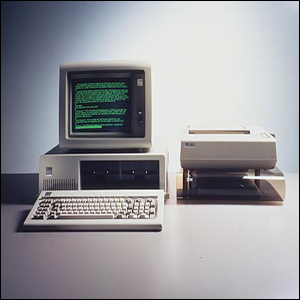
On 12 Aug 1981 you could buy a home model of the IBM PC for $1,565 equivalent to about £1,800 today. For that money you got a 4.7MHz processor, 16K of memory, mono sound from a built in 2½” speaker and a keyboard. No mouse, 160K disk drives were extra as was a monitor for the 4 colour graphics.
Visual Liturgy branded “Spyware”
4 Aug 2006 17:00 by Rick
Visual Liturgy, the package published by the Church of England to make the current version of the prayer book available electronically has been branded as spyware by Norton Anti-Virus. One feels sympathetic towards vicars who had their lifeline software disabled automatically, but perhaps it will teach them not to use Norton. I can’t count the number of times I have had to remove it from systems because it caused problems of one sort or another.
How email works (4) Viruses
27 Jul 2006 12:58 by Rick
Email viruses are another plague on the electronic utopia. To fulfil its definition a virus has to be able to replicate itself and pass on to another victim, preferably without manual intervention (else it is properly called a trojan, a subtle difference which can often be ignored). Because the email protocol is so simple, this is the easiest way for it to achieve its goal either via the native email client found on the machine or by a crude one built into the virus itself. As a result, once a machine has become infected it becomes the source for further infection. In the early days this involved attaching itself to legitimate outgoing mail and sending further infected mails to known addresses found on the source machine e.g. from the address book or a disk scan. Later this developed to the virus itself containing a database of potential targets which was shared out between victims in a cascade process. Ultimately it became more of a spam mechanism with the virus generating names semi-randomly using dictionary type techniques.
There are a number of places that viruses can be trapped and dealt with. All users are recommended to have a good anti-virus product installed. These are capable of scanning incoming and outgoing mail so attempting to deal with the symptoms as well as any potential infection. The better ones do this directly on the port drivers, between the applications and the outside world, so they can catch hidden email clients as well as the standard ones used by the owner. If your anti-virus tool reports outgoing infected mails then look to updating it and doing a major disk scan because you are probably infected.
Trapping infected emails on arrival is not really sufficient. Despite all the warnings, some people run without anti-virus software and can become infected increasing the problem. Also there is the cost involved with storing and distributing these emails. I said in part 3 that the mail servers only see the text stream and pass it though untouched. This is no longer true. Since the flood of malicious emails started there has grown, rather slowly in some places, a need to staunch it on the carriers rather than wait for the users. So now, most ISPs and company mail servers scan each email, decoding the MIME formats and checking each attachment before delivery. I believe that even some inter-network routers also do this.
This is a reasonably acceptable form of mail intercept—there are rarely false positive alerts with good mail being declared infected, and the better scanners just remove the attachment and pass the rest of the mail through with a note so that you know what has happened. The cruder ones strip off all attachments of certain types, such as .exe, which is less helpful and it becomes difficult to send legitimate files reliably. All sorts of subterfuge is used by good citizens to get their files though, the favourite being to change the file extension to something like .xex and give the recipient instructions how to restore it. The paranoid strip off all attachments reducing email to its basic text messaging form. This tends to only be short term at times of high risk.
Rack mount equipment
19 Jul 2006 12:35 by Rick
 In the computing, telecoms and professional audio/video business the 19″ rack is ubiquitous for mounting equipment. This standard, named after the equipment size, came originally from the cabinets used to house telephone switchgear and has resisted metrication largely due to the dominance of the USA in computing. There is however enough slack in the dimensions to allow a fairly crude conversion to metric units though you do come across modules that are a bit “tight” when mixed with others.
The fundamental dimensions are the overall width to the outside edge of the flanges which is 19″ and a height, edge-to-edge, of a multiple of 1¾”. This height is known as 1 unit or 1U so pieces of equipment are specified as, for example, 3U which is 5¼”. The standard actually says that every item (however large) should be 1/32″ shorter to allow for clearance but this can be ignored unless you are manufacturing them.
The flanges (or ears) have holes for bolting to the rack rails and the horizontal distance between centres is 18 5/16″ though the holes are usually drilled oval which allows quite a bit of sideways movement. For a neat effect you should loosen the screws a little after installation align the units before final tightening. The minimum clearance between the rails and other obstructions should be 17 ¾” though some are a very close fit.
 The fixings are most commonly M6 cheese-head bolts (in Europe) and corresponding “cage-nuts” inserted into the 3/8″ square cut-outs in the rails. You do sometimes see drilled and tapped rails but this is usually on proprietary racks used by the bigger computer manufacturers. The rails can either be steel or aluminium and it should be noted that they require different cage-nuts to allow for the metal thickness. The bolts are usually steel and plastic washers can be used to protect the finish. If earth isolation is required then nylon bolts (for light equipment) or plastic flange washers are available, but otherwise it is general practice to earth the rails with a strap.
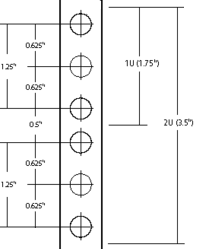 The hole spacing on the rail is complex. Each U has provision for three holes, though the middle one is rarely used. The spacing to the centres from the top or bottom of the unit is ¼”, 7/8″ and 1½”. This means that they are uneven, some being ½” apart and others 5/8″, making it VERY important that units are correctly located in their proper U positions, not offset by one or two holes. To help with this, many rails have a small notch cut out of the edge of the central square hole in each group to identify it. The cage nuts allow a small amount of vertical movement which may be needed when installing fractionally oversize modules.
The smaller equipment (up to 3U) is usually secured by two bolts on each side. 1U and 2U cases usually use the outer hole positions, 3U cases use the inside ones, being 2¼” apart. Larger modules use four or more bolts in various positions (but again, rarely using the central hole of each U.) It is worth noting that when installing equipment, it is the lower screws that should be inserted first and removed last because it is those that “take the weight” and stop the case from twisting, bending the flanges.
Many racks also have back rails to support heavier equipment; there is no standard depth though 31½” is quite common. Equipment that requires front and back mounting often has movable brackets or is dedicated to one brand of rack. Using runners is quite common for large equipment as it allows maintenance without complete removal, though care should be taken to avoid the rack tipping forward.
When installing equipment it is important to read the ventilation requirements. Although it is possible to butt the units up tight together they may cook, so you may need to leave gaps (with blanking plates for neatness). Fan modules are available for situations where a lot of heat needs to be removed.
This standard leaked for a short while onto the domestic audio market in the late 1970’s when it was fashionable to have the flanges even if you had no rack to install them into. This lingers in domestic circles with “full size” components being 430mm wide which potentially could have flanges attached for rack mounting though many of the cases would not be strong enough. They do, however, fit quite neatly onto rack shelves. Semi-pro gear often has rack mount kit options, though beware that they are often overpriced.
How email works (3) Attachments
14 Jul 2006 09:51 by Rick
The body of an email is a continuous stream of plain text lines, each no more than 80 characters long (remember punched cards?) and terminated by a line containing just a single dot “.” this doesn’t allow for much other than simple messages. To get round the restrictions and allow the sending of other types of data, uuencode (unix to unix encode) was borrowed from another system. This allows any data, including binary, to be transformed into plain printable characters, though you wouldn’t want to read them. A corresponding program uudecode converts it back to the original form without loss. The drawbacks to this are that the message increases in size and that the process is very manual. The first problem was addressed by compression but that made the second problem even worse as it is now a three stage process at each end i.e. compress, uuencode send—receive uudecode uncompress, and some data needed different handling, perhaps a different compress program.
The major development to resolve this was MIME (Multi-purpose Internet Mail Extension). Using this the body of the email is divided into a number of sections, still all in plain text and the whole lot terminated by the “.” The mail server knows nothing about it, it is all handled by the client at each end. Each section has its own sub-header which contains details about what sort of data the section contains and how it is encoded. Then when the mail arrives, it is all sorted out into the message (now perhaps formatted in HTML) and the attachments all with their correct type and name.
Songs on the internet
12 Jul 2006 18:13 by Rick

Very topical at the moment as I am trying to get a projector installed at St. Matt’s. Thanks to Dave’s Cartoon Blog for the joke.
I’ve sold my soul
15:34 by Rick
Well, not quite. I’ve sold an advertising slot on one of my pages. Not, you will be relieved to hear, on my main West-Penwith pages, nor on this blog which is guaranteed ad-free, but on one of the few miscelaneous pages.
I wondered, at first, why anyone would want to buy it. True it is one of my busier pages, 718 hits in June (and the stats say that they come in and go out without a look around the rest of the site) but that is nothing in the real world. The key feature of that particular page is that it has a Google Pagerank of 7 out of 10 which is pretty good for a commercial site let alone an amateur one. So that is why they wanted an ad, and a plain text one at that, so that the Google fairy dust would rub off on them. Rank is everything in the Search-Engine-Optimisation world and it is earned by reputation which is judged on who links to you. The more high rank links-in you get, the higher rank you earn and hence the higher up the search listings your site appears. Points are lower (or even lost) for links that look unrelated or generated from link farms and Points mean Prizes—or hard cash for commerce sites.
Now if I could sell a few more I could give up the day job, but I suspect that really would mean selling my soul.
How email works (2) Relays
10:52 by Rick
What we saw in part 1 is the simple case with just a sending and receiving mail server, but quite often a number of intermediate hops are required to reach the ultimate destination. Using the “Received: ” headers in reverse order you can see what route a mail item took to get to you.
When email was invented, the networks weren’t as richly interconnected as they are now and consisted of small islands connected by narrow, unreliable pipes. So the technique to deliver a message was to forward it to another server which was a bit closer to the final destination. There was even a way you could suggest the route you wanted your mail to take. A system evolved where servers would discover the best routes by learned experience. This meant that servers became accustomed to accept any mail and forward it on as required.
In more recent times this custom was exploited as the servers didn’t care where the mail came from. Spammers arranged to send mail to random servers and specify obscure routes knowing that they would dutifully forward them on and their tracks would be hard to detect. This is called the “Open Relay Exploit.” To avoid this, servers began to be more selective and mostly they now only accept mail from their own clients or, alternatively, mail destined for places that they know about and are responsible for. They will no longer accept mail from anywhere to anywhere. In practice you will see from the headers that most mail gets moved around internally at the source end, makes a big leap to the destination, and then moves around a bit there before being stored.
An organisation called ORDB (Open Relay Database) tracks down the few remaining open relays and system managers can use this list to ban them from contact as their transmissions will be unreliable.
W98 Rest in Peace
11 Jul 2006 06:41 by Rick

Well, it has finally gone after all these years, and it is the full flush this time after an earlier attempt failed to see it off. The one we all loved to hate has gone forever. I am certainly not sad to see it go. I can now say with a clear conscience, “sorry I can’t help you; you could install Linux on the old box.” Much has been said to deride XP but it is an order of magnitude better than 98 (we won’t mention ME which has been in a coma for years).
Of course some people loved it; that is fine, I never had to support them anyway as they were enthusiasts and they could get it to work. Joe User, however had nothing but heartache and blue screens.
Now what?
Using it to let the grandchildren surf the net is not a good move. Just because MS have laid it to rest, doesn’t mean the virus writers will. A botnet of W98 zombies will suit them fine. According to W3Schools, 1.6% of systems connecting to them are still running it. Make yours stand-alone and let them run all those great games you had forgotten about.
If you have an application that absolutely must use 98 then isolate it, use the box for nothing else. If the machine is running reliably then leave it alone. If it is a bit dodgy then consider reinstalling from scratch with all known patches. There is a list at Techspot but I don’t know how long they will remain available at MS so cut them to a CD now. Surely someone will create an online archive, but there may be copyright problems. Install just that one application. You probably won’t be able to get AntiVirus updates for much longer so you need to disconnect from any critical network, especially the open internet. If it has to connect to something then put in a firewall, the current ZoneAlarm should work just fine; close it right down to the bare minimum.






 Webmaster