
TapHeating Programmer Battery

23 May 2007 22:28 by Rick

There everyone is, trying to get us to save energy and they make a domestic piece of equipment that has no obvious way to change the battery. Yes, it is rechargeable, but after a while even these will die. They do it with cordless phones, and now I find our heating programmer is the same. After the five or ten years it lasts, we are supposed to throw it away and buy a new one. £60 for the sake of a £2 battery. I am not beaten so easily!
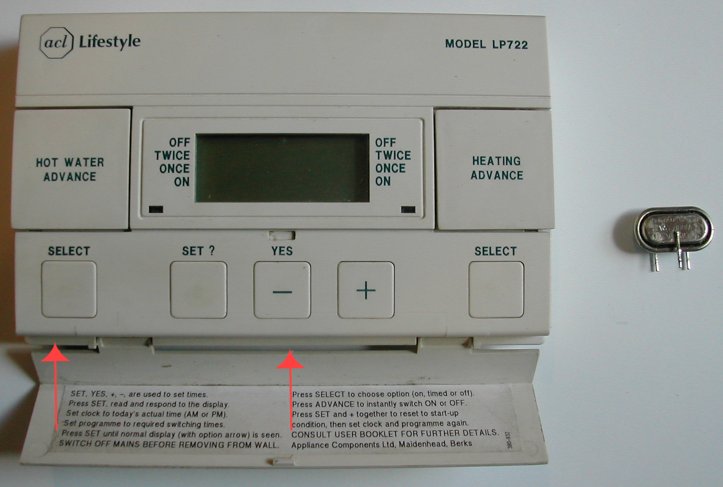
ACL Lifestyle LP722 Programmer

The item in question is an ACL Lifestyle LP722 Programmer. This one dates from about 1990 but it is still made by Invensys under the Drayton brand and, as far as I can see, is very little changed though the brochure says they now have lithium batteries, perhaps they are easy to change.

This older model has a 100mAh NiCd battery, part number V100R. This is no longer made (NiCd is going out of style) but the 150mAh NiMH battery, part number V150H/2p is a direct replacement. I got mine from Cell Pack Solutions for £2 + VAT + P/P = £3.34. Quite reasonable I thought, from a specialist supplier. To find if yours is the same you will have to go through some of the following steps to identify it first and perhaps put it all back together while you wait for the part to arrive.

Now down to business. First you need to make sure you have noted down your program settings. This can be done by stepping through the test sequence on the controls to see when things come on and off. Now you need to TURN THE POWER OFF. This is important for your safety and for the equipment. There should be a double pole isolator or remove the mains plug or whatever is needed.

You can remove the programmer from the wall by loosening the screws marked with the red arrows on the picture above. They don’t need to come right out and, in my case, also watch you don’t drop the screwdriver down the back of the bookcase. Now gently pull from the bottom and then lift it off the lugs. It will be a bit sticky because there are 6 pins to come out of their sockets.
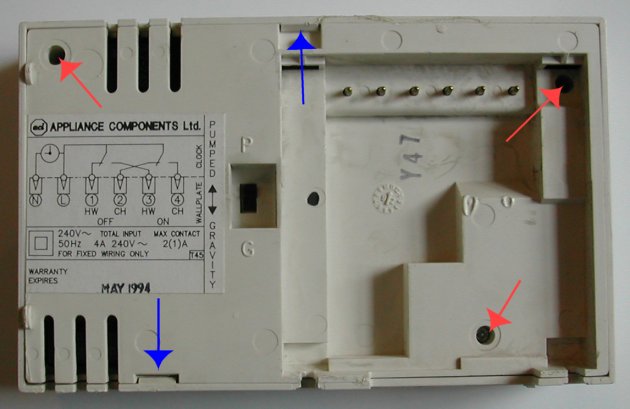
Programmer back

Now turn it over and remove the 3 screws marked with red arrows on the second picture. The back can now be removed but note the clips marked with blue arrows which need to be pushed clear. The back needs to come off leaving the six pins behind so take a bit of care.
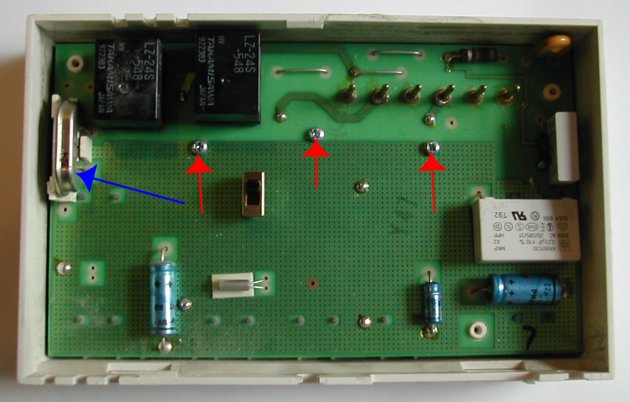
Programmer circuit board

Now you can see the circuit board. The battery is marked with a blue arrow on the third picture. This is far as you need to go if this is a preliminary investigation. You can see what sort of battery you need, though it may be hard to read the number.

Once you have got your replacement you need to remove the three screws marked with red arrows and carefully lift out the circuit board. This should leave behind the display screen and contact strip marked with red arrows on the last picture. but it may stick to the back of the circuit board. If so, carefully separate them and put it back as shown. If you are unlucky, the cover strip (not shown) and all the buttons will fall out as well. If so carefully put them back in the right order (they have thoughtfully marked the + and – positions) and replace the cover. Take care not to lose the rubber push buttons off the back of the circuit board, but these are all the same.

Programmer inside case

Now you can de-solder the battery; a de-soldering wick or solder pump is best for this, otherwise you will have to use three hands and a pair of pliers! Assemble the new battery in the carrier and solder it into place—the single pin side will need to be soldered on both sides of the circuit board.

To re-assemble, reverse the process above. Be sure to get the rubber buttons correctly located. Don’t over tighten the screws as it is easy to strip the thread. Once it is all back together you can replace it on the wall by hooking over the lugs first then firmly pressing it into place before tightening the screws. Now switch the power back on. It will need re-programming but after about 3 days it should be re-charged and providing a backup.


TapGreen Geek (2)

08:33 by Rick

About a year ago I first posted my concern about how much equipment I leave on standby in the house. Since then I have noticed that electricity bills have been a bit on the high side and I was suspicious about the UPS device. This 3kW unit is seriously over our requirements and I was wondering if it had a high overhead.

I have thought for many years that a useful device would be an ammeter reading up to 15A with a mains plug on one end and a socket on the other and had considered building such a device. It came as a pleasant surprise, recently, to discover that not only was such a device manufactured but Maplin had one on special offer—only £15 at the time.

So I put it to work.

Of the original list

  • UPS 3kW rating
  • Router (P90 PC w. no disk drive)
  • Ethernet Switch
  • NAS controller (NSLU2 slug)
  • NAS drive (x2 in standby)
  • Print controller (Pricom)
  • Printer (in standby)
  • Cordless phone charger

that is leaving out the Cable modem and Wireless Access Point which are not on the UPS, the total power usage is 80–85W, little more than a light bulb. I think the variation is whether the UPS is on trickle charge or resting. At current rates that will be costing us £15 per quarter. This is not a huge amount, but significant. Now I need to start testing other things.

Note: Useful rule of thumb at current prices (8.243p/kWh)—1W consumption =approx. 70p per year.

With my desktop running with its two screens and the NAS drive spinning the consumption goes up to 230W. Definitely an incentive to switch it off when not required. Here is a list which I will add to over the next few weeks.

Equipment on all the time

UPS etc. (list above) 80–85W
Wireless Access Point 4W

Equipment switched on as required

PC in use 65W
19″ TFT screen in use 40W
USB disk (difference from standby) 5W
Halogen desk lamp 20W
Laptop in use (charging) 40W
Laptop in use (full) 23W
Laptop off (full) 1W

TapIt is a sad day …

22 May 2007 13:37 by Rick

… when brother goes to law against brother.

In this case, it is the Episcopal Church of the USA suing eleven of its (former) parishes in Virginia to recover their property i.e. the churches in which they worship.

TapThe Panorama Effect

21 May 2007 12:39 by Rick

I have noticed that there is quite often a news item on the Radio on Monday morning that is either sensational or surprising. It is only a minute or so into the report that you discover that the BBC Panorama team are those providing the information. It is not that report itself is slanted in accuracy in any way, just that is being “bigged up.” It is really little more than a trailer for the TV show that evening. I think the radio people be more aware that they are being used and put the item into a clear trailer slot rather than the news bulletins.

TapWordPress 2.2 and Charset

20 May 2007 21:17 by Rick

A while ago someone pointed out that there was an anomaly with WordPress in that the web pages were displayed in UTF-8 character set but the database was stored in a Latin charset and that was causing a few problems. They worked out in detail how this should be corrected.

Unfortunately it seems that the authors took on board that it needed to be changed but ignored the method. The consequence is that people updating to version 2.2 using the default config file are in a bit of a mess if they use a text containing non US-ASCII characters, especially foreign languages (wrt English)

I noticed first because my British blog (this one) frequently uses the pound sterling character £. Having corrected all those I have noticed a few others, for example ô became Ã` and — became –.

Note that this does not affect new blogs at all.

For blogs upgrading from an earlier version to 2.2 the lines to watch in wp-config.php are define('DB_CHARSET', 'utf8'); and define('DB_COLLATE', '');. They didn’t use to be there. I think the mistake was taking any notice of the sample file—silly me, I thought it was necessary to keep all files up to date.

At least there should be some warning about it as it is a natural mistake—I only found the trac entry after the event, the announcement didn’t mention it. There is some documentation about it but that is not something you would naturally look for. Now I have the problem that I have fixed some by hand and made some posts with the new system so how do I fix it—change them all by hand or revert and change those ones I have done back?

TapPaid links & Advertising

18 May 2007 11:16 by Rick

While browsing around to solve a problem I came across this interesting post by a Google guru about what they think of paid links. Now I can see where they are coming from, they want to improve the customer experience so that you find stuff relevant to what you are searching for. So from that point of view, the links to casinos on the Linux site, to quote the example given, are certainly not helpful.

However we should remember that Google are in the advertising business (that is their main revenue source) so there is a bit of a conflict of interest here. When it comes down to it, what is the difference between a paid link and an advertisement; I have seen some pretty dubious Google Ad-Sense adverts on some news pages where they have picked up on words out of context: for example this news story about Charles Darwin included adverts for hotels in Darwin, Australia when I read it. I would prefer to see a well directed paid link than a robot generated advertisement.

In case you were wondering, I have promised to keep this blog ad-free but I see no problem with relevant advertising links on my other pages, though I will always identify then as such. It is the only way to make an extensive public information site financially viable.

TapSoftware Subscriptions Scam

17 May 2007 15:19 by Rick

Those of you who have signed up for an annual software subscription such as an Anti-Virus product need to read the article at Windows Secrets this week. It seems that you may have signed up for automatic debit from your credit card every year and it can be very difficult to get out of. The companies involved aren’t backstreet operators either, but big names like Microsoft (One Care scheme), McAfee, Checkpoint (ZoneAlarm) and Symantec (Norton).

What some have done is buried the information in those impenetrable EULA documents that no one reads. The best of them had the information clealy up-front, but still ticked by default. Although it is only a couple of clicks to sign up to these services, and they are convenient, it can be much harder to cancel, sometimes a phone call to the USA. Sometimes the cancellation doesn’t work even then so you have to try to contact a live (and intelligent) body to get a refund.

TapOrganic Salt!

15 May 2007 20:45 by Rick

Shampoo label

I suppose that it must be H0C0O0NaCl.

That is discounting the fact that if it is sea salt, there will be a fair proportion of Magnesium Chloride in there as well as other compounds.

Thanks to Debbie for finding this.

TapCable Blues

12:29 by Rick

Despite all the bad publicity we are not particularly unhappy Virgin Media customers. The phone does its job, the Broadband is good and we only gave up the TV because we weren’t watching it. We don’t use the phone a huge amount so don’t bother with any of the fancy packages; the basic phone is quite adequate. We subscribe to the standard (original) broadband and it is pretty reliable now. The upload speed is the best I have seen (specifications rarely even mention it) and that is important to me.

What really gets me is that we are locked in, and not just by the usual things like the hassle of changing email addresses. There are apparently dozens of great deals out there but when it comes to the crunch, none of them are available to us—we don’t have a BT phone line. To get one would cost us £125 upfront and even if we did there is no mechanism to get one without signing up to BT for a service contract. Look at the sign up pages and the first thing they ask for is confirmation that you have one. No mention of what to do if you haven’t (I have checked Waitrose, Orange, AOL, Global and Zen) Even the Which? report doesn’t address the issue.

TapPending

11 May 2007 13:46 by Rick

When I first got my Orange mobile phone some years ago, I would send a text message and a short while later I would get a “Delivered” notice. If there was some problem like congestion or a poor signal then I would get a “Pending” notice and some time later a “Delivered” notice when the problem was resolved.

These days I always get both; one straight after the other. Has something changed or is the network always slightly congested?

^ Top