Archive for the ‘Technical’ Category

TapWordPress 2.2 and Charset

20 May 2007 21:17 by Rick

A while ago someone pointed out that there was an anomaly with WordPress in that the web pages were displayed in UTF-8 character set but the database was stored in a Latin charset and that was causing a few problems. They worked out in detail how this should be corrected.

Unfortunately it seems that the authors took on board that it needed to be changed but ignored the method. The consequence is that people updating to version 2.2 using the default config file are in a bit of a mess if they use a text containing non US-ASCII characters, especially foreign languages (wrt English)

I noticed first because my British blog (this one) frequently uses the pound sterling character £. Having corrected all those I have noticed a few others, for example ô became Ã` and — became –.

Note that this does not affect new blogs at all.

For blogs upgrading from an earlier version to 2.2 the lines to watch in wp-config.php are define('DB_CHARSET', 'utf8'); and define('DB_COLLATE', '');. They didn’t use to be there. I think the mistake was taking any notice of the sample file—silly me, I thought it was necessary to keep all files up to date.

At least there should be some warning about it as it is a natural mistake—I only found the trac entry after the event, the announcement didn’t mention it. There is some documentation about it but that is not something you would naturally look for. Now I have the problem that I have fixed some by hand and made some posts with the new system so how do I fix it—change them all by hand or revert and change those ones I have done back?

TapSoftware Subscriptions Scam

17 May 2007 15:19 by Rick

Those of you who have signed up for an annual software subscription such as an Anti-Virus product need to read the article at Windows Secrets this week. It seems that you may have signed up for automatic debit from your credit card every year and it can be very difficult to get out of. The companies involved aren’t backstreet operators either, but big names like Microsoft (One Care scheme), McAfee, Checkpoint (ZoneAlarm) and Symantec (Norton).

What some have done is buried the information in those impenetrable EULA documents that no one reads. The best of them had the information clealy up-front, but still ticked by default. Although it is only a couple of clicks to sign up to these services, and they are convenient, it can be much harder to cancel, sometimes a phone call to the USA. Sometimes the cancellation doesn’t work even then so you have to try to contact a live (and intelligent) body to get a refund.

TapeVoting

3 May 2007 11:05 by Rick

I haven’t been able to find any decent report of the electronic voting trials taking place today in the local council elections, the best is probably Jason Kitcat. I have these comments to make about the principle:

It is not presently (nor in the foreseeable future) possible to construct a secure, Internet-based system for remote electronic voting.

Dr. Rebecca Mercuri, Bryn Mawr College, 2002

The main reason is that you have many conflicting and contradictory requirements. You need to check that the mechanism to vote is actually available; the entitlement of the person to vote; that they vote only once; that privacy is maintained; that no coercion has taken place; that the voter gets positive feedback that their vote has been cast as they directed; and that the candidates and other observers get an unambiguous assurance that count mechanism is accurate and unbiased. Note that some of these are not the same requirements as for commercial transactions; that interaction is deliberately not anonymous (else you won’t get anything delivered nor charged), nor are the requirements for all elections the same.

No voting system is going to meet all these requirements but the added factor in remote electronic systems is the possibility of automation generating sufficient mis-votes to influence the outcome. Proving identity is not done at the ballot box but the attendants are going to notice gross abuse; Privacy is weakened by numbered ballot slips but it takes a manual, obvious and difficult cross reference to trace back each vote, unlike electronic systems where the identity and the vote cast can easily be in the same or linked databases; no one can twist your arm when marking your cross; you put the slip in the locked box personally; representatives of all interested parties can see the count, where the actual voting slips are present laid out on the table and they can oversee any queries that arise.

Introducing the internet into this is to shroud the whole process in a dense fog. You cannot rely on the security of the entry device (home PC) nor the transport mechanism (ISP to global internet). No amount of encryption can compensate for the huge number of home systems that are vulnerable and exposed. It is analogous to leaving ballot boxes unsupervised on street corners for a few days as you have no way to tell how the voting slips arrived. To continue the analogy, how can the voter recognise a genuine ballot box—read “spoofed voter web sites”. Finally, if you get your vote to the correct system, the opportunities for that server, connected to the world, to be attacked are not insignificant. In a recent case, personal details of applicants for NHS positions were exposed alongside their names; this is despite the system requirement to strip off these details before recording the data at all.

There are arguments in favour of electronic polling stations but the systems used must be independently audited (not proprietary black box systems) and provide a printed feedback confirmation of the vote cast which can be deposited in a ballot box in case a manual count is needed e.g. in case of system failure, compromise or dispute.

Dr. Mercuri goes on to say

To say that “it is probably impossible to make any system perfect” and then use this as an excuse to impose a horribly imperfect and flawed process on the voting public, is sorely misguided.

TapDue care and attention

28 Apr 2007 10:43 by Rick

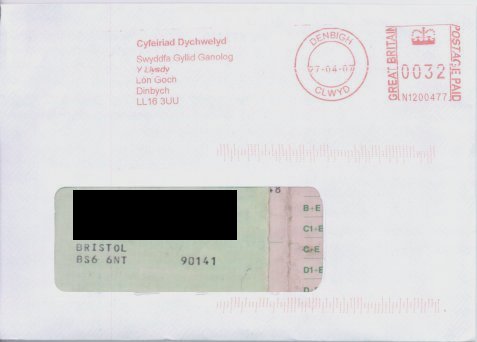
Envelope returning Driving Licence
This is how at least one of our public bodies looks after our valuable identity documents. And they tell us to take care!?

To those who may not know, every Briton over about 25 would recognise this as a Driving Licence.

TapNavigating London

26 Apr 2007 09:13 by Rick

Doesn’t every one have this problem? You pop up out of a hole in the ground; you know exactly where you are; you know exactly where you are going; but you have no idea which way you are facing! All it needs is N,S,E,W signs at tube station and subway exits then you wouldn’t get people staning in the middle of the pavement peering at scrappy maps trying to orientate themselves.

TapPoles apart

21 Apr 2007 17:38 by Rick

By convention, the ends of a magnet are labelled North & South to reflect the direction they point when it is freely suspended. The magnetic field of the earth can be likened to a big bar magnet.

Question: Approximately where would the North pole of this magnet be located.

Answer: Somewhere in the Antarctic. Yes, it was a trick question! Unlike poles attract; like poles repel; so for the North pole of a compass needle to point North, it must be attracted by a South magnetic pole somewhere on the Arctic ice sheet north of Canada (about 7 degrees away from the True North Pole.)

TapHi-Ho Silva

17:25 by Rick

After 35 years service my Silva orienteering compass has stopped working. I didn’t think that they could but mine seems to have lost its magnetism so it will point any way I care to put it. Actually that is not quite true, there is a little charge in it so it will slowly drift around—to point exactly the wrong way! I can only imagine that it has become de-gaussed by an electric field or perhaps from getting too hot but I don’t know how. I trust that airport X-ray machines don’t harm them?

TapConfessions of an email spammer

7 Apr 2007 15:42 by Rick

A while ago, when this web site was really getting going, I discovered the need for a mail form to help people communicate back. At the time I was having problems with random senders being blocked and this seemed the easiest way to do it. I found what looked to be a good system in Jack’s Formmail.php v5.0!. I went through it carefully, pulled out parts which uploaded files to the server which I thought were dangerous, and used it. This has been running for a couple of years—until today.

Today I got a heap of bounced emails into an account that is not normally used much and looking at a few, it was clear that the originals had been generated by my modified script; I had signed them.

The content of a form generated email from my script is as follows, much the same as the original in fact:

 1. To: [recipient]
 2. Subject: [subject]
 3. MIME-Version: 1.0
 4. From: "[realname]" <[email]>
 5. Reply-To: [email]
 6. X-Mailer: DT Formmail5.0_RJP_2
 7. Content-Type: multipart/mixed;
 8.         boundary="----=_OuterBoundary_000"
 9. This is a multi-part message in MIME format.
10.
11. ------=_OuterBoundary_000
12. Content-Type: multipart/alternative;
13.         boundary="----=_InnerBoundery_001"
14.
15.
16. ------=_InnerBoundery_001
17. Content-Type: text/plain;
18.         charset="iso-8859-1"
19. Content-Transfer-Encoding: quoted-printable
20.
21. realname: [realname]
22. email: [email]
23. message: [message]
24.
25. Message sent by formail.php v5.0_RJP_2 from [HTTP_REFERER]
26.
27.
28. ------=_InnerBoundery_001--
29.
30. ------=_OuterBoundary_000--

Lines 1 & 2 are generated by the PHP mail() routine, lines 4 & 5 are generated by the script, lines 21-23 are obtained from the input form and the rest is pretty much fixed. I think my web host inserts Return-Path; [account email address] after line 8 and adds

Received: (from [account]@localhost)
by west-penwith.org.uk (8.12.11/8.12.11/Submit) id [id];
[datestamp]
Date: [datestamp]
Message-Id: [id]

to the front before the mail leaves home. [recipient] is fixed to my email address and coded in the script so that it can’t be harvested, [subject] is, I presume, sanitised by mail(). [email], the sender’s email address, is checked using a regexp and malformed ones rejected. [message] is not checked, but is protected by being inside a MIME type text/plain part.

Have you seen the flaw yet?

Looking at the bounced messages kindly provided by Yahoo! where they quoted the incoming message in full there were some strange additions. There was a big gap between lines 4 and 5 containing the spammy message. Also lines 21-23 were in a different order and there was a lot of additional text before line 25. This consisted of the same spammy message and a very long "bcc:" list. What they had done was inject

[bogus email address at west-penwith.org.uk]
Content-Transfer-Encoding: quoted-printable
Content-Type: text/plain
Subject: [spammy subject]
bcc: [lots of email addresses]

[Spammy content]

..

as the value for my variable [realname] and I hadn’t validated it. The insertion into the content of the message was benign, but in the header, it was taken and interpreted as written which is why all those bcc addresses were sent rubbish. As a last minute alteration, I thought it would be nice to have the mail come from a real person rather than just an email address and didn’t think of the consequences.

Verdict: Guilty as charged.

What I am curious about is a) why the mail stream wasn’t terminated by the “..” before line 5 as it is supposed to be and b) how they discovered the flaw. Unfortunately I haven’t been receiving mail from this form for a few weeks (this may be related) so I would have missed any test runs. Do they have a bot which picks up the variables used by a form and try injecting rubbish into them to see what happens, or has a human cracker been on the job?

I should point out that the flaw that was exploited was not in the original script, it was caused by an alteration I had made. The [subject] may also be vulnerable in a similar way, though it would depend on how mail() interprets it, the manual is vague on this. There are a lot of other things which even the original script doesn’t check so perhaps I should look around for a better one.

TapRepairing a Renault Laguna Card Key

6 Apr 2007 17:58 by Rick

A common fault with these keys is that one of the buttons stops working. You can tell when this is a fault with the key rather than the car because the led stops flashing. If both buttons have failed then first try the obvious and test the battery and make sure the contacts are clean. If so then you need to resort to one of two drastic solutions; buy another one (about £130) or repair it.
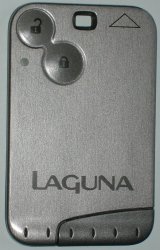
The key before hacking it

This is the type of key we are talking about, it is the type with two buttons and the safety slot in the end, not the proximity type. There may be other models that use a similar key, I have seen one with three buttons for instance, but I don’t know if they have the same weakness. The fault with these keys is that they use surface mount micro-switches and the “lock” one seems to be on a vulnerable part of the board which perhaps flexes and it drops off. Often you can hear it rattling loose inside.

The tools you will need are a good strong Stanley knife, a soldering iron with a very small tip (1mm or less), some long or curved-nose pliers, a strong magnifier and some super-glue.

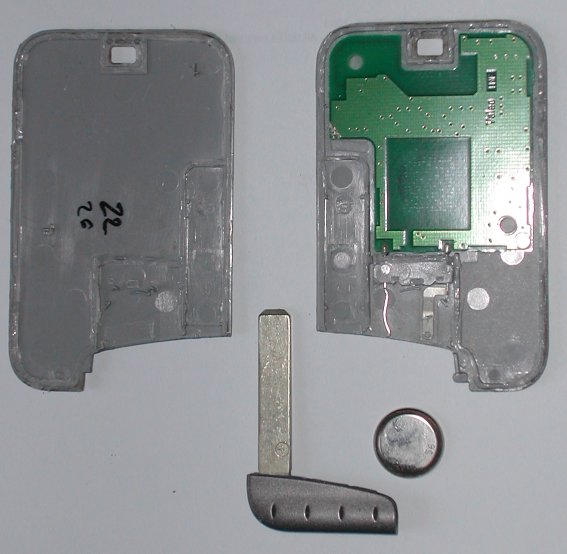
The first task is to get inside. These are not clip-together cases, they are glued all round and on some internal ribs as well. On the photograph of my one below (click for a larger image without my annotations), I have marked the glue lines in red. The blue dots are unglued guide posts. With a strong Stanley knife and starting at the point marked “A” you can carefully cut along the edge, try to cut if you can as it doesn’t split very well—and watch your hands as the blade is liable to slip. When you reach the first bend “B” go back and do the first internal rib, then you can move round peering in the crack to see what to cut next. Be careful not to damage the components or the circuit board. A close inspection of the pictures shows the things to avoid, it is really a matter of patience, care and brute force.
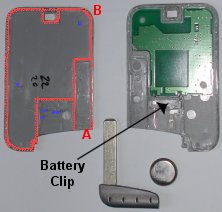
After removing the back

As you can see, mine opened upside down, so the next step is to cut under the battery clip to separate the circuit from the case; I used a small kitchen knife to get in there.
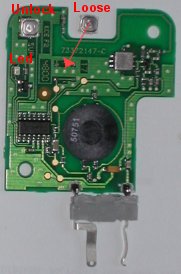
The circuit board exposed

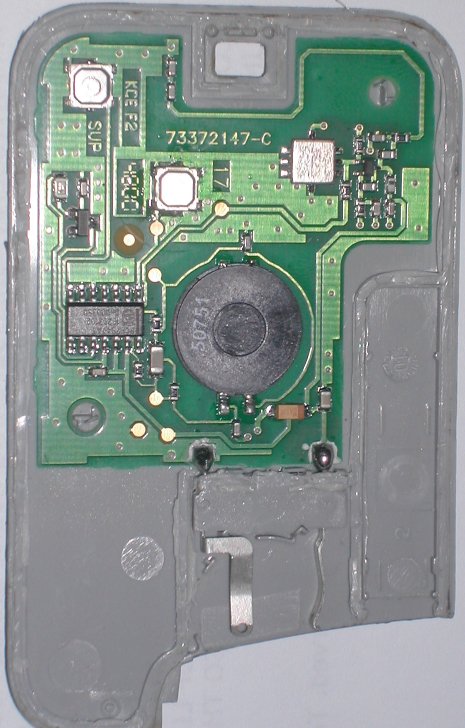
So you should now have all the parts laid out including a loose button switch. This switch has a contact on each corner, two fold-under lugs to hold it together and two other lugs to help it stick to the board (ha! ha!). Sorry, the resolution of our camera is not good enough to see this detail. Near the centre of the circuit board you have a corresponding space with two pads on the earth plane at the top (arrowed blue), two on a track leading to the IC at the bottom (arrowed black) and two isolated holding pads (arrowed red). The orientation of the switch is important, the wrap around lugs MUST be to the sides.
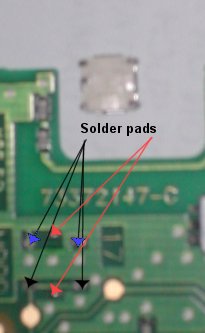
A close up of the problem

With your fine tip soldering iron, clear up and tin all the contacts on the switch. Similarly clean the circuit board pads. You are well away from any delicate components here so there is not a lot of risk. Make a small solder bead on each pad. When I say small I mean small; I used a jewellers eyepiece to see what I was doing, scary with a hot soldering iron inches from my face.

Now lay the switch on top and test that it works by holding the battery in, and pressing the button. If you get the switch the wrong way around, the light will be on without pressing the button. Satisfied that it works you can solder the switch into place—holding the switch down with long pliers, touch the soldering iron to each corner and the top/bottom edges to get the solder to bridge the gap in six places. You may need to go round more than once as the component beds down to the surface. Test it again. As a final touch, I dribbled a bit of super-glue under the switch as an attempt to hold it more securely.
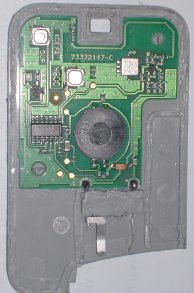
Putting it back together

Now clean up the plastic parts with a knife, removing all loose bits and get the halves to mate together tightly without the circuit. You will also need to clean up the plastic part of the battery clip. Lay the circuit into the back cover, there should be two positioning pegs to hold it in place. Apply a drop of glue to the battery clip to secure it and leave it for a few moments to set. Finally run a bead of glue around the outside edges and the main internal rib, bring the parts together and clamp (clothes pegs) or weight it until it sets. How many of the original lines you do depends on if you are likely to want to undo it again but I would suggest omitting the front of the battery clip.

For the technical, the numbers on the components are: the big round piece (transmitter coil?) is 50751, the DIL package (encoder?) is Phillips PCF7947AT with other numbers 16793102 and DnD00350. The small silvery unit (oscillator crystal?) has EPC05, R727 and M5MN. A Google search didn’t turn up much.

TapHandy tips for Laguna owners (4)

5 Apr 2007 09:18 by Rick

I have been surprised how popular this series has been with readers, attracting many more comments than most. I should point out that I am no expert in this subject, just passing on things that I have discovered either by personal experience, research, investigation or plain logic. To that end I can recommend the prolific RenaultForums which has a much larger group of contributors, some of them quite knowledgeable.

It is from reading many posts on there that I have extracted the following useful tips.

  • The anti-hijack lock. This is the system which locks all the doors (from the outside) as soon as the car exceeds 6 mph. When delivered new, it is switched off. To enable/disable it, with the ignition on (card key fully inserted) press and hold the central locking button on the console until it goes “beep”.
  • Fuses. Having lost my handbook, I am still trying to trace what fuses do what. There are three locations for fuses that I have found, the one by the driver’s knee, one by the battery under the bonnet and one in a very strange place. If you pull out the ashtray (grab it firmly by the sides and pull straight out) then below it is the socket for the engine diagnostic system and a single fuse. This may be for the radio or possibly the cigarette lighter.
  • Tyre pressure sensors. This is a hot topic for discussion but a few snippets emerge.
    • The valves which contain the sensors are quite fragile so care needs to be taken when changing tyres.
    • The metal valve caps corrode and stick on and can cause the valve stems to break when trying to remove them. Many correspondents recommend changing them for plastic ones as soon as possible.
    • The valves are colour coded and a matching code chart can be found on the edge of the driver’s door below the lock. Make sure that the right valve/wheel is on the right corner of the car else the system will get confused.
    • If you get the sensors come on for no apparent reason then try over inflating the tyres by 5-10 psi and then reducing back to the correct pressure to unstick them.
    • If you have to get any new valves then the car computer needs to be programmed to accept the new codes—this seems to require a Renault agent.

As soon as I find some time to repair my bad card key I will post about that and other key related things.

^ Top