Archive for the ‘Technical’ Category

TapWAT no Advantage?

11 May 2009 09:39 by Rick

In the forthcoming Windows 7 the hated Windows Genuine Advantage changes it’s name to Windows Activation Technologies and it is supposed to be slightly less annoying.

But seriously, Windows 7 is getting a lot more critical support than Vista ever has. One of the best features is a built in virtual platform for running old XP applications, though this rather depends on your processor supporting it. It is intended for the huge number of business users who can’t or won’t switch and are costing MS a lot of sales. It is reported that many typical retail consumer PC’s won’t have the right processor chip.

TapPhishing Phone Call

9 May 2009 11:00 by Rick

This morning we had an automated phone call, one of those that is generated by computer, apparently from our credit card company. It knew the name on the account and asked us to ring back on a given number regarding the security of our card.

The first problem, as this was a call out of the blue, was that we had no pen to hand to write down the number even though it was repeated. We checked the source and it was an unknown (to us) 0845 number.

But secondly, how were we to know that the call came from the bank in the first place. The name of the account is on the card and the name of the bank can be deduced from the first few digits of the card number. Anyone who we had made a transaction with could have discovered those details.

As it happens it was from our bank—I discovered this by ringing our normal telephone banking number and getting put through to the fraud department. It was an out of the ordinary transaction they were worried about which, in fact, was legitimate. I am pleased with their dilligence in bringing it to our notice.

The right way to have worded the phone call was to ask us to ring the number printed on the back of the card or statement and either use a code for the automated routing system or tell us to ask for a particular department. That way we don’t have to find a pen to write anything down and we can be certain that we are really ringing the bank.

TapWhy I don’t like the iPhone

8 May 2009 08:52 by Rick

It is purely selfish. Since it was introduced, all the good Apple news, rumour and help sites are full of dross. It is not easy to pick out the good Mac stuff from the useless iPhone stuff so it takes me twice as long to browse through the daily feed.

TapRSS feed fixed

7 May 2009 18:03 by Rick

I have finally figured out why the RSS feed on this blog had died. I had been assuming that it was due to an illegal character in one of the post headings because that is what broke it last time; XML is very fussy about character set.

Today I had a look at the source of the XML that wouldn’t display and spotted that there were two blank lines on the front. Removing those (by hand) fixed it, I said XML was fussy!

Now where were they coming from. A search on Google for “wordpress xml blank lines” came up with a few suggestions and it looks like it is a common problem but everyone has to figure it out for themselves; there is no FAQ. The prime suggestion was blank lines on the end of the wp-config.php file but that wasn’t the case for me. The next was in functions.php in the theme; BINGO. I am always very verbal when writing code and put in lots of comments and white space. Normally that doesn’t matter but functions.php is loaded for every action (even for the admin panels) and PHP is a strange beast—everything that is not with us is against us; i.e. everything that is not a PHP statement is directly output to the stream so blank lines before the first < ?php and after the last ?> is output and you cannot separate the functions outside of the PHP structure either. Once I had fixed that then it was all ok.

I still can’t figure out the source of the two blank lines that cause the Comment feed to fail! [Update: that is fixed too. Same problem, just that I hadn’t properly cleared the browser cache.]

TapA test for the Conficker Worm

3 Apr 2009 09:31 by Rick

All the hype about Conficker/Downadup on April 1st was no more than that. It wasn’t a day when you were going to get infected, it was, if you were already infected then that was the day it would become active in whatever it was going to do e.g. spam.

In practice, because of they way it was propagated, home users were less likely to be affected anyway as it used corporate networks, though there was some risk from USB memory sticks. Also, well over half of the worlds affected machines were in areas where they take little notice of licensing and were using cracked copies of Windows.

Anyway, there is quite a simple way to discover if you are affected. Visit this Conficker Eye Chart and follow the instructions, it is very easy. It is not 100% guaranteed because proxy servers can make things seem ok when they are not, but it is a good start. As a second test, go to your anti-virus supplier’s web site. If you can get there and read a sample of the pages then you are almost certainly NOT infected.

TapAVG 8.5 Free is here

30 Mar 2009 19:07 by Rick

This caught me a bit by surprise as we use the paid system on most of the machines I manage and, on there, the update is automatic. However, if you use the free version then you will soon be getting update suggestions. There doesn’t seem to be a time limit yet unlike last year’s debacle so there is no panic, but it will need to be done sometime. It looks quite stable and, as I said, has been on the paid version for a little while.

To get and install it, you need to navigate through their site. You don’t want the free trial versions, you need the real free version, the one they call Free Basic Protection. From then on the install is just like version 8 which I documented last year, except there may be a few fewer questions to trip you up. If you have disabled the link scanner in the browser, it doesn’t seem to get reset or maybe it is not used any more, I am not sure.

TapBulk eMail

9 Mar 2009 17:33 by Rick

Do you send bulk eMail? Are you sure? What about the coffee rota or the minutes of the Squash Club committee meeting. I am not talking Mega Company marketing circulars here (that’s David’s job) but the little things that go to a modest number of people—this is addressed to you.

When you make up the circulation list, whether in an organised address book list or an ad-hoc list just typed into the field, DON’T put them in the “To:” or “Cc:” line—Use “Bcc:”! (blind copy). As there ought to be a “To:” address, make that yourself—it will confirm that it went out ok when you get yours back.

This is first of all plain courtesy as not every one wants their eMail address to be widely published and they gave it to you on the assumption that you would look after it. But secondly, if any one of the machines belonging to the people on your circulation list is compromised, then all the rest of you will be bombarded with spam.

TapWordPress 2.7+ Comments

6 Mar 2009 11:32 by Rick

As I mentioned earlier, I upgraded the version of WordPress used on this blog last night. I did the Church website some time ago and it was easy but this one was much more complicated. The difference is that this one accepts comments and the commenting system in WordPress was completely revamped for version 2.7.

This is a screen shot from my development system using the Default theme.
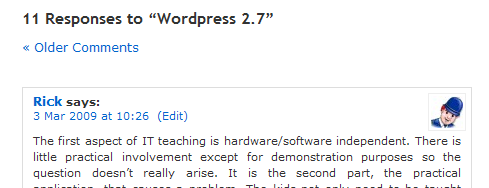
A sample blog comment section

Here I have set the Discussion Settings to say

Break comments into pages with 10 comments per page and the last page displayed by default. Comments should be displayed with the older comments at the top of each page.

As you can see from the first line there are 11 comments on this post and below is a link back to the earlier ones and the 11’th one in full. It looks ok but, as I will demonstrate in a minute, they have hidden the underlying problem.

I happen to think that comments need to be numbered. It is my choice but I consider it necessary both as a visual clue so that readers can tell immediately which posts are the most recent and what order to read them, and also so that the discussion can refer to earlier points unambiguously. The generated HTML for the clip above (edited and wrapped) is as follows

	<h3 id="comments">11 Responses to &#8220;Wordpress 2.7&#8221;</h3>

	<div class="navigation">
		<div class="alignleft"><a
                href="http:// … /wordpress-27/comment-page-1/#comments"
                >&laquo; Older Comments</a></div>
		<div class="alignright"></div>
	</div>

	<ol class="commentlist">
			<li class="comment byuser comment-author-sandpit bypostauthor even
                        thread-even depth-1" id="comment-24">

Here you will see the initial heading, the “Older Comments” link and, below that, <ol class="commentlist">. They are using an ordered list which should have item numbers for every <li> that follows, but they do not appear. They are being suppressed by the CSS style sheet using .commentlist li {list-style: none;}. Now if you want comments numbers, as I do, the instinct is to remove this suppression but that is not good enough (disregarding the work to get the layout to look right) because this comment will be numbered 1. because that is what <ol> does, not 11. as it should be. Every page will be numbered 1. to 10. Worse still, if I had set it to display newer comments at the top, they would be numbered in the wrong order.

The solution is to use a fantastic little plugin Greg’s Threaded Comment Numbering which solves this and other even deeper problems.

This is not really a complaint but it is a job half done. They have brought a lot of interesting controls forward into the admin interface for the average user to be able to control commenting, but the back-end code to handle them properly is not there. You can switch the feature on but you need a lot more skill to get it to work. I saw a comment from an experienced developer on the forums saying that WordPress is moving so that functional customising is moving away from themes, which are relatively straight forward to hack, to plugins and widgets which are more difficult and best left to the experts. If that is the case then they need to consolidate so that features such as this are either fully built into the base-code or left to plugin developers but not half-and-half.


TapFacebook Ads

10:09 by Rick

I have had a bunch of posts piling up waiting until I could update WordPress (which I did last night) so here is another one.

I have created a Facebook account, mostly to see what it is all about and see if I can use it to progress my genealogy research. That has been quite successful but in passing I have noticed that the advertisements down the right hand side of the profile screen are dominated by “Get Rich Quick” ads. They are all very similar in style with titles like “My New £1,000/day Hobby” and are mostly advertising a system using Google Adsense. The way this works is that you allow Google to put adverts on your website or blog and you get paid if your readers click through to the advertised site. It is certainly a legitimate way of earning and it is possible to make money doing it—BUT you need a very popular web site to make much. To get a very popular site you need lots of good content and that takes time and effort (and skill).

I strongly suspect that what these Facebook advertisers are really selling is a book or software supposed to help you reap these enormous gains. Information about running an Adsense program is readily available for free online (just read them with your brain switched on) and, anyway, you will probably find that the supposed income from the schemes are faked anyway.

P.S. The linked technique above can be used to fake any web site so just don’t trust screen shots!

TapMigrating to Mac (Part 2)

6 Feb 2009 09:48 by Rick

When I wrote Part 1 last April, I promised an update in a few weeks—well I forgot.

My continued impression is that the hardware is excellent and I am now very comfortable using the machine. Even my worries about the Mighty Mouse have, so far, been unfounded, though I do have to clean it fairly often. I discovered that the “not quite full screen” problem was only for certain applications and Firefox in particular was fixed with a later release.

The problems with Time Machine and sleep mode have meant that I have given up using the sleep facility altogether and now shut the machine right down every night. The regular updates keep rolling in and I continue to be surprised how many of them require a system reboot.

The number of applications regularly using the VMware Windows guest has reduced to three (Family Tree Maker, MediaMonkey and EasyWorship) and I am now using Crossover for WaveCorrector. For others I have found native applications and the number of these becoming available is increasing as Apple’s market share improves.

To the details. I have omitted areas where there has been no change.

Browsing/Web

  • Firefox. Version 3 is much better, eliminating most problems and integrating with the Mac much more smoothly though it hangs sometimes—the “My eBay” page is a regular one.
  • I never found the “seamless FTP built into Finder” that I was told about so got CyberDuck instead which is very good, though it seems to get confused if I try to multi-task it.

eMail/IM

  • Thunderbird. A similar experience to Firefox—very good but it occasionally hangs, in particular on the first reply message of the day. I am looking forward to Version 3.
  • Pop Peeper was abandoned in favour of a Thunderbird account configuration which downloads headers only. This works fine and means less clutter on the desktop.
  • I have adopted Adium for IM which seems to do the job quite well though I have no need for conference rooms any more. We have also started using Skype occasionally and I found a USB desk mic (Logitech AK5370) which works very well.

Document processing

  • I am a bit concerned that NeoOffice is lagging well behind OpenOffice in updates but it works ok. I am looking forward to it being able to create and edit PowerPoint files that EasyWorship will accept.
  • So far I am using The Gimp native for picture editing. It is rather clumsy working under X and some people have said that it works better under VMware but if I was going to do that I would revive PaintShop Pro. I would like something better (I can’t justify the cost of PhotoShop) and while researching this post I noticed that the Gimp version I am using is rather old so I will update and see if it is better..
  • For plain text and HTML/CSS editing I have found TextWrangler which has some very good features including a very slick file compare.

Family History

  • Family Tree Maker for Windows works well in the VMware guest. I can’t see me replacing this as the pain of file conversion would be too much to consider; unless they come out with a Mac version perhaps 😀 .

Music preparation

  • Rip—Max seems to do a similar job to Exact Audio Copy and works very well. It even picks up many album details
  • Digitise—I am now using Wave Corrector from Crossover as it is a bit more responsive than from the VMware guest. I have got used to the Mighty Mouse but, for this application, something a bit more precise on the scroll wheels would be better.
  • Encoding— I have installed LAME in a number of places; native for Max and Audacity, in the VMware guest and also in the WaveCorrector Crossover bottle.
  • Edit—Audacity works fine but it doesn’t get used much. A handy tool to have in the box.
  • Download—µTorrent is now available in beta and it works just fine. I am glad to be rid of BitTorrent which continually dropped out and was very slow.
  • MP3 player—I have a plain MP3 player not an iPod and also don’t use iTunes so I needed something else to load it. XNJB was designed for the Creative range of players but it works well with other similar models including my Samsung and there is a good list on their site.

GPS/Mapping

  • Garmin MapInstall, MapManager, POI Loader and WebUpdater is now available for the Mac. It wasn’t easy to install and find all the stuff required, some of it had to be transferred from an existing Windows install including the big maps but it works ok now. Garmin have a rather protective attitude to software downloads.

Presentation

  • A hardware failure on the church system forced me to review this and, in order to loan my own Windows system to them, I transferred everything into the VMware guest on the Mac. EasyWorship now works very well since VMware started supporting multiple monitors.

Security

  • I don’t know what went wrong when I first tried to configure the OS X firewall but it is fine now. I am a bit concerned about how effective it is but I don’t think the risks are too great. I am sure it is something Apple will come under a lot of pressure to get right. I am having a few problems with the Canon MFP (MP600R) Scanner interface, which doesn’t surprise me, but otherwise no problems any more.
  • I have now abandoned PINS for password management and use KeePass on Windows and KeePassX on the Mac which use a compatible database. Both versions are installed on my memory stick so can be used anywhere I go without installing.

Backup/Restore

  • Backup4all. Works fine in the VMware guest, though there is now very little data to worry about. The new version of VMware makes it much easier to use Mac directories in the Windows guest transparently.
  • I haven’t found a good application to sync. memory sticks yet so I still use Pen Drive Manager on my office Windows system. It is disconcerting that, if the VMware guest window has focus, it automatically picks up anything you plug into the USB socket without asking.
  • I am using Springy for ZIP files. The built in mechanism was just about ok for extracting files but pretty useless for creating them.

Hardware

  • The dual head graphics card on the Mac is very good and with the addition of the built-in Spaces feature for virtual screens, this gives me all the window area I need.
  • The sound system is every bit as good quality as I expected and with some additional software, such as SoundFlower, LineIn and SoundSource allows me to configure it just as I would like. A clever feature is being able to configure the internal speaker separately so I send the system bings and bonks there so they are unobtrusive. I will post later about the sound configuration as it is quite interesting. If I need any more then AudioHijack looks excellent.

As a consequence of loaning out my Windows system, all data has been transferred and, except for a small panic when I lost some very old files, it has all gone smoothly. The next thing I will need to do is look at upgrading/enlarging the NAS as it is almost full. I would really like one that supports TimeMachine if that is possible. I would also like to find out what Bonjour is all about.

^ Top



